Clash of the camera phones 2025: I compared the iPhone 16 Pro, Pixel 9 Pro, and Galaxy S25 Ultra – here are the pictures

Three titans of mobile photography face off
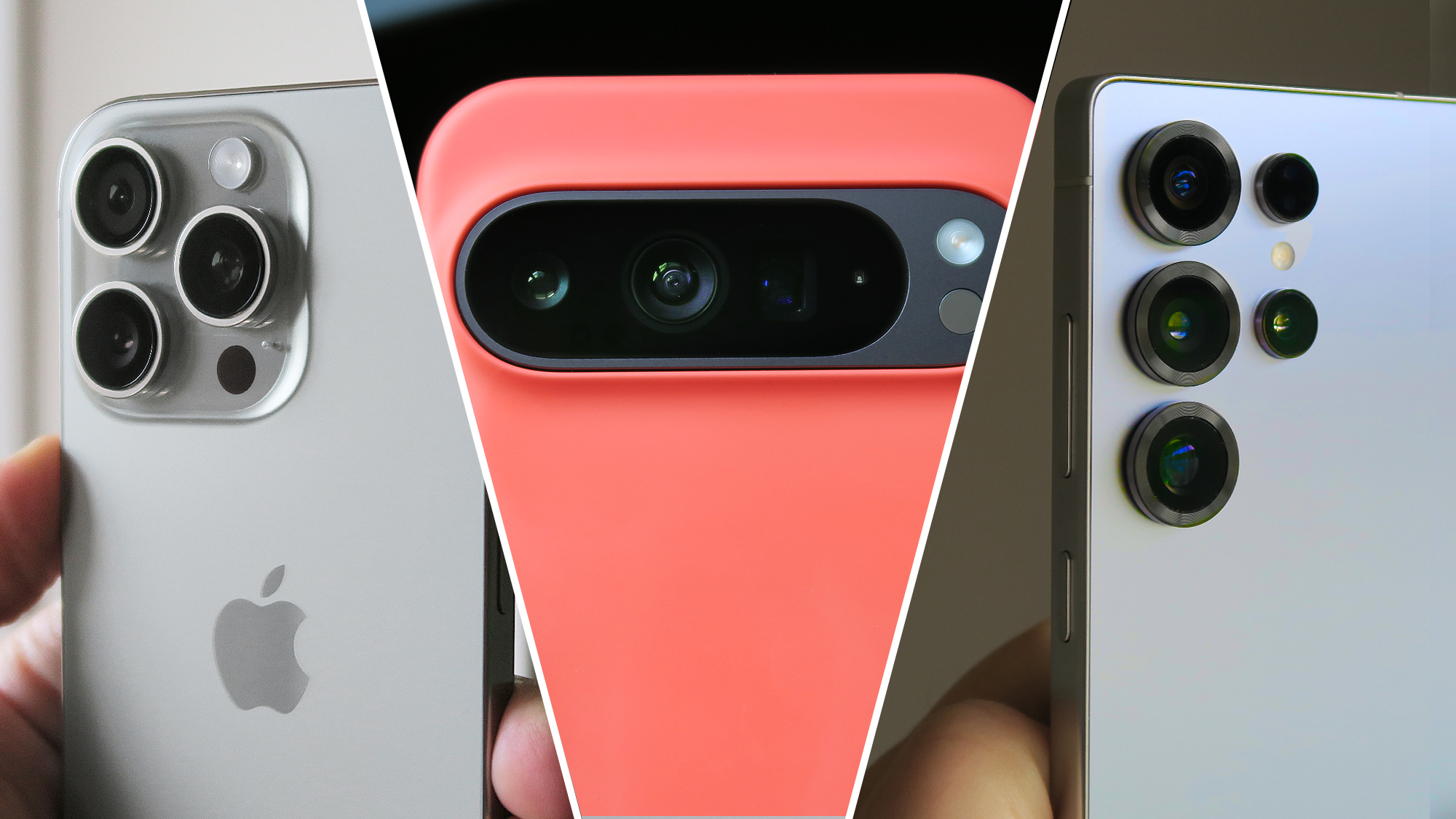
Apple iPhone 16 Pro, Google Pixel 9 Pro XL in Coral Mous case and Samsung Galaxy S25 Ultra camera close-ups

iPhone 16 Pro (left), Google Pixel 9 Pro XL in a Mous case (center), Samsung Galaxy S25 Ultra (right)

Apple,Google, andSamsunghave long battled it out in the smartphone space, and in no area is the competition more intense than camera capabilities.

The iPhone’s consistency and video prowess are the stuff of legend, Google is forever pushing the envelope with its AI-backed image processing, while Samsung tends to throw as many megapixels and lenses at the situation as possible, brute-forcing its way to photographic supremacy.

With so many variables to what defines thebest camera phone(and more importantly, the best camera phonefor you), only a direct comparison can really unpick where each of these mobile titans’ latest flagships takes the lead.

As such, in this guide, we’ve compared theiPhone 16 Pro,Pixel 9 Pro,andGalaxy S25 Ultra– aka the best camera phones Apple, Google, and Samsung currently offer – to discern their strengths, weaknesses, and if there really is an all-out winner.

Note:Unless otherwise specified, comparison shots in galleries are presented in the following order: iPhone, Pixel, Galaxy.

>>>Replacement battery for Samsung Galaxy S25 Ultra

Specs comparison

Here’s how the three phones in question compare from a specs perspective:

iPhone 16 ProPixel 9 ProGalaxy S25 Ultra
Price (at launch):Pro: $999 / £999 / AU$1,849; Pro Max: $1,199 / £1,199 / AU$2,149Pro: $999 / £999 / AU$1,699; Pro XL: $1,099 / £1,099 / AU$1,849$1,299 / £1,249 / AU$2,199
Chipset:Apple A18 ProGoogle Tensor G4Qualcomm Snapdragon 8 Elite for Galaxy
Main camera:48MP, 1.22μm pixels, ƒ/1.8, 1/1.28-inch, sensor‑shift OIS50MP, 1.2μm pixels, ƒ/1.68, 82° FoV, 1/1.31-inch sensor, OIS200MP, f/1.7, 24mm, 1/1.3-inch, 0.6µm pixels, OIS
Ultra-wide camera:48MP, ƒ/2.2, 120° FoV, 1/2.55-inch sensor48MP, ƒ/1.7, 123° FoV, 1/2.55-inch sensor50MP, f/1.9, 120˚ FoV, 1/2.55-inch sensor
Telephoto camera:12MP, 120mm, ƒ/2.8, 1/3.06-inch sensor, 3D sensor‑shift OIS, auto-focus, 5x tetraprism optical zoom48MP, ƒ/2.8, 22° FoV, 1/2.55-inch sensor, 5x periscope optical zoom, Super Res Zoom up to 30x, OIS10MP, ƒ/2.4, 67mm, 1/3.52-inch, 1.12µm pixels, PDAF, OIS, 3x optical zoom
Secondary telephoto camera:N/AN/A50MP, ƒ/3.4, 111mm, 1/2.52-inch, 0.7µm pixels, PDAF, OIS, 5x periscope optical zoom
Front camera:12MP, ƒ/1.9, 1/3.6-inch sensor, PDAF + TrueDepth system42MP, ƒ/2.2, 103° FoV, 1/2.51-inch sensor, dual pixel PDAF12MP ƒ/2.2, 1/3.2-inch, 1.12µm pixels, 26mm, dual pixel PDAF
Key imaging technology:Camera Control, Smart HDR 5, LiDAR scanner, Apple ProRAW, Dolby Vision HDR recording at up to 4K 60fps, LOG video recording, Academy Color Encoding System, Cinematic video recording, latest-gen Photographic StylesPro controls, 10-bit HDR video, Magic Editor, Best Take, Add Me, Photo Unblur, Motion Mode, Real Tone, Night Sight, Astrophotography, Top Shot, Live HDR+, Video BoostProVisual Engine, Reflection removal, Generative fill, Astrophotography, Pro Mode, Pro VideoMode, Dual Recording, Nightography, Instant Slow-mo, Photo Assist, Super HDR, Super Steady video

Main sensor

First, we’re comparing shots from each phone’s main sensor; as if you’d just opened the camera app, framed up, and tapped the shutter. As such, no settings have been changed and the phones have been allowed to focus and expose based on their own assessment of each scene.

>>>Replacement battery for Google Pixel 9 Pro Fold

Fluorescence by Liz West

Not only was Liz West’s ‘Fluorescence’ evenly lit by a bright, rainy London sky – perfect for testing each phone’s dynamic range and exposure management in a high-contrast scene – but the neon wrap around the tetrahedral ‘tree’ itself was a great way to gauge each phone’s color accuracy too.

The iPhone delivered the darkest image, preserving the most cloud detail, while at the same time crushing details in the darkest parts of the scene most prominently. In contrast to its competitors, the colors of the tree also lacked the same degree of vibrancy.

Characteristically for a Pixel, the 9 Pro’s camera served up a notably warmer image than the iPhone or Galaxy. It also appeared to flatten out the scene, diminishing contrast. Despite less sky detail, it actually proved to be the sharpest shooter throughout the rest of the scene, minimizing motion blur and even picking out individual tiles on the wet roof of Coal Drops Yard, to the right of frame.

Samsung’s latest Ultra delivered the nicest image overall, showcasing the best dynamic range and characteristically vibrant colors. In the past, Samsung’s post-processing has been known to be heavy-handed, but with its last few generations of flagship, the results out of its cameras have displayed a lot more nuance, and that’s evident with what was delivered here.

Winner:Galaxy S25 Ultra

Kova Patisserie

Against this artificial lighting, the iPhone nailed the white balance, but again, it pushed contrast past what you’d consider a natural shot, crushing details in the dark grooves of the Oreo cookie.

The result from the Galaxy S25 Ultra was similar, with excessive contrast and sharpening applied to the scene, along with a magenta tinge to the phone’s white balance.

Google’s latest flagship captured a warmer image than its competitors, but only by a hair. The shot otherwise demonstrated the best command of dynamic range, color accuracy, and detail, delivering the most appetizing scene overall.

Winner:Pixel 9 Pro

St Paul’s Cathedral

London’s largest cathedral is adorned with fine sculptural detail, while the slivers of blue sky peeking through the clouds give us insight into each brand’s post-processing preferences.

The iPhone produced the most appealing shot overall, with the building’s stonework being brought into stark relief as a result of the phone’s proclivity for high-contrast processing.

There’s also obvious brightening of the subject from both Apple’s and Samsung’s phones, but the 16 Pro delivers superior results and even manages nicer color reproduction.

The Pixel prioritizes correct exposure of the sky, leaving the cathedral itself looking under-exposed and dynamically flat. Detail capture is once again excellent, however.

Winner:iPhone 16 Pro

>>>Replacement battery for Samsung Galaxy S25+

Macro (main camera)

While all three of these phones possess dedicated macro modes – which rely on their secondary ultra-wide snappers – they’re all also capable of taking great close-up shots with their superior main sensors, which is what’s tested here.

The iPhone turned out the brightest shot, but heavy post-processing (namely too much contrast and over-saturation), as well as the least natural-looking bokeh (the background blur), resulted in an unflatteringly unrealistic-looking scene.

Samsung came in second, thanks to nicer bokeh and more consistent colors across the frame, but oversaturation and lackluster detail capture placed it behind the Pixel.

Although colors appear notably more muted than its competitors’ shots, the Pixel 9 Pro captured the best foreground detail while dressing the most convincing bokeh fall-off in the background. The color processing was also the most true-to-life; if only exposure had been a little higher, it would have been the perfect shot.

Winner:Pixel 9 Pro

Motion

When light is plentiful, unless you choose to fiddle with settings or use a specialized shooting mode, all three of these high-end phones should be able to freeze motion and deliver a crisp shot. In practice, however, the results were a little surprising.

Once again, the iPhone and Galaxy sported the most like-minded approach to the scene, albeit with superior color reproduction from the S25 Ultra, while the water pouring from the lions’ mouths was frozen well enough.

The Pixel surprised by opting for a longer exposure in the pursuit of higher detail capture compared to its peers, at the expense of motion blur in the water in the center of the frame. The shot came out uncharacteristically cool for a Pixel, too.

While this is perhaps one of the most subjective scenes in this comparison, Samsung’s phone took the best motion shot, while the Pixel captured better overall frame detail.

Winner:Galaxy S25 Ultra

Zoom

Just as withlast year’s three-way camera comparison, Samsung’s latest Ultra device once again offers the most versatile photographic hardware for zoom capture.

It boasts dedicated 3x and 5x telephoto snappers, as well as a ceiling of 100x magnification (which, although not necessarily usable in its own right, helps provide headroom to any zoom shots beyond 10x magnification). This doesn’t automatically render it the best long-range camera phone here, though.


Across the iPhone’s (above) ultra-wide, main and 5x tetraprism telephoto, you can capture lossless 0.5, 1x, 2x and 5x shots, with a peak 25x magnification.

With the high-contrast scene of Elizabeth Tower, the ultra-wide actually demonstrated impressive dynamic range, while the rest of the phone’s zoom range was consistent with itself, but otherwise badly underexposed; most evident in comparison to both the Pixel and the Galaxy.

Nonetheless, detail through its entire focal range was good, even if shots fell behind in overall presentation.


The Pixel 9 Pro’s ultra-wide and 1x shots sport noticeably different processing to the rest of its focal range, with the limitations of the phone’s dynamic range leading to a little under-exposure at these lower magnifications.

Once the bright cloud is out of frame, the images taken at 2x, 5x, 10x, and 30x offer far greater consistency and even exposure. Google’s algorithmic detail retention is impressive too, with more natural-looking fine details at higher focal lengths, compared to the S25 Ultra.


Although the Pixel put out brighter shots at higher focal lengths, the S25 Ultra proved the most consistent entry of the trio, across dynamic range, color reproduction and detail retention.

It also retained the most detail in the clouds and offered up more true-to-life color science compared to the Pixel in this particular scene. Not to mention, all of the additional telephoto hardware does result in greater versatility when shooting at range.

Winner:Galaxy S25 Ultra

Low light

Testing these phones’ low-light capture capabilities revealed some of the most stark differences between how each manufacturer tackles such scenarios. While both test scenes included obvious light sources, the settings are dark overall, and pose a complex challenge to each phone’s processing.

While the scenes used here emulate more common low-light environments, one caveat would be that extreme low-light capture and specialized shooting scenarios – such as astrophotography – are best left to the Pixel.

Neon sign

The 16 Pro delivered the most true-to-life shot, with accurate white balance and pleasing color reproduction on the neon lighting itself, with impressive detail retention towards the edge of the frame.

The Pixel 9 Pro, meanwhile, prioritized exposing the sign itself as accurately as possible, even if that meant the rest of the scene was left drab and dark.

As for the Samsung, it took things in the opposite direction, brightening the darkest areas for a flatter, brighter overall result that lacked the impact of the iPhone’s image, while also misjudging color accuracy, creating an overtly warm image, with an almost sickly green artificial look to it.

Piccadilly Circus by night

While this scene has an obvious bright spot, the rest of the frame is otherwise in darkness.

The Pixel once again prioritized correctly exposing the brightest part of the scene, at the expense of darker areas of the frame, including detail work on the Shaftesbury Memorial Fountain. Apple’s and Samsung’s phones, meanwhile, took a similar approach to one another.

The S25 Ultra handled the bloom from the screen wrapping around the fountain more handily, but overall detail, colour accuracy, and white balance have to go to the iPhone here.

Winner:iPhone 16 Pro

Conclusion

Over the ten categories explored here, the Galaxy S25 Ultra’s camera system pips both the iPhone and Pixel to the post, with its rivals tying for joint second.

There’s an undeniable degree of subjectivity here, with some of the decisions made by the camera engineering teams behind these three phones not necessarily being empirically better than another, but just preferred by the photographer.

That said, each phone demonstrated a technical superiority over its rivals in one area or another, while feature sets further deepen each phone’s camera experience beyond what’s explored here.

Regardless of which phone wins you over, know that you’re getting one of the best smartphone snappers available today.
Skype is shutting down after 20 years. A look back at 8 other beloved apps from the 2000s that no longer exist.

Social media users reacted to the announcement by sharing how they “grew up” with the voice and video call service.

Skype’s homepage in 2011. (David Loh/Reuters)Key Takeaways

  • Microsoft shut down Skype, the internet-based phone and video call service, 14 years after acquiring it for $8.5 billion, offering users the option to integrate their accounts with Microsoft Teams or export their data ahead of the shutdown.
  • Vine, a short-form video hosting platform acquired by Twitter for $30 million, was discontinued in 2016 due to the lack of a direct monetization feature for creators, leading many to switch to other platforms like TikTok and Instagram Reels.

Microsoft shut down Skype, the internet-based phone and video call service, on Monday, 14 years after the tech company bought it for $8.5 billion.

Microsoftannounced in Februarythat Skype users could opt into integrating their accounts with Microsoft Teams for free or export all of their data from Skype ahead of the shutdown. Microsoft Teams offers one-on-one and group calls similar to Skype and its more contemporary competitors Zoom, FaceTime, WhatsApp and Google Meet.

“Skype has been an integral part of shaping modern communications and supporting countless meaningful moments, and we are honored to have been part of the journey,” Jeff Teper, president of Microsoft 365 collaborative apps and platforms,said in a blog post.

Skype originally launched in 2003 and quickly gained popularity as an option for users to make free voice calls over the internet to anyone in the world. Three years later, after it was acquired by eBay, Skypelaunched video calling, making video calls more accessible to the general public.

While Skype has been losing users for the last few years, going from around40 million in March 2020to around36 million in February 2023, Skype fans were still saddened by Microsoft’s announcement. Several commemorated their fond memories of the platform on social media, sharingclips of Skype’s distinct call soundandvisuals of how the program’s look evolvedover the last 20 years.

In honor of Skype’s demise, we look back at some other beloved apps and social platforms from the 2000s and 2010s that are no longer with us.

>>>Replacement battery for Microsoft Surface Pro 9 2032 1996 1997 2038

Vine (2012-2017)

The Vine app homepage in 2013. (Jens Büttner/Getty Images)

Vine was a short-form video hosting platform where users could film and upload clips of six seconds or less that would then play on a loop. Four months after it was founded, the company was bought by Twitter for$30 million.

After Vine launched as an iOS and Android app in early 2013, it became themost-used video sharing appon the market. By 2015, the app had200 millionmonthly active users.

The problem with Vine — and why competing platforms like TikTok, YouTube and Instagram Reels went on to succeed — was that itdid not have a way for users to earn moneydirectly through their videos. Afterconfronting Vine executivesover the lack of profitability in 2016, many top-performing Vine creators started turning to other video platforms to make money.

Finally, in October 2016, Vine announced it wasgoing to be discontinued. But several major Vine creators are still in the spotlight thanks to their start on the app, including YouTubers David Dobrik and Jake and Logan Paul, as well as pop singer Shawn Mendes.

>>>Replacement battery for Microsoft Surface Laptop Studio 1964

AIM (1997-2017)

AOL Instant Messenger. (Screenshot: Wayback Machine)

AOL Instant Messenger (more commonly known as AIM) was an instant messaging service that allowed people to message each other in real time and for free. You would make a custom username and could set “away” messages, build out profiles with song lyrics and quotes, and send messages to other AIM users at any time, even if they weren’t online at the same time you were. There were alsochatbotsthat users could message to get stock updates, weather information or dating advice.

By 2000, there were61 million AIM users; by the mid-2000s, AIM had the largest share of the instant messaging market in North America. It also helped launch much of the internet lingo we still use today, such as “LOL” (“laugh out loud”) and “BRB” (“be right back”).

Soon, other tech companies started launching their own, more advanced messaging platforms, like Google Chat.

In December 2017,AIM shared its last away messageand announced it would be discontinued, saying, “The way in which we communicate with each other has profoundly changed.”

>>>Replacement battery for Microsoft Surface Pro X 13″ Tablet

MSN Messenger (1999-2014)

MSN Messenger. (Screenshot: Wayback Machine)

Microsoft developed MSN Messenger to compete with AIM. It also required users to create unique usernames and allowed them to write their own statuses and bios. By the mid-2000s, it had evolved into Windows Live Messenger, which, like Skype, started offering audio and video calls as options instead of just instant messaging.

In 2009, Microsoft reported that its messaging app had330 million active users.But three years later, in 2012, the company announced it would beretiring Windows Live Messengerand replacing it with Skype.

Friendster (2002-2015)

How the Friendster homepage looked in 2011. (Getty Images)

Friendster is considered one of the original social network sites, predating Facebook (2004) and MySpace (2003), where people could connect with other users, share content on their profiles and message each other. It also helped people find out about local events and up-and-coming bands and bond with strangers over shared interests.

By 2008, Friendster had more than 85 million members worldwide —most of them basedin the Philippines, Malaysia, Thailand and Singapore. It was the first global online social network thatsupported different languages on a single internet domain, so people from all over the world could speak to each other.

But in 2009, it started experiencing performance issues andwas sold to MOL Global, a payments company in Malaysia, for $39 million. In 2010, MOL sold the intellectual property behind Friendster to Facebook for $40 million. Five years later, the siteshut downfor good.

Picnik (2005-2013)

Picnik. (Screenshot: Wayback Machine)

Picnik was an online photo editing service that allowed users to edit photos, add filters and text, and even combine multiple images for free.

In 2010, Picnik wasacquired by Googleand, two years later,announcedthat it would be moving its photo editing tools toGoogle Photosrather than operating as a separate website.

After the 2012 announcement, one of the site’s original employees, Lisa Conquergood,said, “Sixty million voices cried out when Picnik died.”

Omegle (2009-2023)

Omegle. (Screenshot: Wayback Machine)

Omegle was a website-based online chat service where users didn’t need to create an account to speak to people. The site wouldrandomly pair peoplein one-on-one instant messaging conversations. In 2010, it evolved into pairing random strangers invideo chat conversations.

Omegle was created by then 18-year-old Leif K-Brooks while he was living at home with his parents. Without any marketing, the site was getting around 150,000 daily visitors within a month after it launched. By the mid-2010s, there were reportedlyaround 15,000 people on Omegleat any given time.

But in 2019, Omegle faceda $22 million lawsuitfrom a teenager in Oregon who blamed the platform for making her a victim of child sex exploitation. As a result, in late 2023, K-Brooksannouncedhe would be shutting down Omegle because of the stress and expense.

“Over the years, people have used Omegle to explore foreign cultures; to get advice about their lives from impartial third parties; and to help alleviate feelings of loneliness and isolation,” K-Brooks wrote. “Unfortunately, there are also lowlights. Virtually every tool can be used for good or for evil, and that is especially true of communication tools, due to their innate flexibility.”

Formspring (2009-2013)

Formspring. (Getty Images)

Before Reddit’s AMAs, Formspring gave anonymous internet users the chance to ask strangers anything they wanted. At its peak, there were over 30 million registered users and over 4 billion posts on the platform.

When Formspring’s founder and CEO, Ade Olonoh,announcedthat it would be shutting down in 2013,Forbes reportedit had to do with failing to develop a revenue model that could compete with similar platforms, such as Quora and Tumblr.

Ask.fm (2010-2024)

Ask.fm. (Danny E. Martindale/Getty Images)

Ask.fm was a question-and-answer social network that launched to compete with Formspring. Ask.fm users would have to create a profile, but they could still be anonymous, and, in 2021, users became able to communicate privately over direct messages.

By 2013, the company reached65 million registered usersand was seeing around 190 million unique visitors per month.

Over the years, Ask.fm kept rebranding but eventually announced it would be shutting down in December 2024.

“Unfortunately, our ‘Ask and Answer’ platform no longer meets current needs,” theannouncement said, referring to social media platforms like X and Reddit.

Google Wallet brings digital ID support to UK, more US states

Residents can now add their passports to the Wallet and present them as ID.

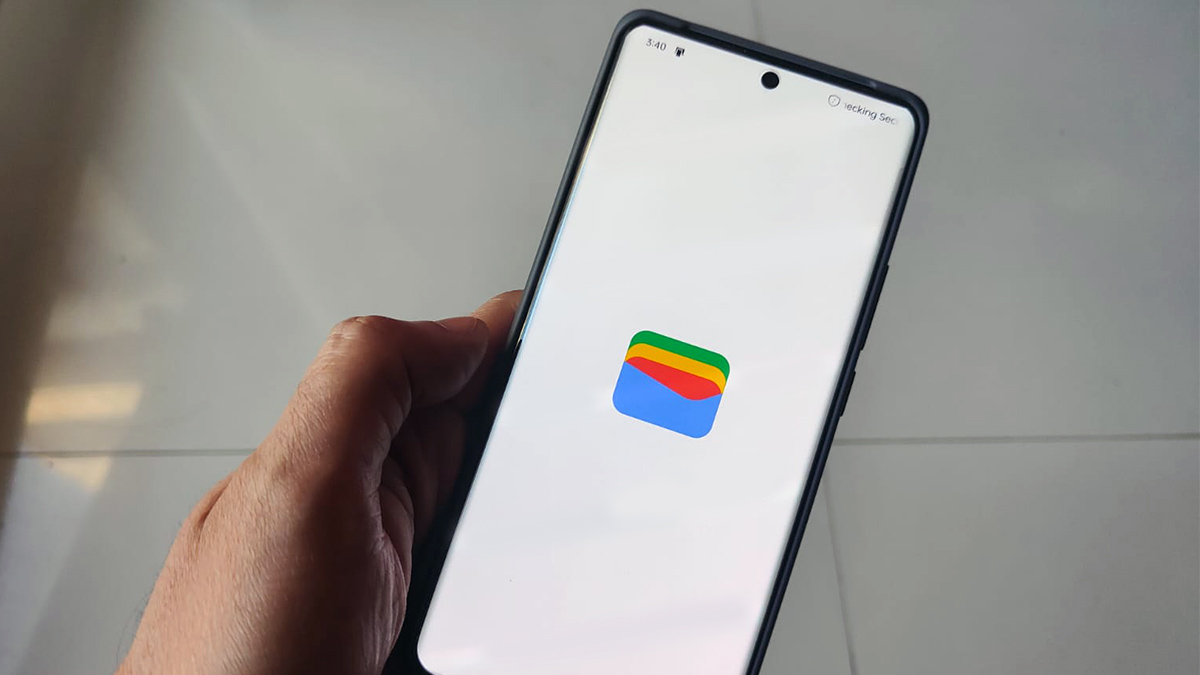
Google Wallet app on loading screen

What you need to know

  • Residents in the U.K. will get access to add their passports as a digital ID on their Google Wallets.
  • This will help residents expedite their identification process, which requires them to prove their age and identity safely and securely.
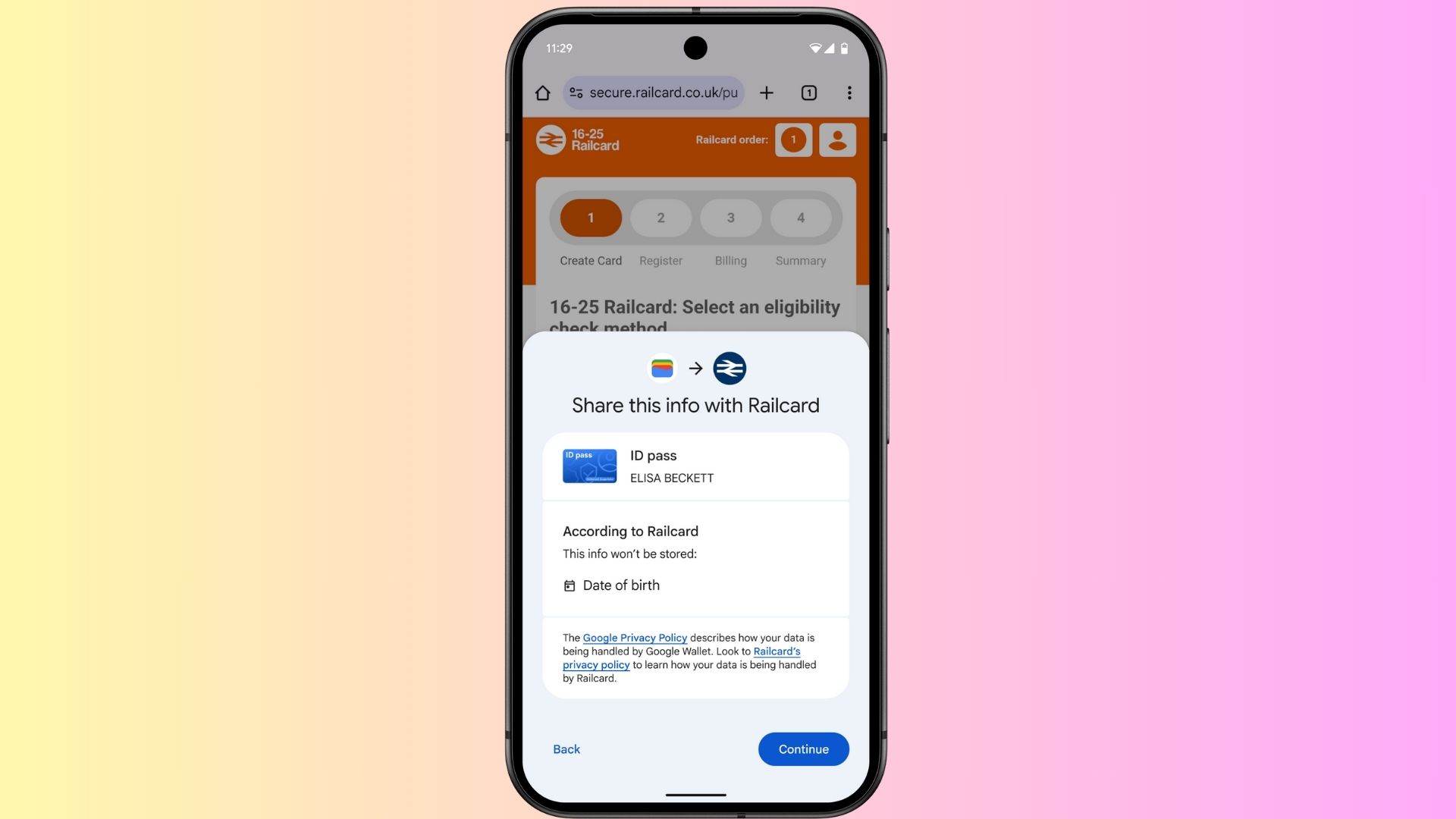
  • Google is partnering with Rail Delivery Group, which will offer train travellers the opportunity to use their digital ID for select Railcards.
  • Additionally, Google says it’s exploring opportunities with the U.K.’s Department for Science, Innovation, and Technology to help verify users’ identities for alcohol purchases and other purposes.

Google announced in a press release today (April 29) that it is expanding the Digital ID access viaGoogle Walletto the residents in the U.K. They are joining several states in the U.S., where residents can save their driver’s licenses and state IDs inGoogle Wallet.

Residents will soon be able to create digital ID passes with their U.K. passports and securely and conveniently store them inGoogle Wallet. This move makes it seamless for people to verify their identity just with a tap of a button on their phones, rather than pulling out their physical IDs each time.

To start, Google says it is partnering with the U.K.’s Rail Delivery Group, offering train travellers the opportunity to use their digital ID while travelling. However, it is important to note that these digital IDs are not a replacement for the original physical ones. Furthermore, U.K. residents cannot use digital IDs at airports for travel.

>>>Replacement battery for Google Pixel 9 Pro Fold

Google Wallet IDs UK

(Image credit: Google)

Additionally, Google states that it is also exploring certification with the U.K.’s Department for Science, Innovation, and Technology, which could enable residents to use their digital IDs for alcohol purchases and other purposes.

Adding your U.K. passport toGoogle Walletis super easy. All you need to do is open the app, tap“Add to Wallet,“pick“ID,“and follow the steps. The process is likely very similar toadding a U.S. passport to Google Wallet.

The app will prompt you to take photos of both sides of your ID and record a quick selfie video for verification. In a few minutes, you’ll receive a notification that your digital ID is ready to use. Once it’s set up, you can access it just like you do other payment cards.

Creating a passport pass in Google Wallet.

(Image credit: Google)

That said, Google is bringing an additional layer of protection when it comes to keeping data private. It has integrated a software called Zero Knowledge Proof (ZKP) technology into Google Wallet. This ensures that the website or apps you use to verify your identity cannot be traced back to you with the help of your information.

This technology works in tandem with the Google Wallet, allowing users to verify their identity and age simultaneously in apps like Bumble. Google says this is to “help foster a safer, more secure environment for everyone.” The tech giant will also open-source their integration of ZKP technology to other wallets and online services in the future.

>>>Replacement battery for Google Pixel Fold

Digital IDs expands to more U.S. states

Google Wallet lets users digitize QR code or barcode passes.

(Image credit: Google)

Google is expanding its digital IDs access to Arkansas, Montana, Puerto Rico, and West Virginia, which will soon be able toadd government-issued digital IDs to Google Wallet.

The tech giant is also expanding the eligibility of its digital IDs to other services in Arizona, Georgia, Maryland, and New Mexico. For instance, users will be able to use their mobile IDs at the DMV for improved and streamlined customer experiences.

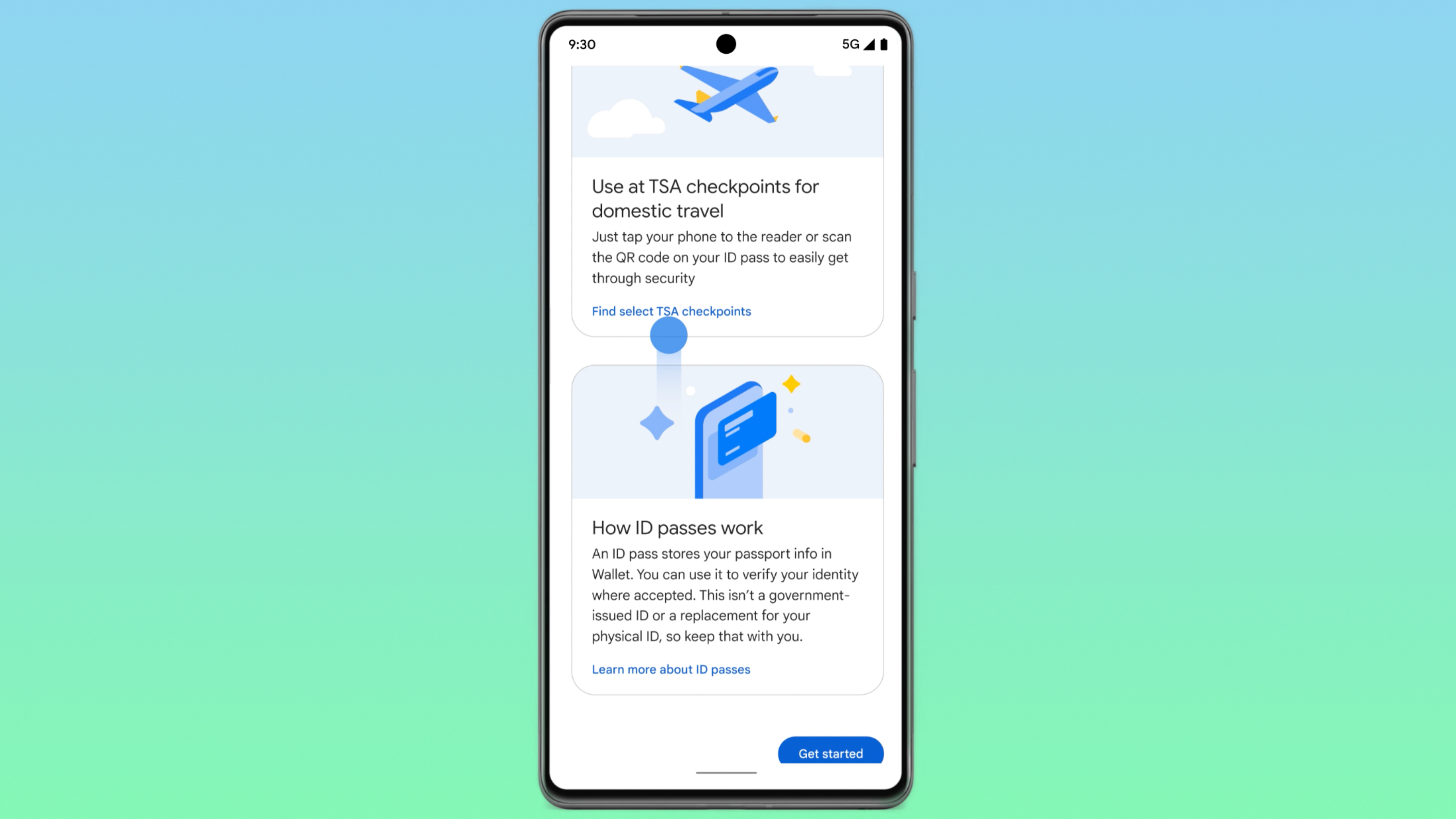
Residents in the above-mentioned states can use their digital ID pass, created from a U.S. passport, for domestic travel with TSA security at supported airports, even if they do not have a driver’s license or state-issued ID.

Soon, users will also be able to use the digital ID to recover Amazon accounts, access online health services with CVS and MyChart by Epic, verify profiles on platforms like Uber, and more.

Lastly, Google Wallet is being expanded to 50 more countries, where users to view and use digital passes in the app and on theweb, even where tap-to-pay isn’t available yet.

MSI’s ‘secure’ yellow-tipped RTX 5090 12V-2×6 cable is still vulnerable to melting, user report suggests

Thankfully, the affected GPU is still thought to be functional.

MSI yellow tipped cable

(Image credit: MSI)

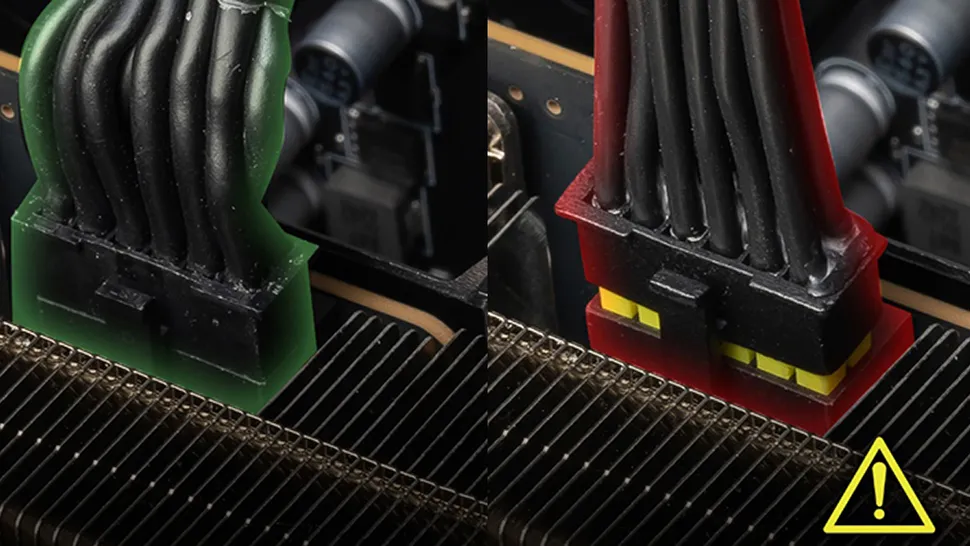
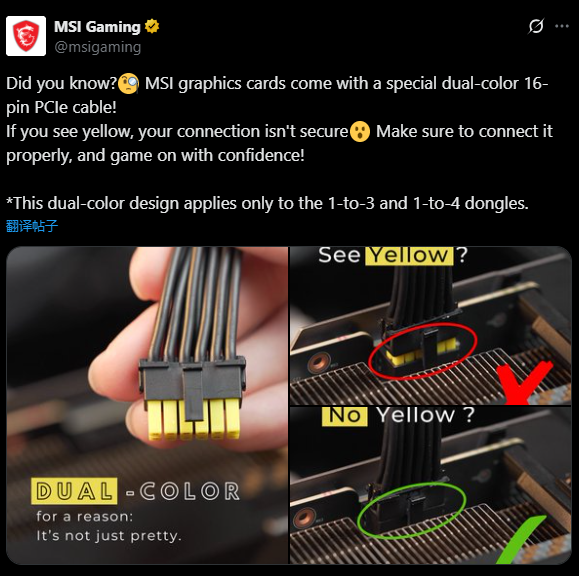
Melting RTX 50 issues keep emerging like there’s no tomorrow, and this probably won’t change until Nvidia tightens up the power delivery or revises the design altogether. A user atQuasar Zonereported thermal damage on MSI’s preventiveyellow-tipped 12V-2x6power cables, which were originally meant to simplify cable seating and prevent melting, viaHarukaze. Thankfully, the accompanying RTX 5090 remains unharmed, at least by visually inspecting its power connector.

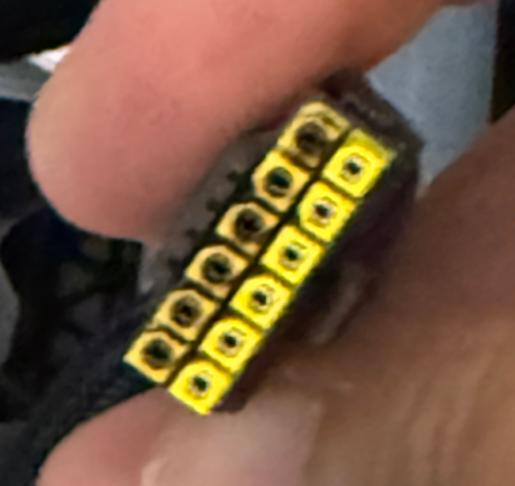
Burnt connector

(Image credit: Aki (Quasar Zone) via Harukaze)

This issue is not newfound, as the 12VHPWR connector hasalso wreaked havocon a handful of last-gen RTX 40 GPUs as well. RTX 50 GPUs draw power through the six 12V terminals on the 12V-2×6 connector, each with a strict current limit of 9.5A. Naturally, GPUs have load-balancing capabilities, but reference RTX 50 models are unable to determine per-pin current measurements, preventing effective load distribution across the pins, and that’s a design choice Nvidia made.

Consequently, a poor connection on some pins forces the entire load through the correctly seated ones.Several reviewershave witnessed this firsthand, with individual pins spiking to more than 150 degrees Celsius.

The affected user owned an MSI RTX 5090 Suprim, which came bundled with MSI’s yellow-tipped 12V-2×6 cables (4x 8-pin to 16-pin), serving as a foolproof visual aid for ensuring proper connector seating. Likewise, power was supplied by an ATX 3.1 compliant 1,300W supply from Superflower, so the PSU wasn’t the source of the problem. Either way, all it took was a small gaming session with the GPU at 400W for the user to discover an entire 12V terminal row on their cable, burnt to a crisp.

>>>Replacement battery for MSI Vector 17 HX A13V GP68 GP78 HX GP68HX

Keep in mind, the yellow tip is merely a visual aid, and errors can still go unnoticed, well, until they melt your GPU. It’s impossible to know if there was user error involved or not. According toUNIKO’s Hardware, the materials used in MSI’s yellow-tipped 16-pin to 16-pin (native) cables differ from those in their 4x 8-pin to 16-pin adapter. Regardless, the larger problem is the inherent design of Blackwell GPUs, which cannot seemingly handle power imbalances.

>>>Replacement battery for MSI BTY-M59

Asus’ Astral works around that by including a series of shunt resistors that alert users if a specific pin is drawing excessive current.Zotac’s safety lightmechanism is also a noteworthy mention, as it prevents your GPU from powering on if the cable isn’t inserted properly. Maybe try building yourown power connector, with per-pin sensing, and a current-overload alarm, as that’s what a Chinese enthusiast apparently did.

Motherboard sizes explained: which should you buy in 2025?

Not all motherboards are made equally

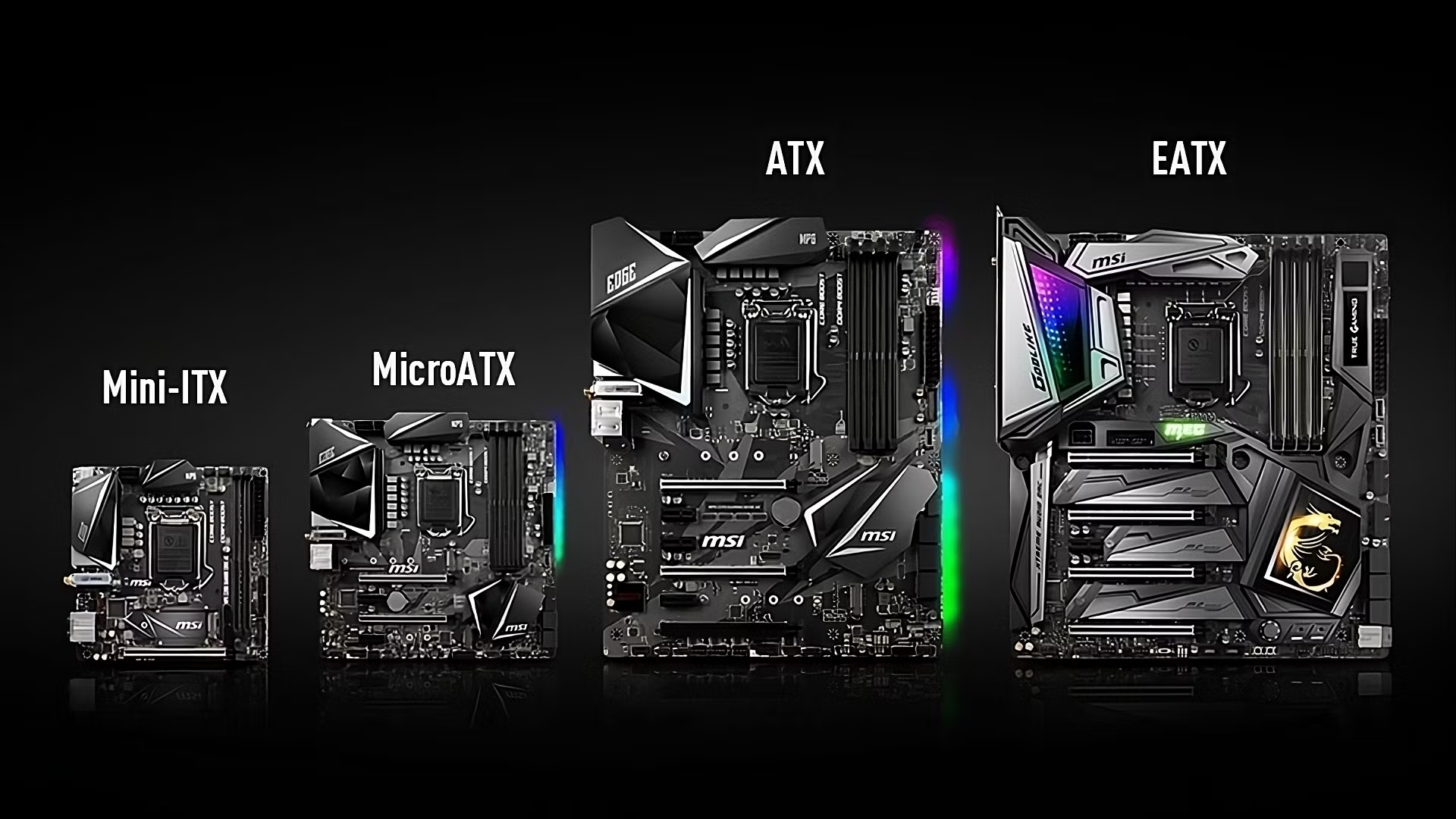
MSI's four available motherboard sizes

(Image credit: MSI)

A motherboard is one of the most important components to purchase when building a new PC as it’s the foundation for all of your machine’s parts to interact, but it’s far from a one-size-fits-all solution in 2025. There are four motherboard sizes available, each with different strengths and weaknesses, with smaller and larger fiberglass rectangles used for different purposes.

As such, there’s no easy answer for what thebest motherboardcan be, so it’s vitally important to know the four commercially available sizes, rough pricings, and the sockets available for some of the best processors on the market. After all, compatibility is vital in 2025, particularly if you’re eyeing up some of thebest DDR5 RAM,best graphics cards, and otherPCIe 5.0 componentsfor the build.

From Mini-ITX models up to their EATX counterparts, oriccabattery goes into detail about motherboard sizes in 2025, which companies are supporting them, the current-generation sockets, and everything else you need to know so that you can build your new machine with confidence.

(Image credit: Asus/Gigabyte/MSI)
>>>Replacement battery for Asus ZenBookPro15 UX535LH

Motherboard sizes explained

There are four motherboard sizes available in 2025 from major manufacturers such as Asus, Gigabyte, and MSI, among others. These areMini-ITX,MicroATX,ATX, andE-ATX. As the naming conventions imply, the two smallest models are the mini-ITX and MicroATX options, which measure 6.7 x 6.7 inches and 9.6 x 9.6 inches, respectively.

The most common motherboard size is ATX, which measures 12 x 9.6 inches. For those that need a little extra headroom for additional components, E-ATX (Extended ATX) offers the largest amount of space with 12 x 13 inches of fiberglass available. As can be evidenced from the motherboard size chart above, there’s quite a dramatic difference in scale between Mini-ITX and MicroATX, with more of a subtle difference when comparing ATX and EATX, generally with the latter having more room on the right-hand side.

In terms of use cases, both Mini-ITX and MicroATX motherboards are favored for small form factor (SFF) work and gaming computers, such as those you may use in a low-profile office setting or a console-sized rig for living room use. As the smaller scales suggest, you can expect fewer PCIe lanes for connecting components (and a more cramped building experience) depending on the PC case you’re using. This also means limited room for some of thebest CPU coolers(and more limited airflow in general), so this is something paramount to consider before you invest.

As a frame of reference, Mini-ITX is around two-thirds the size of an ATX motherboard. Historically, the former was designed for lower power consumption and efficiency when compared to the more common sizes. However, in 2025, some manufacturers have started catering to gamers and power users in this smaller size, though you (typically) will pay a premium in comparison.

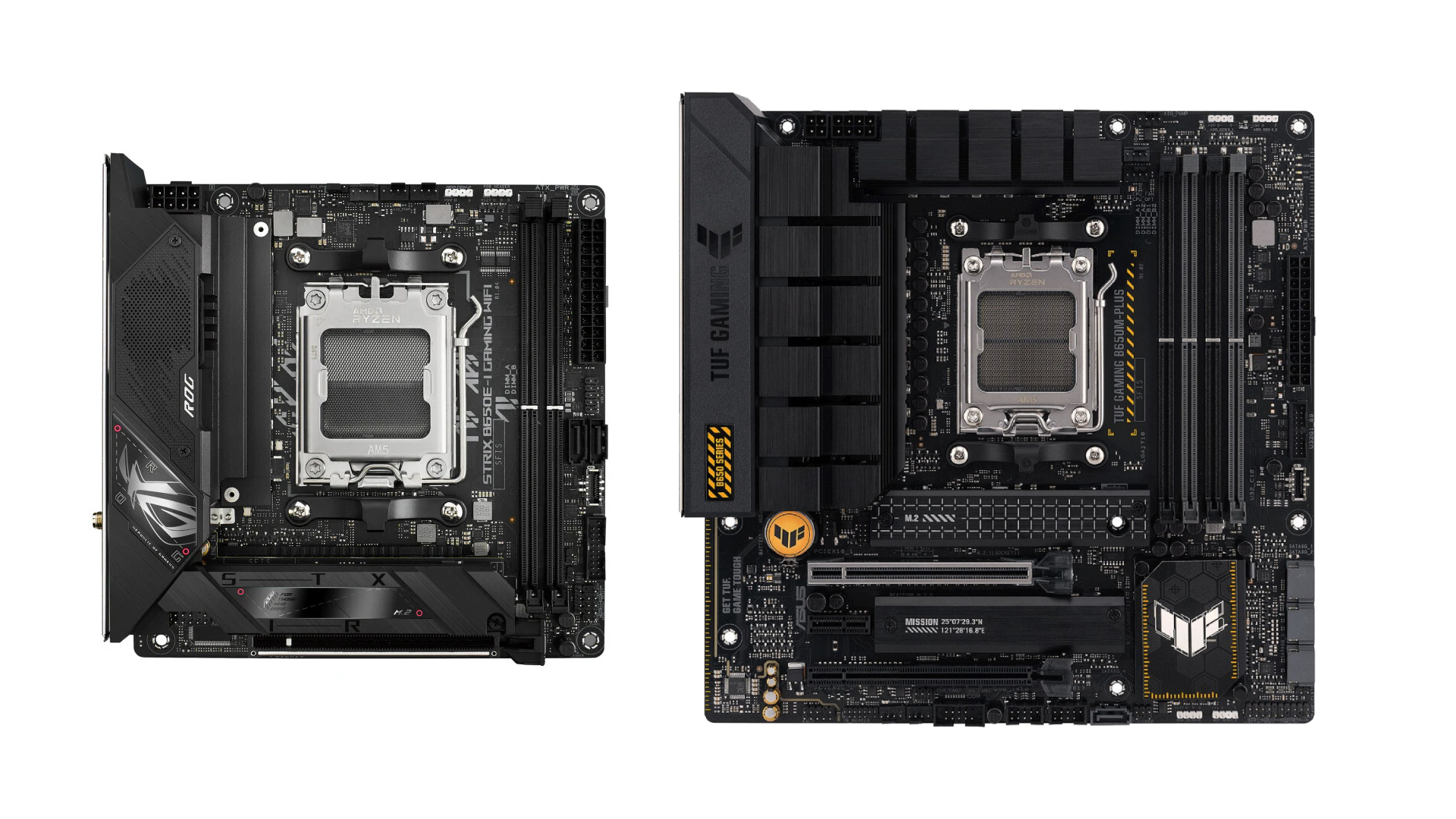
Mini ITX vs MicroATX motherboard

(Image credit: Asus)
>>>Replacement battery for Asus ZenBookPro15 UX535LH

Mini-ITX vs MicroATX: Strengths and Weaknesses

Starting out with Mini-ITX motherboards, these models tend to be the more expensive way of building a small form factor (SFF machine) when compared to microATX which is (generally) considered to be a more wallet-friendly option. This is consistent in the prices that you’ll expect to pay between Mini-ITX and microATX, as reflected in today’s popular models from major manufacturers.

Socket AM5 options sell for more of a premium in the Mini-ITX form factor, as can be evidenced by the ASRock A620I Lightning Wi-Fi ($139.99), Gigabyte B850I Aorus Pro ($279.99), MSI MPG B650I Edge WiFi ($299.99) with a rough range of the budget and more premium offerings. In contrast, MicroATX equivalents are (generally) more affordable well under the $200 mark, including the ASRock B650M Pro RS ($139.99), MSI Pro B650M-A Wi-Fi ($159.99), and Gigabyte B850M Gaming X Wi-Fi 6E ($179.99).

Price and size aside, another major difference between Mini-ITX and MicroATX is the number of ports and connections available on the motherboard. Due to its cramped 6.7 x 6.7 inches available, Mini-ITX mobos usually only have a single PCIe x16 slot for the graphics card and up to two M.2 SSD ports. Depending on the manufacturer, there may only be two RAM slots instead of four, and the rear I/O could be more cut down by comparison, resulting in fewer USB ports and other connections.

MicroATX, in contrast, usually features four RAM slots, two PCIe x16 slots, up to four M.2 ports, and vastly more expansive options for its rear I/O, because you’ve got 43% more space on the motherboard. In theory, MicroATX seems to be a superior option (being cheaper and offering more); however, it’s also larger in a way that makes certain small form factor (SFF) builds harder to achieve, being less slick and compact as a result. You should make your choice depending on your use case; do you need more than dual-channel RAM, two M.2 ports, a graphics card slot, and a basic rear I/O? If so, maybe the silicon needs to be larger.

ATX vs E-ATX motherboard

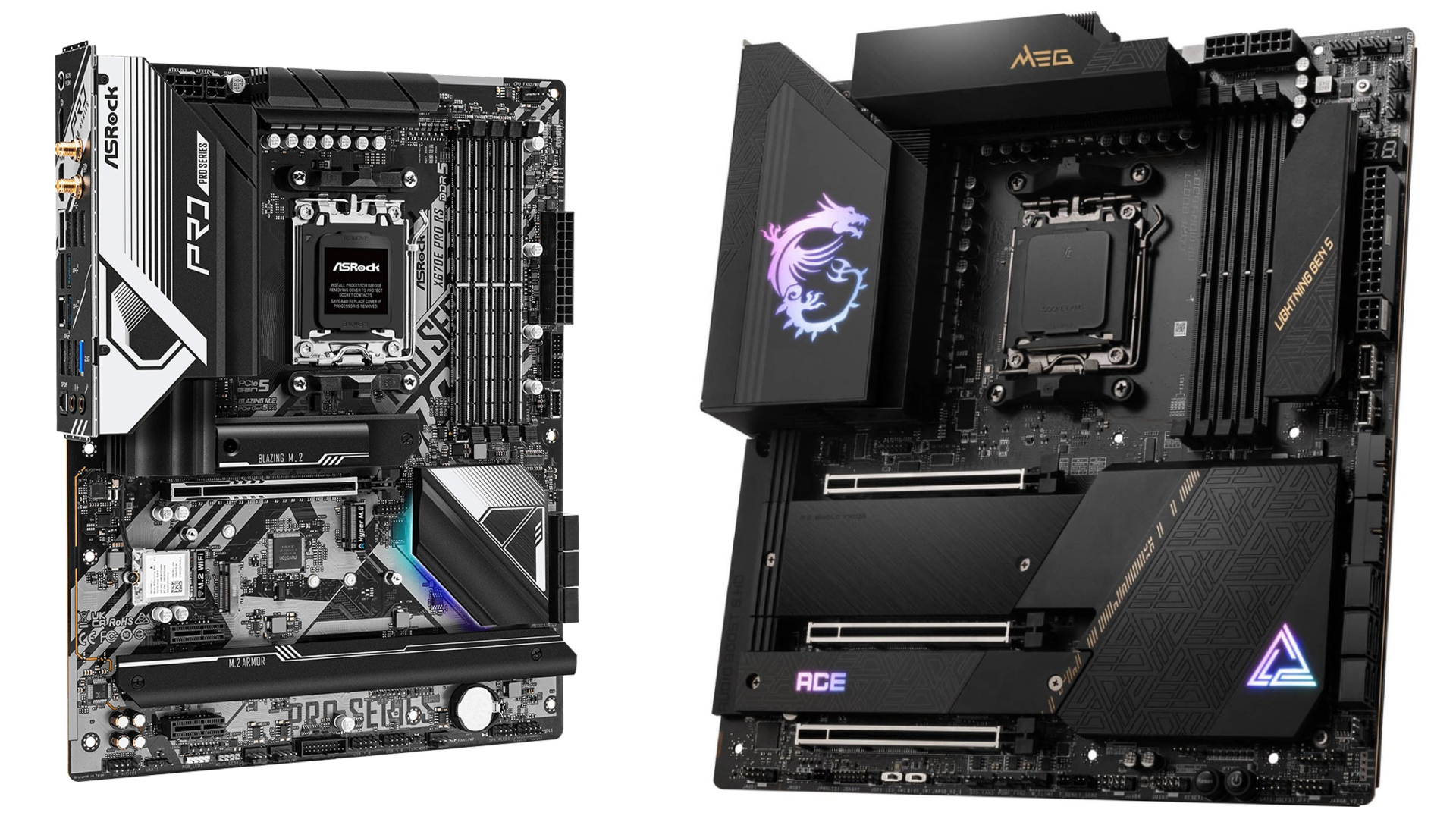
(Image credit: ASRock / MSI)
>>>Replacement battery for Asus ROG Zephyrus G16 2024 GA605 GU605M GA605WI

ATX vs E-ATX: Strengths and weaknesses

When compared to the two smaller motherboard sizes, ATX and E-ATX variants do not seem as drastically different on the surface. However, the extra space afforded by the 35% more space can be staggering, depending on the hardware you’re planning on using. While ATX motherboards traditionally feature up to four PCIe x16 ports and four RAM slots, E-ATX versions can boost things up to as high as eight PCIe x16 ports with the potential for as much as eight RAM slots (though this is unlikely in 2025 compared to historical examples).

The major drawback of E-ATX motherboards is their higher price tag when compared to ATX offerings, as well as more limited availability. While still supported for today’s current AM5 and LGA 1851 sockets, you’re going to pay a heavy premium for the extra components space on the motherboard itself. Some popular E-ATX options can elipse their ATX counterparts, as can be seen with the pricing of the ASRock X670E Taichi ($449.99) and the MSI MEG X670E ACE ($499.99). In contrast, similar ATX models are much cheaper, like the ASRock X670E Steel Legend ($259.99) and the MSI MAG X670E Tomahawk Wi-Fi ($239.99).

With that said, is the extra real estate worth potentially paying double (or more) when compared to an ATX motherboard? It will ultimately depend on the use case. The power user will get the most out of the larger board space, which can be particularly important if you’re thinking of forging a high-end creation or gaming PC featuring a custom loop in a far larger E-ATX compatible PC case, complete with bleeding-edge components. It all comes back to airflow and the space required; E-ATX will afford you as much room as possible, provided you can stomach the sticker price.

It’s commonly been debated that gamers will not see the benefit of the extra data lanes afforded by an E-ATX motherboard. Instead, those planning a server rig, a deep-learning machine, or something more granular might find the extra slots and connections of vital importance. Do you need more expansion slots? Then E-ATX may be the solution here, otherwise, ATX will satisfy the vast majority of PC users for just about any task imaginable while also being far more affordable and available.

Gigabyte AM5 motherboard

(Image credit: Gigabyte)

Which motherboard should you buy?

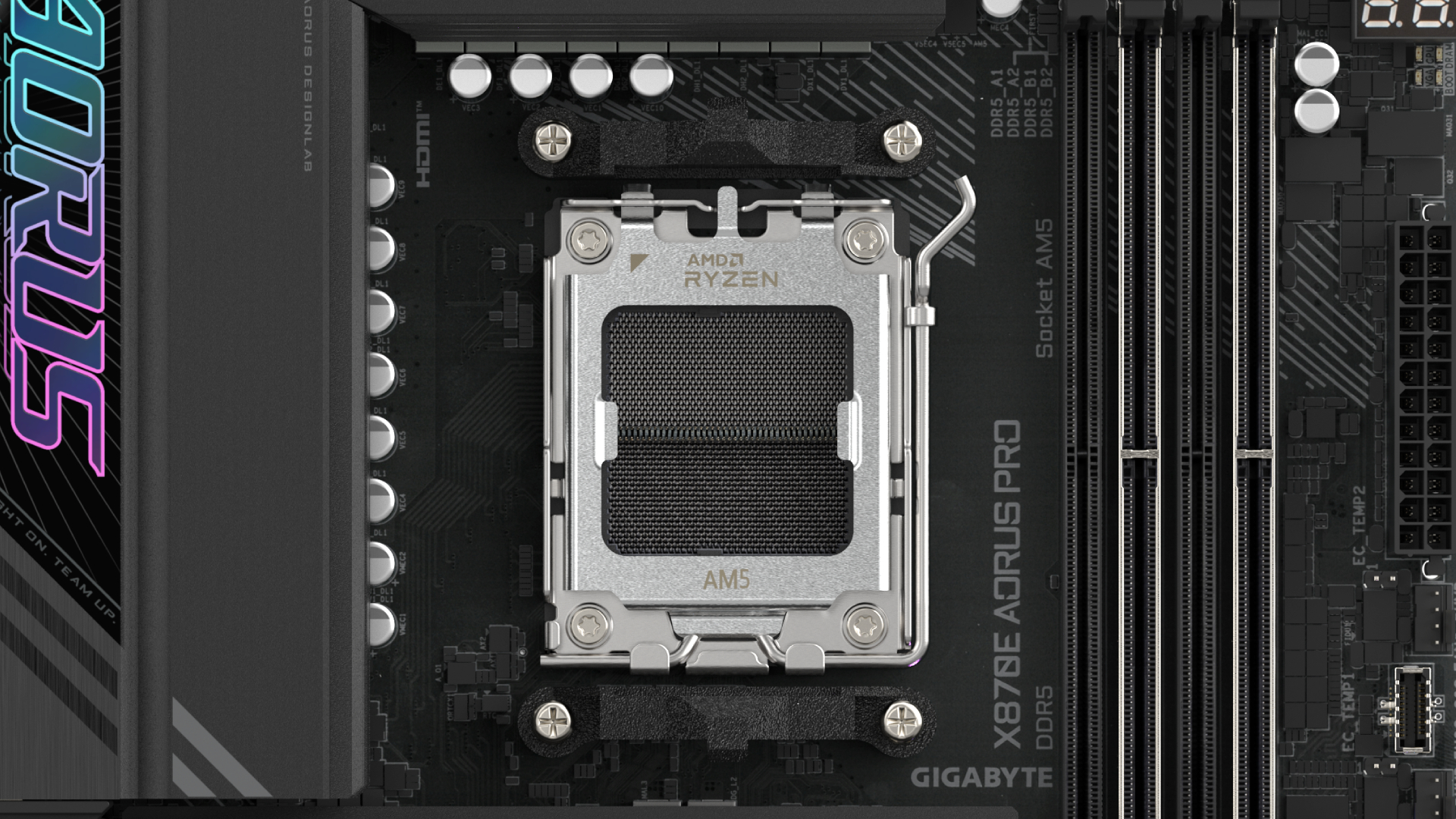
We’ve outlined the four different motherboard sizes available in 2025, their use cases, price differences, and varying features as they stand right now. Choosing a motherboard is not as cut and dry as you would expect, and that’s why you need to visualize your rig before putting any money down. Consider the chipset of the board for starters. Will you use AMD’s AM4 or AM5 platform? Similarly, will you pay the premium investing in Intel’s latest LGA 1851 socket instead of sticking with the older (and arguably better) LGA 1700 platform that hosted Alder Lake and Raptor Lake?

All four motherboard sizes support the latest and greatest of today’s processor technology, just in different ways. Mini-ITX is pricey as you’re paying extra for the sleek form factor, whereas MicroATX provides a similarly small (but far cheaper) experience that usually does not boast the same features by comparison. ATX is the most widely used and commonly stocked motherboard, but power users may need the added versatility of an E-ATX board if they’re building a server or a dedicated workstation, even if gamers may not feel the added benefit.

Compatibility is the most important factor above all. As such, we recommend dedicated tools such as PCPartPicker when virtually pricing and sizing up a machine; you’ll get to see which motherboards support your chosen CPU, GPU, RAM, M.2 SSD, and other components efficiently, as well as get suggestions for compatible cases. Building a PC the size of aPS5orXbox Series Xmay be an exciting idea, but you may need a Mini-ITX motherboard and SFF components, which can boost the price while making things cramped to build in. The motherboard is the foundation of your whole machine, after all.