For years, buying a new smartphone has been presented as the easiest way to get better performance, longer battery life and more advanced features. But that mindset is changing in Britain. As phone prices remain high and consumers become more conscious of electronic waste, keeping a good device for longer is becoming increasingly attractive.
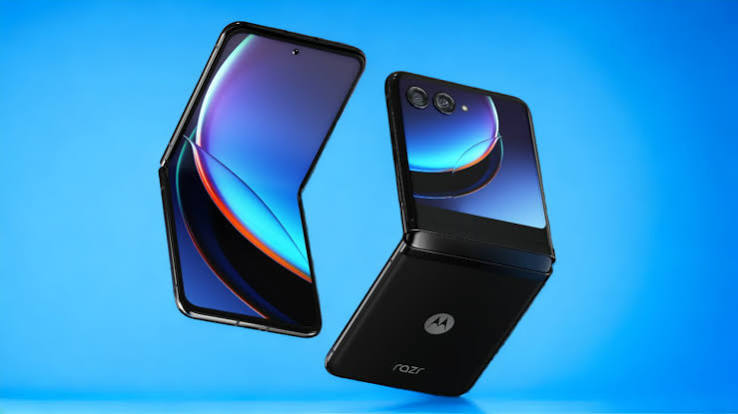
This is particularly interesting with foldable phones. A device such as the Motorola Razr 40 Ultra can still look remarkably modern after two years, thanks to its distinctive design and useful outer display. Yet there is another question that becomes more important with age: what condition is the battery in?
For owners considering whether to keep, sell or replace their Motorola Razr 40 Ultra, battery health may now be a more meaningful measure of value than having the latest processor or newest software feature. After two years of daily charging, commuting, streaming and social media use, a healthy battery can make the difference between a phone that still feels enjoyable and one that constantly needs a charger.
The Two-Year Smartphone Reality Is Changing
The traditional upgrade cycle has become harder to justify. Modern smartphones are already powerful enough for everyday tasks such as messaging, photography, navigation, video calls and mobile banking.
In Britain, this matters because the cost of living continues to influence purchasing decisions. Spending hundreds of pounds on a new phone simply to gain incremental improvements can be difficult to justify when an existing handset still performs well.
That is where the Motorola Razr 40 Ultra becomes an interesting case study. Its foldable form factor remains distinctive, while the large external display gives it functionality that does not necessarily feel outdated simply because newer models have arrived.
Instead of asking, “What can the newest phone do that mine cannot?”, consumers are increasingly asking a different question: “What is stopping my current phone from working as well as it used to?”
Very often, the answer is the battery.
Why Battery Health Matters More After Two Years
Lithium-ion batteries naturally lose capacity over time. Every charging cycle, period of heat exposure and extended use contributes to gradual chemical ageing.
A phone does not suddenly become old when it reaches its second birthday. Battery deterioration is normally gradual. However, the difference can become noticeable in everyday situations.
A Motorola Razr 40 Ultra that once comfortably lasted through a full day may eventually require a top-up during the afternoon. Someone who regularly travels across London, uses Google Maps, listens to podcasts and relies on mobile data may notice the change even sooner.
Battery ageing can also affect how people use their phones. Instead of simply enjoying the device, users start thinking about where the next charging point will be.
That creates a strange situation. The phone itself may still be fast enough, the camera may still be perfectly capable and the foldable design may still feel fresh. But declining battery capacity can make the entire experience feel older than it really is.
Foldable Phones Make the Battery Question More Interesting
Foldable smartphones have always involved compromises. Manufacturers have to fit displays, hinges, cameras, processors and batteries into relatively compact bodies.
The Motorola Razr 40 Ultra illustrates why battery efficiency matters so much in this category. Its clamshell design allows a conventional smartphone-sized experience when opened, while the external screen enables users to perform certain tasks without unfolding the phone.
That can actually influence battery consumption.
Checking a notification, controlling music or handling a quick interaction on the outer display may be more convenient than opening the main screen every time. For some users, this means the phone can be used more selectively throughout the day.
After two years, however, battery capacity becomes an increasingly important part of that equation.
A foldable phone with excellent design but noticeably reduced endurance may feel less practical than a conventional smartphone with a larger, newer battery. This is why battery condition deserves more attention when evaluating an older foldable.
The Outer Display Could Help Extend Everyday Usability
One of the most recognisable features of the Motorola Razr 40 Ultra is its large external display.
Rather than treating the cover screen as simply a notification panel, users can interact with a range of functions without fully opening the handset. This can make the phone feel surprisingly capable even when it is several generations old.
For example, checking the weather, controlling music, viewing notifications or handling quick information can be done with minimal interaction.
This matters for battery-conscious users. Every small reduction in unnecessary screen use can potentially contribute to better daily endurance.
It does not stop natural battery ageing, of course. A two-year-old battery will still behave differently from a new one. But efficient usage can help owners get more practical value from the capacity that remains.
In other words, battery health is not just about the number displayed in a diagnostic menu. It is also about how efficiently the device’s remaining capacity is being used.
Britain’s Second-Hand Phone Market Adds Another Dimension
The growing interest in refurbished and second-hand technology has changed the way consumers think about older smartphones.
A phone no longer needs to be the latest model to have value. Design, condition, software support, camera quality and battery performance can all influence what buyers are willing to pay.
This makes the Motorola Razr 40 Ultra particularly interesting on the used market. A well-maintained foldable can still offer something visually different from the increasingly similar-looking slab smartphones available today.
But battery condition can become a key selling point.
Imagine two used Motorola Razr 40 Ultra handsets listed at similar prices. One has been carefully maintained and still offers strong everyday battery performance. The other requires frequent charging and shows obvious signs of heavy use.
Even if both phones have the same storage capacity and specifications, the first handset is likely to feel like the better purchase.
For sellers, this demonstrates why looking after battery health is not only about convenience. It can also help preserve the practical value of a device.
Is a New Phone Really the Best Upgrade?
The smartphone industry is very good at creating excitement around new releases. Faster processors, brighter screens, improved cameras and new AI features can make an upgrade sound essential.
But not every user needs all of those improvements.
For someone whose Motorola Razr 40 Ultra still handles calls, messaging, photography, streaming and everyday apps without difficulty, replacing the entire phone may offer less value than expected.
The biggest weakness may simply be reduced battery endurance.
That changes the upgrade calculation. Instead of comparing the existing phone with a £1,000-plus flagship, consumers can first consider whether improving the phone’s weakest component would extend its useful life.
This approach also fits neatly with the broader “use it for longer” mentality becoming more visible across consumer technology.
Battery Habits Still Matter
Battery health is influenced not only by age but also by how a phone is treated.
Owners of a Motorola Razr 40 Ultra can take several sensible steps to reduce unnecessary battery stress. Avoiding excessive heat is particularly important. Leaving a phone in direct sunlight, using it intensively while it is already very hot, or charging it in poorly ventilated conditions can increase thermal stress.
Charging habits can matter as well. There is no need to obsess over every percentage point, but avoiding extreme heat and unnecessary battery abuse is sensible for long-term ownership.
Software updates should also be kept current where supported. System optimisation can improve power management, while checking which apps consume the most energy can reveal unexpected sources of battery drain.
Sometimes the problem is not simply an ageing battery. A poorly optimised app, constant background activity or weak mobile signal can also cause unusually high consumption.
The Real Test Is Your Daily Routine
Battery health should ultimately be judged against personal usage.
A light user may be perfectly happy with a Motorola Razr 40 Ultra that has lost some capacity. Someone who spends hours navigating around Manchester, streaming video on a train or using mobile data throughout a working day may find the same battery condition frustrating.
This is why a percentage or diagnostic reading should not be treated as the entire story.
Ask practical questions instead.
Does the phone still last through your normal working day? Do you need to charge it significantly earlier than before? Does the battery percentage fall unusually quickly during ordinary tasks? Does the handset become unexpectedly warm?
These everyday observations can tell you more about whether the battery is becoming a genuine problem.
Battery Health Could Become the New Upgrade Metric
For years, consumers have compared smartphones by processor speed, camera megapixels and display technology.
Those specifications still matter, but battery health could become increasingly important as people keep devices for longer.
The Motorola Razr 40 Ultra demonstrates the point particularly well. Its hardware can remain capable while its battery gradually loses endurance. If the rest of the device still meets the owner’s needs, replacing the entire handset simply because of reduced battery capacity may not always make sense.
This represents a broader shift in how technology is valued.
Instead of seeing a smartphone as disposable consumer electronics, users are increasingly treating it as a long-term product. The question is no longer simply how impressive a phone is when purchased, but how useful it remains after two, three or even four years.
A Second Life for a Two-Year-Old Foldable
The idea of a second life is especially relevant to foldable smartphones.
A Motorola Razr 40 Ultra that has spent two years in someone’s pocket does not automatically become obsolete when a newer Razr arrives. If the display, hinge, cameras and software experience remain satisfactory, the battery may be the component that determines whether the handset continues as a reliable daily phone.
That could make battery condition one of the most important considerations for existing owners, buyers of used devices and people deciding whether to upgrade.
It also reflects a wider change in British technology consumption: buy less frequently, maintain what you already own and make each device work harder for its price.
So, Is Battery Health the Real Upgrade?
For many Motorola Razr 40 Ultra owners, the answer could be yes.
A new generation of smartphones may offer faster chips, additional AI features and improved cameras, but those improvements do not automatically solve the everyday frustration of carrying a phone that struggles to reach the end of the day.
After two years, battery performance becomes much easier to notice than many headline specifications.
The Motorola Razr 40 Ultra remains a useful example of why smartphone value should not be measured purely by release date. Its distinctive foldable design and large outer display can still make it an appealing device, particularly for users who value convenience and portability.
If the battery remains healthy, keeping it may be a perfectly sensible choice. If battery endurance has become the main weakness, addressing that issue may make more sense than immediately replacing the entire phone.
Think Battery First, Upgrade Second
The smartphone market is moving towards a more practical idea of ownership. British consumers are becoming more interested in value, longevity, repairability and reducing unnecessary replacement.
Against that backdrop, the Motorola Razr 40 Ultra presents an interesting question: does an older phone really need to be replaced, or does it simply need its weakest component addressed?
After two years, battery health may be the most important factor determining that answer.
For users who are happy with the phone’s design, performance and features, extending its useful life can be more attractive than chasing every new release. And when a battery is the main source of frustration, solving that problem can potentially transform the everyday experience.
The next smartphone upgrade, in other words, may not always need to be a new phone. Sometimes, the smarter upgrade is simply getting the battery working at its best again.