How to Add a Longer-Lasting Battery to Your Smartphone

Well, it’s noon and your phone’s battery is already at 37 percent. There are ways to avert this disaster, adding more battery capacity to your favorite smartphone.

Option 1: The Battery Case
The first option you can choose is a battery case. This is exactly what it sounds like. It’s a case you put your phone in — like a typical case designed just to protect your phone — but the case is thicker than normal and includes a built-in battery. The case itelf plugs into your phone’s charging port, and you generally plug the charging cable directly into the case’s charging port when it’s time to charge both your phone and the battery case itself.

Technically, this is just getting a separate battery and carrying it around with you. In practice, a battery case gives your phone more battery power at the cost of increased thickness. The case just becomes part of your phone — you don’t need to carry a separate battery pack in your pocket and attach your phone to it via a cable when it’s time to recharge. Just flip a switch and the battery pack will charge your phone with the power from its own battery. The battery pack can even be charged at the same time you charge your phone, so it’s not even a second device to charge.

This is probably the ideal option for most phones if you consistently need more battery power to make it through a day. Mophie’s line of iPhone battery cases are probably the most well-known, but Mophie has also made cases for other smartphones. They’re not the only company that’s made battery cases, either. Just be sure to get a battery case designed for your specific model of phone so it will fit! Search on Amazon or a similar website and you’ll find many battery cases to choose from.

Option 2: The Aftermarket Battery Replacement
Most phones don’t have user-replaceable batteries anymore, but some do. Samsung’s line of Galaxy phones stand out here, with even the high-end Galaxy S5 and other S-series phones offering user-replaceable batteries. Because these batteries and the entire plastic back panel of the phone can be removed and replaced, it’s possible to get aftermarket batteries that are larger, complete with new back panels to accomodate them.

If you have a phone with a user-replaceable battery, you can probably buy a larger replacement battery for it. The battery and its accompanying back replace your phone’s existing battery, so it’s a more effective solution than a battery case with a battery separate from your phone’s battery. Perform a search for “extended battery” and the name of your phone to find one. For example, you can pick up third-party extended batteries that promise three times the battery life for your Samsung Galaxy S5 for $40 or so on Amazon.

As with a battery case, this will make your phone thicker and larger. Whether that’s worth the trade-off is up to you — if you struggle to make it through a day with your phone’s current battery, it probably will be worth it. But, whatever you do, don’t buy super-cheap battery replacements.

Option 3: Just Carry Around a Separate Battery Pack
There’s also the external battery pack option. Rather than replacing your phone’s battery or adding a battery case, you can just carry a separate battery pack around with you and connect it to your phone with a cable whenever you need to charge your phone away from an outlet. This has the benefit of ensuring your phone stays thin, and you can use the battery pack to charge other devices that might need more power — a tablet, for example.

Editor’s Note: for our recent trip to CES 2015, we bought this RAVPower external battery pack and it worked amazingly well. We were able to recharge an iPhone 6 repeatedly throughout the trip without having to recharge the battery pack at all.

But there are downsides here. The battery pack is yet another thing you have to carry, so it’ll be difficult to pocket and will be more at home in a bag. You’ll have to connect it to your phone via a cable, so you can’t just tuck your phone into your pocket normally and have it charging as you could with a battery case. You’ll also need to charge your battery pack separately, so it’s yet another thing you have to charge at the end of the day.

Still, a battery pack isn’t a bad option. If you only need the extra power for your phone occasionally, it’s a good option you can take with you if you know you’ll be using your phone a lot on a particular day. On days when you won’t be using your phone much, you can take your still-thin phone with you and leave the battery pack at home. However, if you struggle to make it through every single day with your phone’s battery, a battery case or extended battery is a more convenient option you can always take with you and always have in your pocket.

Charging your phone throughout the day can also help. Whenever you’re using your computer, you can plug your smartphone into it via its charging cable — the one with a USB connection — and your phone will charge from the computer. There’s no memory effect with modern batteries, so regularly topping your phone off throughout the day won’t actually damage the battery.

All Cell Phone Battery in here, such as Acer,LG, Apple, Lenovo and Samsung Cell Phone Battery and so on.
Debunking Battery Life Myths for Mobile Phones, Tablets, and Laptops

Batteries need to be cared for properly — they’re a critical part of our mobile devices and battery technology hasn’t advanced as fast as other technologies. Unfortunately, there’s a lot of incorrect information about batteries out there.

Some of the big myths come from old battery technologies and are actively harmful when applied to new battery technologies. For example, nickel-based batteries needed to be fully discharged, while modern lithium batteries shouldn’t be fully discharged.

Perform Shallow Discharges; Avoid Frequent Full Discharges
Old NiMH and NiCd batteries had a “memory effect” and had to be completely discharged from 100% to 0% to keep their capacity. Modern devices use Lithium Ion batteries, which work differently and have no memory effect. In fact, completely discharging a Li-ion battery is bad for it. You should try to perform shallow discharges — discharge the battery to something like 40-70% before recharging it, for example. Try to never let your battery go below 20% except in rare circumstances.

If you were to discharge your battery to 50%, recharge it, and then discharge it to 50% again, that would count as a single “cycle” with modern Li-ion batteries. You don’t need to worry about performing shallow charges.

There’s only one problem that shallow discharges can cause. Laptops can get a bit confused by shallow discharges and may show you wrong estimates for how long your device’s battery will last. Laptop manufacturers recommend you perform a full discharge about once per month to help calibrate the device’s battery time estimate.

Heat (and Cold) Can Damage Batteries
Heat can reduce a battery’s capacity. This affects all types of devices — even smartphones heat up when performing demanding tasks — but laptops can become hottest of all when under load. The battery is in the laptop, near the electronics that become hot while working heavily — this contributes to battery wear.

If you have a laptop that you use plugged in all of the time and it gets quite hot, removing the battery can increase the battery’s life by limiting the battery’s exposure to the heat of your laptop. This won’t make too much of a difference in normal use, but if you’re using a laptop to play a lot of demanding games and it’s heating up quite a bit, it may be helpful. Of course, this only applies to laptops with removable batteries.

Your climate is also a concern. If it gets very hot where you live or you store your device somewhere that gets very hot — say, a hot car left in the sun on a summer day — your battery will wear down faster. Keep your devices near room temperature and avoid storing them in very hot places, such as hot cars on summer days.

Extreme cold temperatures can decrease the lifespan of your battery, too. Don’t put a spare battery in the freezer or expose any device with a battery to similarly cold temperatures if you’re in a region with cold temperatures.

Don’t Leave the Battery At 0%
You shouldn’t leave the battery in a fully discharged state for very long. Ideally, the battery wouldn’t discharge all the way to zero very often — but if it does, you should recharge it as soon as possible. You don’t have to race to a power outlet when your smartphone dies, but don’t throw it in your drawer and leave it there for weeks without charging it. If you let the battery discharge completely and leave your device in a closet, the battery may become incapable of holding a charge at all, dying completely.

Store Batteries at 50% Charge
On the other hand, leaving the battery charged fully for an extended period of time could result in a loss of capacity and shorten its life. Ideally, you’d store the battery at 50% charge if you weren’t going to use it for a while. Apple recommends you leave the battery at 50% if you intend on storing the device more than six months. If you’re using it regularly, you shouldn’t need to worry about its state — although you never want to leave a battery at 0% for too long.

Storing the battery while fully discharged could result in the battery dying completely, while storing the battery at full charge could result in the loss of some battery capacity and shorten your battery’s life.

This applies to both batteries in devices and spare batteries you may have lying around — keep them at 50% if you won’t be using them for some time.

Leaving Your Laptop Plugged in All The Time Is Okay, But…
This one appears to be fairly controversial. We’ve previously covered the eternal question of whether it’s okay to leave your laptop plugged in all the time. We concluded that it’s okay and the battery’s temperature is the main thing you need to worry about. Apple disagrees, recommending against leaving its Macbook Air and Macbook Pro notebooks plugged in all the time.

Ultimately, we’re both saying the same thing. It’s fine to leave your laptop plugged in at your desk when you’re using it, as the laptop won’t “overcharge” the battery — it will stop charging when it reaches capacity. However, just as you shouldn’t store your laptop’s battery at full capacity in a closet, you shouldn’t leave your laptop plugged in for months on end with the battery at full capacity. Allow your laptop’s battery to occasionally discharge somewhat before charging it back up — that will keep the electrons flowing and keep the battery from losing capacity.

Battery University says that “the worst situation is keeping a fully charged battery at elevated temperatures.” If your laptop produces a lot of heat, removing it might be a good idea. If you have a fairly cool laptop that you occasionally let discharge a reasonable amount, leaving it plugged in — even for days on end — shouldn’t be a problem. If your laptop gets extremely hot, you may want to remove the battery, as we mentioned above.

Batteries Will Always Wear Down
Like all other types of batteries, Li-ion batteries will wear down over time, holding less and less charge. Apple says its laptop batteries will reach 80% of their original capacity after “up to” 1000 full discharge cycles. Other manufacturers commonly rate their batteries 300 to 500 cycles.

The batteries can still be used after this point, but they’ll hold less electricity and will power your devices for shorter and shorter periods of time. They’ll continue losing capacity the more you use them. Heat and aging will reduce the battery’s life, too.

Whatever you do, your devices’ batteries will slowly wear down over time. With proper care, you can make them hold a long charge for longer — but there’s no stopping entropy. Hopefully, your device will be due for an upgrade by the time its battery dies.

Largest range of Laptop Batteries, Chargers & AC adapters. Find the right battery, ac adapters for your phone or tablet. 12 Month Warranty,30 Days Money Back!

How to Choose a Replacement Battery for Your Cell Phone

Most modern cell phones are more than just a communication device; they also serve as a navigation system, a Web browser, a handheld game system, a music player, a day-planner and much more. It’s getting harder and harder to get by without one of these multifunction cell phones. But running all those applications uses a lot of battery power.

Even with cell phone accessories like car chargers and emergency chargers, your battery power may not last long enough. Over time, your cell phone battery will start to degrade and battery life will shorten. When a cell phone battery starts to degrade, you may think of replacing your cell phone altogether. But if your cell phone is still fairly new, it may be less expensive to buy a replacement battery. This guide will help you choose a replacement battery for your cell phone.

Choosing a Replacement Battery:
1.Review your cell phone information.
To get the right type of replacement battery, you will need to know what kind of cell phone you have and what kind of battery is suitable. Most cell phone carriers rename the cell phones that they carry. You need to know the actual name and model number of your cell phone, not the cell phone’s carrier-assigned name, to find a replacement battery. This information can be found in your user manual. You may also want to write down the IMEI number and the battery type and serial number. You can also find it on the inside of your cell phone, usually on a sticker or plaque underneath the battery. Also, review your cell phone purchase information. Many cell phone companies offer a one-year warranty for batteries.

2.Contact your cell phone manufacturer.
You can get cell phone manufacturer information easily on the Web. Ask them if they offer any warranty on the battery or cover the cost of a replacement battery. If they agree to pay for a replacement battery, they may ask for a proof of purchase to reimburse you. Also, don’t forget to check with your cell phone carrier or your cell phone manufacturer to see if using a third-party replacement battery voids the warranty.

3.Purchase a replacement battery.
If both the manufacturer and the cell phone carrier refuse to send you a replacement battery, you will need to find your own battery. You may find batteries made by both the original manufacturer and third-party manufacturers. Do your research before buying. More than one kind of replacement battery might be made with inferior materials or a low percentage of the active ingredient, have less battery power than a quality-made battery or have a short battery life. You don’t want to wind up purchasing another replacement battery in a few months.

Cell Phone Battery Tip
Remember to always dispose of your old cell phone battery by recycling it properly. Search online for places in your neighborhood that recycle dry-cell and rechargeable batteries. There are plenty of free recycling services to help you reduce your environmental impact.

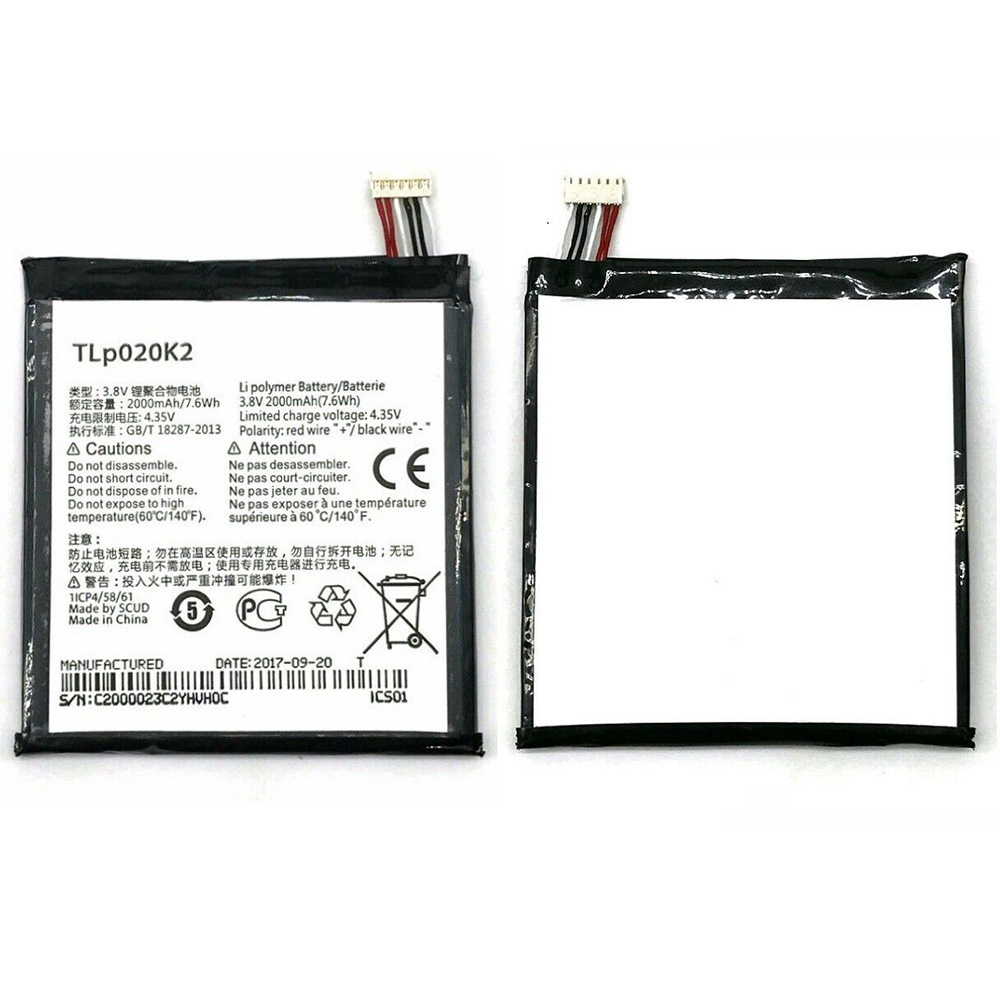
Alcatel One Touch 6039H 6039Y 6039K Alcatel TLp020K2 Battery

Buy Alcatel TLp020K2 Cell Phone Battery replacement for Alcatel One Touch 6039H 6039Y 6039K.

Fit Machine Model Alcatel One Touch 6039H 6039Y 6039K – 2000mAh/7.6WH – 3.8V/4.35V.

All products from our shop are 100% the highest quality! We provide the high quality Laptop Batteries. Alcatel TLp020K2 battery is best compatible with the original equipments. 

OriccaBattery.co.uk ◆Free Shipping ◆ One year warranty ◆ 30 days money back guarantee.

Battery TLp020K2 Replacement For Alcatel One Touch 6039H 6039Y 6039K

TLp020K2

Alcatel TLp020K2 Specifications
Brand:Cell Phone Battery for Alcatel
Capacity:2000mAh/7.6WH
Voltage:3.8V/4.35V
Type:Li-ion
All products from our shop are 100% the highest quality! 
We provide the high quality Laptop Adapters!

PRODUCT COMPATIBILITY:

TLp020K2

REPLACEABILITY WITH THE FOLLOWING MODELS:

Alcatel One Touch 6039H 6039Y 6039K 

How to Maintenance your new replacement Alcatel TLp020K2 battery?
1. New Alcatel TLp020K2 battery pack must be fully charged before use.
2. New battery pack needs to be fully charged and discharged (cycled) a few times before it can condition to full capacity.
3.Laptop battery undergo self-discharging when left unused. Always store a Alcatel TLp020K2 battery pack in a fully charged stage for storage.
4. Fully drain and fully recharge your battery pack every few months.
5. Turn down the LCD brightness of your portable device.
6. Use built-in power management on your portable device.
7. Turn off LCD or other unnecessary accessories when not in use.
8. Set screen saver blank to 1 to 2 minutes of your notebook.
9. Add more RAM if you have extra RAM expansion slot, it will reduce the usage of hard drive and it is power exhaustive.
10. Close unused software in your Alcatel One Touch 6039H 6039Y 6039K phone .
11. Remove unused PC Cards or USB devices from your notebook.
12. Don´t watch DVD or play graphics intensive video games.
13. Don´t short circuit terminal or store your Alcatel TLp020K2 Cell Phone Batteries pack with metal parts. 14. Don´t drop or mutilate the Alcatel TLp020K2 battery pack.
15. Don´t expose to moisture or water.

Related popular recommendations:
58-000049 Battery Compatible Amazon Kindle PaperWhite 2nd Gen 6″
L14M2P21 Battery Compatible Lenovo S41-70 S41-70AM
ACDP-100D01 Laptop Adapters For Sony Vaio PCGA AC19V4 ACDP-100D01
TLI017C1 Battery Compatible Alcatel One Touch OT-5027B DAWN OT-4060O STREAK OT-4060A IDEAL
088796 Battery Compatible Bose Soundlink Mini 2 Pack
PA5162U-1BRS Battery Compatible Toshiba Portege R30 R30-A series
061384 Battery Compatible BOSE SOUNDLINK Mini Series
82-71363-04 Battery Compatible MOTOROLA MC70 MC75 FR68
FX30 Battery Compatible Motorola XT1575 Moto X Pure Edition / Moto X Style

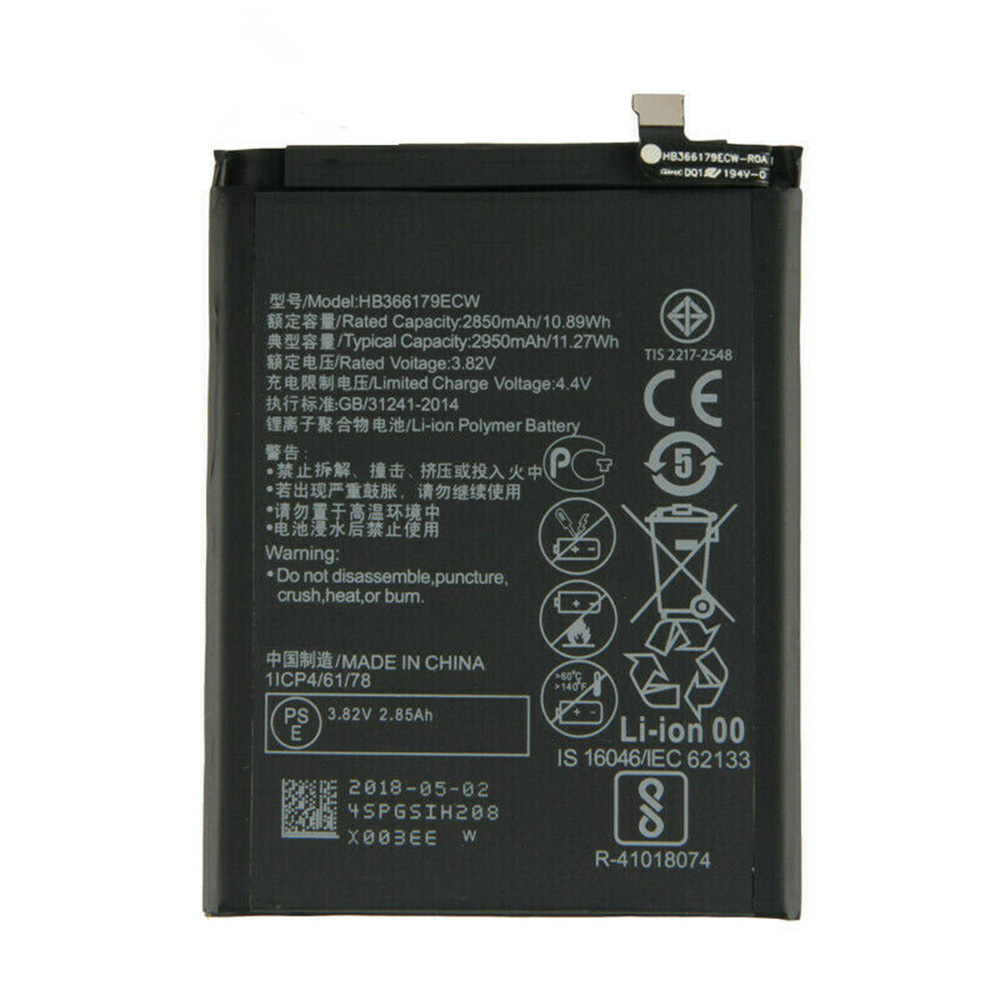
Huawei Nova 2 CAZ-AL10 CAZ-TL00 Huawei HB366179ECW Battery

Buy Huawei HB366179ECW Cell Phone Battery replacement for Huawei Nova 2 CAZ-AL10 CAZ-TL00.

Fit Machine Model Huawei Nova 2 CAZ-AL10 CAZ-TL00 – 2850mAh/10.88WH – 3.82V/4.4V.

All products from our shop are 100% the highest quality! We provide the high quality Laptop Batteries. Huawei HB366179ECW battery is best compatible with the original equipments. 

OriccaBattery.co.uk ◆Free Shipping ◆ One year warranty ◆ 30 days money back guarantee.

Battery HB366179ECW Replacement For Huawei Nova 2 CAZ-AL10 CAZ-TL00

HB366179ECW

Huawei HB366179ECW Specifications
Brand:Cell Phone Battery for Huawei
Capacity:2850mAh/10.88WH
Voltage:3.82V/4.4V
Type:Li-ion
All products from our shop are 100% the highest quality! 
We provide the high quality Laptop Adapters!

PRODUCT COMPATIBILITY:

HB366179ECW

REPLACEABILITY WITH THE FOLLOWING MODELS:

Huawei Nova 2 CAZ-AL10 CAZ-TL00 

How to Maintenance your new replacement Huawei HB366179ECW battery?
1. New Huawei HB366179ECW battery pack must be fully charged before use.
2. New battery pack needs to be fully charged and discharged (cycled) a few times before it can condition to full capacity.
3.Laptop battery undergo self-discharging when left unused. Always store a Huawei HB366179ECW battery pack in a fully charged stage for storage.
4. Fully drain and fully recharge your battery pack every few months.
5. Turn down the LCD brightness of your portable device.
6. Use built-in power management on your portable device.
7. Turn off LCD or other unnecessary accessories when not in use.
8. Set screen saver blank to 1 to 2 minutes of your notebook.
9. Add more RAM if you have extra RAM expansion slot, it will reduce the usage of hard drive and it is power exhaustive.
10. Close unused software in your Huawei Nova 2 CAZ-AL10 CAZ-TL00 phone .
11. Remove unused PC Cards or USB devices from your notebook.
12. Don´t watch DVD or play graphics intensive video games.
13. Don´t short circuit terminal or store your Huawei HB366179ECW Cell Phone Batteries pack with metal parts. 14. Don´t drop or mutilate the Huawei HB366179ECW battery pack.
15. Don´t expose to moisture or water.

Related popular recommendations:
58-000049 Battery Compatible Amazon Kindle PaperWhite 2nd Gen 6″
L14M2P21 Battery Compatible Lenovo S41-70 S41-70AM
ACDP-100D01 Laptop Adapters For Sony Vaio PCGA AC19V4 ACDP-100D01
TLI017C1 Battery Compatible Alcatel One Touch OT-5027B DAWN OT-4060O STREAK OT-4060A IDEAL
088796 Battery Compatible Bose Soundlink Mini 2 Pack
PA5162U-1BRS Battery Compatible Toshiba Portege R30 R30-A series
061384 Battery Compatible BOSE SOUNDLINK Mini Series
82-71363-04 Battery Compatible MOTOROLA MC70 MC75 FR68
FX30 Battery Compatible Motorola XT1575 Moto X Pure Edition / Moto X Style