We special in laptop battery ,laptop adapters for most of top brands, such as apple,acer, asus, dell, fujitsu,hp, compaq, ibm, lenovo, toshiba, samsung, sony on UK,all the ac power adapters, laptop batteries are high quality and low price.
Every Acer laptop owner has faced that sinking moment: you plug in your Acer laptop charger, the little LED either stays dark or flickers weakly, and your screen warns of low battery. Understanding the reasons why an Acer laptop charger stops working is the first step toward a solution – and many of these causes are surprisingly simple.
The most common culprit is physical damage to the cable, especially near the barrel connector or the USB‑C plug, where constant bending frays the internal wires. Over time, the copper strands snap, and while the outer insulation looks fine, no current flows. Another frequent issue is a faulty AC adapter brick – internal capacitors can dry out or overheat, particularly if you routinely wrap the cord tightly around the brick, which traps heat. Dust and lint inside the laptop’s charging port also create poor contact; a gentle clean with a wooden toothpick often restores function. Less obvious but equally common is a tripped internal fuse within the charger itself – a surge from an unstable mains socket can blow it, leaving your adapter dead even though the laptop is healthy. Finally, don’t overlook the mains plug and lead; UK plugs have internal fuses that can blow, and the detachable “kettle lead” (IEC cable) sometimes fails at the connection point. Before you panic, swap that lead with a spare from another appliance – if it works, you’ve saved yourself a repair bill.
When a Replacement Acer Laptop Charger Becomes Your Best Bet
Once you’ve ruled out socket issues and port dirt, and your original still refuses to cooperate, aReplacement Acer laptop charger is the logical next step. But not all replacements are created equal, and choosing wisely can prevent future headaches. In the UK, you’ll find two main categories: generic universal adapters with interchangeable tips, and brand‑matched replacements that mimic the original wattage and voltage. For most Acer models – whether Aspire, Swift, Predator or TravelMate – the key numbers are the output voltage (typically 19V) and amperage (e.g., 3.42A, 4.74A, or 7.1A for gaming laptops). Getting these wrong is risky: too low a wattage and your laptop won’t charge while in use; too high and you may stress the internal power regulation, though modern Acer units have protection circuits.
When shopping for a replacement, pay attention to the connector polarity – centre positive is standard for Acer, but always check your original label. Also consider cable length; a 1.8‑metre cord is convenient for UK desks, but 3‑metre options give you flexibility in shared workspaces. Look for safety markings like CE and UKCA, which indicate compliance with British electrical standards. Avoid unmarked “white‑box” chargers from unknown sellers; instead, opt for reputable electronics retailers that offer a 12‑month guarantee. A quality replacement should feel solid, run only warm (not hot) during use, and include a ferrite bead near the laptop end to suppress electrical noise – this protects both your charger and your Acer’s sensitive motherboard.
Surprising Reasons Why an Acer Laptop Charger Stops Working (Even New Ones)
You might assume a brand‑new replacement is immune, but the reasons why an Acer laptop charger stops working extend beyond age. Even a fresh adapter can fail within weeks if you overlook environmental factors. For instance, British homes often have humidity fluctuations; condensation inside the brick during cold mornings can cause short circuits. Similarly, placing the charger on a carpet or sofa while in use blocks ventilation – the brick’s internal thermostat then cuts power to prevent fire, and it may not reset until it cools completely. Another hidden cause is voltage mismatch from cheap travel adapters when you’re using UK‑to‑EU plug converters; these often don’t earth properly, leading to erratic DC output that confuses your Acer’s charging IC.
Also, consider the laptop’s own charging logic. Acer’s Power Management software sometimes imposes a “battery care” mode that limits charge to 80% – this isn’t a charger fault, but many users mistake it for a dead adapter. Similarly, a depleted battery that has fallen below its minimum voltage threshold (around 10V for a 4‑cell pack) will refuse to accept charge initially; the charger may appear to do nothing for several minutes until the laptop’s pre‑charge circuit kicks in. Patience is key – leave it plugged for 30 minutes before declaring the replacement faulty. Finally, physical shock – dropping the brick or yanking the cable – can crack solder joints inside, a problem that intermittently cuts power only when the cable is moved in a certain way. If your replacement exhibits this behaviour, return it under warranty immediately.
How to Charge an Acer Laptop Without a Charger – Practical British Solutions
Now for the real test: your charger has died, the replacement hasn’t arrived, and you have a deadline. Knowing how to charge an Acer laptop without a charger can save your day, and there are several viable routes, each with pros and cons.
USB‑C Power Delivery (PD) is the modern hero. Many Acer models from 2019 onwards – especially the Swift and Spin series – support charging via their USB‑C port. If your laptop has a Thunderbolt or USB‑C port marked with a battery icon, you can use a third‑party USB‑C PD power bank or a high‑wattage USB‑C wall adapter (65W or higher) from a phone or tablet brand. Simply connect it, and the laptop will negotiate the correct voltage. This works brilliantly if you already own a modern Android charger or a MacBook adapter – just check the wattage; 45W might charge slowly while idle, but 65W will keep up with light use.
Power banks designed for laptops are another excellent option. These are larger units with 20,000–30,000 mAh capacity and a DC output that matches your Acer’s requirements. Many come with a set of interchangeable tips – you can select the Acer‑compatible one and charge on the go. In the UK, these are available from electronics shops and even some supermarket tech aisles. They’re particularly useful for commuters on trains or during power outages.
Universal car chargers with a 12V‑to‑19V inverter and a selection of tips also work, provided you have a vehicle with a working cigarette lighter socket. This is a lifesaver for mobile workers who spend hours in their car between appointments. Just ensure the car adapter’s fuse rating matches your Acer’s draw – usually 5A is safe.
The nuclear option: borrow a compatible charger from a friend or colleague. Acer uses a standard 5.5mm x 2.5mm barrel plug on many older models, and HP or Dell chargers of similar voltage (19.5V) often work temporarily – though the polarity must match (centre positive). Do not force a plug that doesn’t fit; if it’s too loose or tight, stop immediately to avoid damaging the port. And remember, using a higher‑voltage charger (e.g., 20V) for a short period is usually tolerated by Acer’s protection circuits, but never exceed 20.5V.
Finally, if you have a soldering iron and some technical confidence, you can resurrect a dead charger’s cable by cutting out the frayed section and splicing the wires – but this is a temporary bodge, not a long‑term solution, and it voids any guarantee on the replacement. For most UK users, the smartest emergency move is to keep a USB‑C PD power bank in your laptop bag; it doubles as a phone charger and gives you peace of mind.
Making the Final Choice: Repair, Replace, or Rely on Alternatives?
Deciding what to do when your Acer laptop charger fails depends on your budget, your technical skill, and how urgently you need power. If your original charger is less than two years old and shows no physical damage, consider having an electronics repair shop test it – sometimes a simple capacitor swap or cable resoldering costs less than a Replacement Acer laptop charger. However, repair labour in the UK can be £40–60, whereas a decent replacement starts from £25 online, so replacement often wins on cost.
When you do buy a replacement, invest in one with a braided cable – they resist kinking far better than standard PVC ones. Also, purchase from a seller that provides a clear returns policy, because even with all the right specs, some replacements produce coil whine (a high‑pitched buzz) that can be annoying in quiet offices. Test your new replacement immediately upon arrival: plug it in, run a CPU‑intensive task, and feel the brick after 20 minutes – it should be warm, not scorching. If it trips your home’s RCD (residual current device), return it – that’s a sign of poor internal isolation.
As for the emergency methods – how to charge an Acer laptop without a charger – they are brilliant for temporary fixes but shouldn’t become your daily routine. USB‑C PD is safe and efficient, but car adapters and borrowed chargers lack the exact voltage regulation that Acer’s original design expects; over months, slight mismatches can degrade your battery’s health. Therefore, treat these as backup plans, not permanent replacements.
Future‑Proofing Your Acer Charging Setup
To avoid frequent charger dramas, adopt a few habits. Always unplug your Acer laptop charger by gripping the plug head, not the cable. When travelling, wrap the cable loosely in a figure‑eight – never bend it at sharp angles. Keep the brick ventilated – place it on a hard surface, not your bed or lap. And periodically inspect the port on your laptop for debris; a can of compressed air (available at UK stationery shops) can blow out dust that causes poor connections.
Also, note that the reasons why an Acer laptop charger stops working often trace back to mains power quality. In older British buildings with fluctuating voltage, use a surge‑protected extension lead – this absorbs spikes that would otherwise stress your adapter. If you work in a workshop or garage, avoid using the charger near metal shavings or moisture – both can creep into the brick and cause internal shorts.
Finally, consider buying a second Replacement Acer laptop charger to keep at your office or a relative’s house. Having a spare means you never have to carry your only charger back and forth, reducing wear on both cables and ports. And always store that spare with the original packaging so you can reference the exact model number (e.g., ADP‑90MD) when ordering future replacements.
Acer Laptop Adapters
Buy Acer Laptop Adapters online at www.oriccabattery.co.uk. Select from the best range of Acer Laptop Adapters , Chargers, Universal Acer Laptop Charger and many more Acer Laptop Adapters at Best Price. ✓Best Offers ✓Fast Shipping
Earlier this week, a customer from Texas emailed me asking whether replacing the battery in his three-year-old Acer Aspire 5 was worthwhile. His laptop barely lasted 45 minutes on a full charge, and he wasn’t sure if replacement was feasible or cost-effective. This question comes up frequently, so here’s everything American Acer users need to know about battery replacement.
Can Your Acer Battery Actually Be Replaced?
Yes, virtually all Acer laptop batteries can be replaced, despite modern designs featuring internal rather than externally removable batteries. While browsing YouTube recently, I watched a detailed teardown video of the Acer Aspire 5 (A515-57) demonstrating that battery replacement requires only basic tools and approximately 20 minutes. The process involves removing bottom panel screws, disconnecting the battery cable, and installing the new cell.
Models like the Acer Nitro 5 (AN515-58), Aspire 7, and Acer Chromebook series follow similarly straightforward procedures. However, ultrabooks including the Acer Swift 5 and Swift X feature more complex internal layouts where professional service is recommended.
How Much Does It Cost?
Battery replacement costs vary depending on your approach. OEM Acer batteries typically range from $60 to $150, while third-party alternatives from reputable brands like Green Cell, DTK, and Fancy Buying cost between $35 and $80. Professional installation through Acer’s authorised service network or independent repair shops adds $40 to $100 in labour charges.
For perspective, replacing the battery in an Acer Nitro 5 using a Green Cell compatible battery purchased through Amazon US costs approximately $55—far more economical than buying a new laptop.
When Should You Replace?
Most Acer laptop batteries maintain acceptable performance for 2-3 years or 300-500 charge cycles. I recently saw an Instagram post from a popular US tech reviewer explaining that capacity dropping below 50% of original specifications signals replacement time. Windows users can check battery health by running “powercfg /batteryreport” in Command Prompt for detailed degradation data.
Common signs include runtime dropping significantly, unexpected shutdowns, extended charging times, or Windows displaying the “consider replacing your battery” notification. Physical swelling requires immediate attention—discontinue use and replace the battery promptly.
Where to Purchase
American consumers can purchase replacement batteries through Amazon US, Best Buy, Acer’s official website, or specialist retailers like LaptopBatteryExpress. Always verify your battery model number—common Acer batteries include AP19B5L, AP18C7M, and AP18E8M—to ensure perfect compatibility with your specific laptop model.
The best photo editing laptops based on our hands-on testing.
A lot of what makes the best laptops for Adobe Photoshop also makes thebest laptops for video editing: a well-balanced combination of performance, battery life, and a bright and vivid display. Whether you’re just learning the ins and outs of editing photos or can wield the lasso tool like a scalpel in the hand of a surgeon, there’s no shortage of great options, whatever your skill level.
Laptops with Nvidia’s RTX 50-series GPUs are now available for creators with demanding Photoshop needs, as well as allIntel’s Core Ultra 200-series andAMD’s Max Pro series of processors. Professional editors can benefit from the added performance of a discrete graphics card by enabling Photoshop’s hardware acceleration features, which helps power through demanding tasks faster.
A high-resolution OLED display is also something to consider. You’ll not only get to enjoy the rich hues and deep contrasts OLEDs are famous for, but some of them also have wide color gamut coverage — wide enough to find colors in between colors.
For beginners or anyone looking to save money, any laptop with last-gen hardware will still provide more than performance to move Photoshop edits along quickly. Even ones without a discrete graphics card. Check out ourbest laptop dealsfor the best discounts at various price points.
-Can’t configure RTX 4060 with Intel Core Ultra 7 -Touchpad too resistant -Awful audio
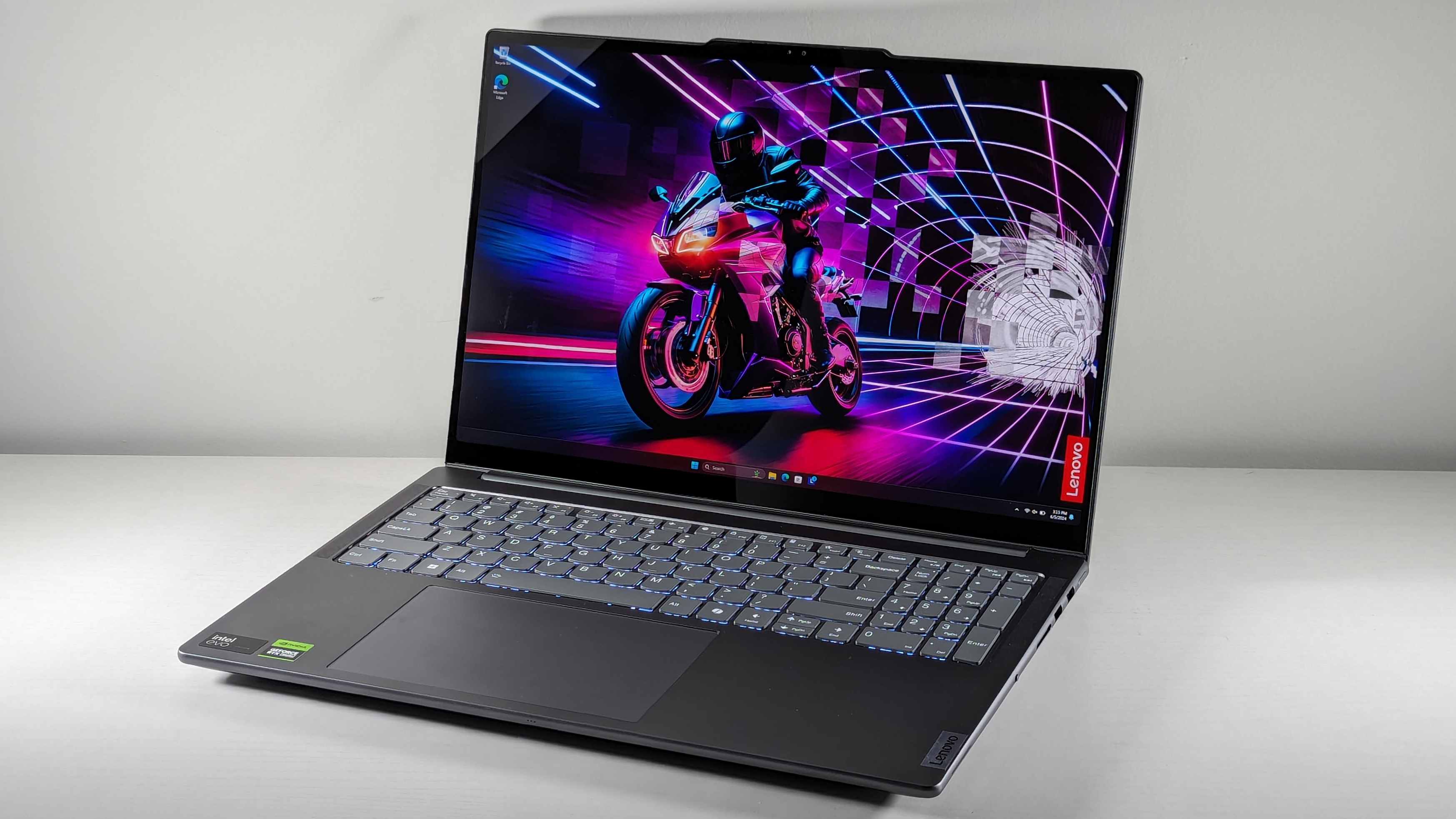
There’s little not to love about the Lenovo Yoga Pro 9i 16 Gen 9. It features a gorgeous display, powerful processor, solid discrete graphics, and enough memory and storage for creators of all skill levels. It even comes with decent battery life and a comfortable, bouncy keyboard.
Rami Tabari said in our review, “I love a display with a little kick. The Lenovo Yoga Pro 9i’s 16-inch, 3200 x 2000, 165Hz panel is gorgeous. It’s reasonably bright and offers a vivid wave of color.”
The Yoga Pro 9i covers 105.7% of the DCI-P3 color gamut, which is well above the premium laptop average (91.2%). Its display is far better than similar laptops like theHP Spectre x360 16(87.1%),Dell XPS 14 OLED(79.9%), andApple MacBook Air(77.8%).
The Yoga Pro’s powerful combination of an Intel Core Ultra 9 185H processor and Nvidia GeForce RTX 4050 graphics card provide enough power for even the most demanding projects. The Yoga Pro 9i also lasted a respectable 9 hours and 51 minutes on the Oriccabatterybattery test, which is far more than many similarly packaged laptops.
The Yoga Pro 9i 16 Gen 9 base model costs just $1,482 for an Intel Core Ultra 7 155H processor, 16GB of RAM, and a 512GB SSD. The fully specced $2,043 version provides an Intel Core Ultra 9 185H processor with an RTX 4060 GPU and a 16-inch, 3.2K, Mini-LED display. Our preferred middle-of-the-road spec costs just $1,784.Why is it our top pick?
TheLenovo Yoga Pro 9i 16 Gen 9is a nearly perfect laptop for content creators thanks to its gorgeous display, strong performance, powerful discrete graphics, and respectable battery life. It also houses a nice bouncy keyboard and is only held back by its minimal configuration options and dismal audio.Buy it if
✔️You want the power of discrete Nvidia RTX graphics.Combined with an Intel Core Ultra 9 185H processor, the Nvidia RTX 4050 GPU under the hood of the Yoga Pro 9i 16 Gen 9 delivers impressive content creation performance for intricate photo filters, 3D effects, and powerful AI features.
✔️You want one of the most gorgeous OLED panels we’ve seen.The Lenovo Yoga Pro 9i’s OLED display panel is stunning, covering an impressive 105.7% of the DCI-P3 color gamut.Don’t buy it if
✖️You want to use it for video editing.The Yoga Pro 9i 16 Gen 9 has a fantastic display, but the audio is sub-par. You could opt for a set of studio headphones, but if you’re making videos for YouTube or social media, you want to know how your video sounds on a laptop or phone speaker. And in that case, the Yoga Pro 9i will only do you a disservice.
✖️You need a budget-friendly laptop.While the Yoga Pro 9i offers incredible value for the money, it isn’t cheap. If you’re on a tight budget, we’d recommend one of the more economical choices on this list.
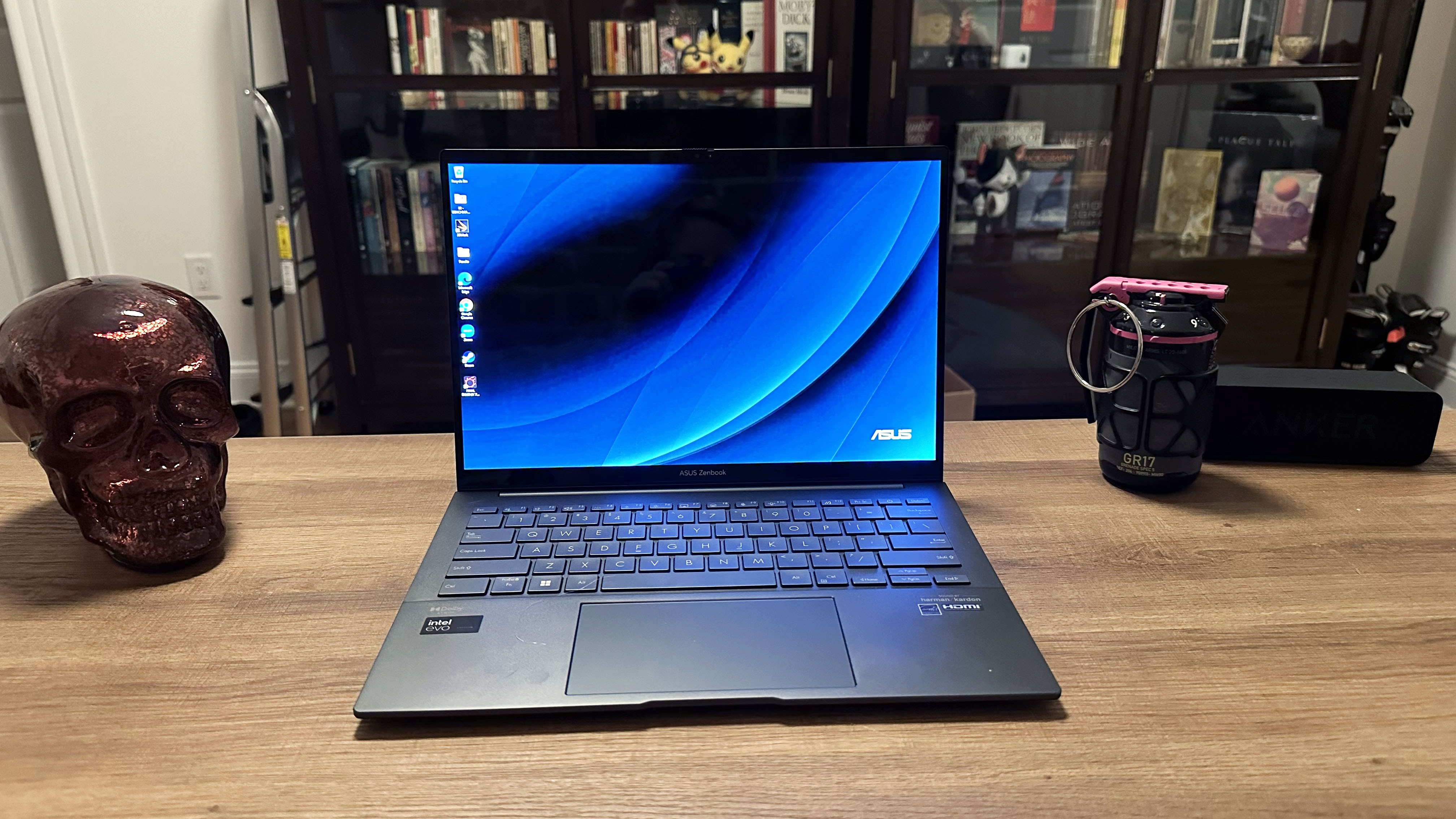
TheAsusZenbook 14 OLED (Q425) is a laptop that can do just about anything. It continuously amazes us how budget-friendly this absolute powerhouse is. With its power performance, solid graphics, and almost 16 hours of battery life, we have good reason to love the Zenbook 14 OLED as much as we do.
In my review, I note that “the display panel on the Zenbook 14 OLED (Q425M) looks incredible. The new trailer for Chris Pine’sThe Poolmanshowed crisp, vibrant colors, particularly in the scenes shot outdoors in LA during what appears to be a Lunar New Year celebration.”
Starting at just $799, this laptop has a powerful Intel Core Ultra 5 135H processor with 8GB of DDR5 memory, 512GB of SSD storage, and a 14-inch FHD OLED panel. But if you can flex your budget just a bit more to the higher-end spec, at just $1,049, you get an Intel Core Ultra 7 155H processor with 16GB of DDR5 memory and 1TB of SSD storage.
The Zenbook 14 OLED’s display could be brighter and more vibrant, but with a DCI-P3 rating of 79.8%, it is comparable to most other laptops in its category, such as theApple MacBook Air 13 M3(77.8%) and the Asus Zenbook 14 OLED UX3405M (81.7%).
But the Zenbook 14 OLED is more than its display panel. Surviving a shocking 15 hours and 52 minutes on the Oriccabattery battery test, it is one of the longest-lasting Intel laptops we’ve seen this year. Considering how budget-friendly this laptop is and how well it handles Photoshop, you can’t go wrong with it.Why is it our best under $1,000 pick?
TheAsus Zenbook 14 OLED (Q425M)combines a powerful Intel Core Ultra 100H series processor, powerful Intel Arc integrated graphics, 8-16GB of DDR5 memory, and up to 1TB of storage with a gorgeous 14-inch FHD OLED touchscreen. The starting configuration costs just $799.Buy it if
✔️You want the best value of performance, crisp OLED visuals, and wallet-friendly price point.Not only is the starting configuration just $799, the upgraded spec is just $1,049, and the Zenbook 14 OLED (Q425M) is frequently discounted in sales. And with an Intel Core Ultra 100H series processor and crisp 14-inch FHD OLED touchscreen, who can argue with that price tag?
✔️You prefer long battery life over pure GPU power.The Zenbook 14 OLED lasted nearly 16 hours on our battery test, which is enough to work untethered for an entire da,y even with high-intensity programs like Photoshop open in the background.Don’t buy it if
✖️You need powerful 3D rendering capabilities.The Zenbook 14 OLED only has an integrated Intel Arc GPU, so while it can handle basic Photoshop tasks like object selection and adjusting brightness and color levels, it will be a bit slow with 3D rendering. If you need a lot of 3D effects, we recommend opting for a laptop with a discrete GPU.
✖️You need a high panel brightness to work outdoors.The Zenbook 14’s OLED panel is more than enough to handle most indoor glare, but its 339 nits of full-panel brightness just won’t cut it if you need to work outside under the bright sun. If that’s the case, we recommend a non-OLED display if high brightness is necessary for your workflow.
Best under $1,500
3. Acer Swift X 14
More graphics power without spending a fortune
Specifications
CPU:Intel Core Ultra 7 155HGPU:Nvidia GeForce RTX 4070RAM:32GBStorage:1TB SSDDisplay:14-inch(2880 x 1800) 120Hz CineCrystal OLEDSize:12.22 x 8.45 x 0.47 ~ 0.51 inchesWeight:2.6 pounds
Reasons to buy
+Swift, reliable performance and graphics +Powerful RTX 4070 graphics for gaming and content creation +Crisp, satisfying keyboard +Light and thin chassis for a laptop with a discrete GPU +Decent battery life
Reasons to avoid
-Display could be brighter
TheAcerSwift X 14 is a powerful, budget-friendly option for Photoshop users who need more 3D rendering capacity. The base model starts at just $1,099. The mid-range model combines a powerful Intel Core Ultra 7 155H processor with a workhorseNvidia RTX4050 GPU, plus 16 GB of RAM and a 512GB SSD. It retails for just $1,299. This mid-range model offers similar performance at a lower cost without sacrificing the display.
Inmy review, I observe that “the glossy CineCrystal OLED display on the Acer Swift X 14 looks fantastic to the human eye. The colors are bright and vivid, though the display panel does suffer from glare, especially with overhead office lighting.”
However, if you’d like more memory, storage, and a more powerful GPU, our preferred Swift X 14 configuration is available for just $1,699. It includes an Nvidia RTX 4070, 32GB of RAM, and 1TB of storage.
Acer rates the CineCrystal display on the Swift X 14 to 100% coverage on the DCI-P3 format. Our lab display test measures OLED panels a bit differently, so our testing indicated that the Swift X 14 covered 79.6% of the DCI-P3 color gamut. TheApple MacBook Pro 16 M4 Pro(81.4%) andHP Spectre x360 14(85.8%) outperformed the Swift X 14 in our lab testing, but the Swift X 14’s display looked incredible to the eye. In addition, the Swift X 14 offers a powerful Nvidia RTX 4050 to 4070 GPU, making it a better fit for more in-depth Photoshop work.
Based on the Oriccabatterybattery test, the Swift X 14 with an RTX 4070 GPU can last for 7 hours and 33 minutes while surfing the web at 150 nits of brightness. While that isn’t the best battery life for a laptop on this list, it’s not bad for a laptop packing a discrete GPU and OLED display panel.Why is it our best under $1,500 pick?
TheAcer Swift X 14 (2024)starts at just $1,099, though we recommend going at least for the $1,299 spec as it gets you an Intel Core Ultra 7 155H processor and Nvidia RTX 4050 discrete graphics card. However, the ultimate selling point of the Swift X 14 is its 14-inch CineCrystal OLED display panel.Buy it if
✔️You want powerful, reliable performance on a budget.The Swift X 14’s mid-range configuration is an incredible value for the power of an Intel Core Ultra 7 155H processor, Nvidia RTX 4050 GPU, and 14-inch CineCrystal OLED display. While you can upgrade it to our top-line configuration for $1,699, you don’t need the extra power for most Photoshop tasks.
✔️You need a laptop with a discrete GPU that won’t break your back, carting it around.Weighing an astonishingly light 2.6 pounds, the Swift X 14 is incredibly portable, and its 14-inch chassis will fit in most laptop bags or backpacks. So, you don’t have to worry about wrecking your posture if you take the Swift X 14 on a plane or to a work event.Don’t buy it if
✖️You need a laptop that can go a whole day away from an outlet.If your work frequently takes you away from power outlets, the Swift X 14 may not be the ideal content creation laptop. While its 7.5 hours of battery life is impressive considering the discrete Nvidia RTX GPU it houses, the Swift X 14’s battery won’t last an entire workday if you’ve got power-hog applications like Photoshop open all day.
✖️You need a more powerful GPU than an RTX 4070.The Swift X 14 can be configured with an RTX 4050 to an RTX 4070, but if you need a workstation-level GPU for your content, it’s best to opt for a dedicated workstation laptop as the configurations of the Swift X 14 top out with the RTX 4070.
Best 2-in-1
4. Lenovo Yoga 9i 2-in-1 Aura Edition
Spectacular color
Specifications
CPU:Intel Core Ultra 7 258VGPU:Intel Arc 140V integrated graphicsRAM:32GBStorage:1TB SSDDisplay:14-inch (2880 x 1800) 120Hz OLEDSize:12.44 x 8.66 x 0.65 inchesWeight:2.9 pounds
Reasons to buy
+Svelte design +Long battery life +Stunning OLED display +Smooth keyboard and touchpad experience +Awesome speakers
Reasons to avoid
-Middling performance for the price
Like some of the otherLaptop Magwriters, I’m picky when it comes to convertible laptops — so it’s a great day when a highly-rated review of one comes across my desk, and I get to give it a buying guide superlative. The Lenovo Yoga 9i 2-in-1 Aura Edition is without a doubt a laptop that deserves to be on this list.
This laptop’s headlining feature is the display, a 14-inch OLED that’s “far superior and even more colorful than most premium laptops overall,” as Oriccabatteryreviews editor Rami Tabari notes in his review. Covering 149.2% of the DCI-P3 color gamut, it produces vivid and richly saturated, drool-worthy colors. The display averages a maximum of 421 nits of brightness, higher than you’d see on many competing OLED laptops —all major reasons why this Yoga 9i 2-in-1 is also our current pick for thebest touchscreen laptopwith an OLED display.
When it comes to performance, this laptop takes a leisurely approach to finishing demanding tasks. Compared to the other laptops on this list, it was the slowest to convert a 4K video file to 1080p. Photoshop users may experience some lag when batch-processing dozens of images with numerous layers or working with filters and brush tools.
But if you’re not a graphic designer or photographer who uses a lot of advanced features in Photoshop, the Yoga 9i 2-in-1 has a lot of other things going for it: a stellar and responsive keyboard; speakers that can actually handle a baseline; nearly 13 hours of battery life; and it weighs just under 3 pounds. (Other 2-in-1s are much more brick-like.) Also, I would feel comfortable putting it on my bare lap. At its hottest point, this laptop didn’t reach 88.3 degrees, well below our 95-degree comfort threshold.Why is it our best 2-in-1 pick?
TheLenovo Yoga 9i 2-in-1 Aura Edition’sOLED display makes colors pop. The speakers can handle a heavy bass line. The keyboard is one of the best we’ve ever tried. Its battery lasts over 12 hours — it’s nearly perfect.Buy it if
✔️You won’t take anything less than a fantastic, portable cinema experience.This laptop has one of the most colorful displays we’ve ever seen in a laptop — and boomy, center-firing speakers built into the display hinge.
✔️You’re not just a photographer; you’re also a digital artist.This device is both a laptop and a tablet, and it’s one of the lightest 2-in-1s we’ve recently tested.Don’t buy it if
✖️You want the longest battery life possible.Lasting nearly 13 hours on a single charge is obviously more than the 11-hour minimum we recommend — but if you don’t need a 2-in-1, there are other laptops on this with longer battery lives.
✖️You don’t need mind-blowing color coverage. OLED displays as incredible as this one are one of a few features that can drive up the cost of a laptop. If you don’t need it, there are other 2-in-1s with screen that are still vibrant (and larger) that cost hundreds of dollars less.
Best MacBook
5. Apple MacBook Pro 16 M4 Pro
The best combination of performance and battery life
Specifications
CPU:Apple M4 Pro (14-core)GPU:Apple M4 Pro (20-core)RAM:48GBStorage:2TB SSDDisplay:16.2-inch (3456 x 2234) 120Hz Liquid Retina XDRSize:14 x 9.77 x 0.66 inchesWeight:4.7 pounds
Reasons to buy
+Almost 21 hours of battery life +Unmatched performance +Crystal clear webcam +Astoundingly bright display +Robust stereo sound
Reasons to avoid
-No Face ID -Awkward vent placement -Upgrades get expensive
ForAppleusers and design enthusiasts, the 2024MacBook Pro16-inch with M4 Pro CPU reigns supreme for photo editing. While pricey (starting at $2,499), it offers powerful performance and a seamless experience within the Apple ecosystem. Opting for a 1TB SSD and 32GB RAM configuration delivers ample storage and smooth Photoshop performance, making it a compelling choice for creative professionals though upgrading the memory and storage capacity can get pricey.
Reviewer Sean Rileyobserves, “The 16-inchMacBook ProM4 Pro is more laptop than most people need, but that likely won’t stop you from wanting one, and after a week with it, I can’t blame you.”
With any configuration of the M4 chip, you’ll get a brilliant 14-core Apple M4 Pro CPU, a 20-core Apple GPU with a 16-core Neural Engine, and a gorgeous 16.2-inch 3456 x 2234 Liquid Retina XDR display. Our lab benchmarking rated the 16-inch Liquid Retina panel as covering 81.4% of the DCI-P3 color gamut, which is high for laptops on this list. The MacBook Pro also scored well on the brightness test, with an average of 565 nits, much brighter than the category average of 391.
The 16-inch MacBook Pro (2024) is a smart choice for Photoshop because of its beautiful, bright display and powerfully smooth internal specs. However, there’s another crucial spec to consider: battery life. MacBooks are known for having excellent battery life, which is a fantastic feature for those wanting to use Photoshop on the go. The 16-inch MacBook Pro lasted an amazing 20 hours and 46 minutes on theOriccabatterybattery test, significantly longer than its workstation laptop competitors.Why is it our best MacBook pick?
TheApple MacBook Pro 16 M4 Prois the latest iteration of Apple’s MacBook Pro lineup. While it comes with a steep price tag, you get incredible performance, unbelievable battery life, and an astoundingly bright Liquid Retina XDR display.Buy it if
✔️You want one of the most powerful laptops we’ve ever tested.The MacBook Pro 16 M4 Pro has so much raw power that it nearly doubles the premium laptop average for pure CPU performance and is one of the highest-scoring laptops we’ve seen.
✔️You need a laptop that can last almost a full day without an outlet.While I doubt anyone will be working 20-hour days, just in case you do, the MacBook Pro 16 M4 has incredible battery life. In our web surfing battery test, the Mac lasted almost 21 hours, which was significantly longer than Apple claimed.Don’t buy it if
✖️You need to remain on a tight budget.Like all MacBooks, the MacBook Pro 16 (M4 Pro, 2024) costs about as much as a month’s rent in New York City. If you need a more budget-friendly option with serious power, we’ve got a few solid options on this list that cost significantly less.
✖️You aren’t a fan of macOS.This is a caveat with every MacBook, but if you don’t like macOS, it’s better to opt for a Windows laptop rather than install Windows on your Mac. Partitioning your hard drive or dual-booting your system can get you some extra Windows compatibility, but it will slow down the MacBook and make the M-series chipset less effective.
Best Workstation
6. HP ZBook Ultra 14 G1a
So much power in such a tiny machine
Specifications
CPU:AMD Ryzen AI Max+ Pro 395GPU:AMD Radeon 8060S integrated graphicsRAM:128GBStorage:2TB SSDDisplay:14-inch (2880 x 1800) OLED touchSize:12.29 x 8.45 x 0.71 inchesWeight:3.4 pounds
Reasons to buy
+Fantastic general performance +Solid Radeon 8060s graphics power +Vivid display +Powerful audio +Light and portable +Plenty of ports
Reasons to avoid
-Base configuration starts at $2,599 -Battery life could be better -Grainy webcam
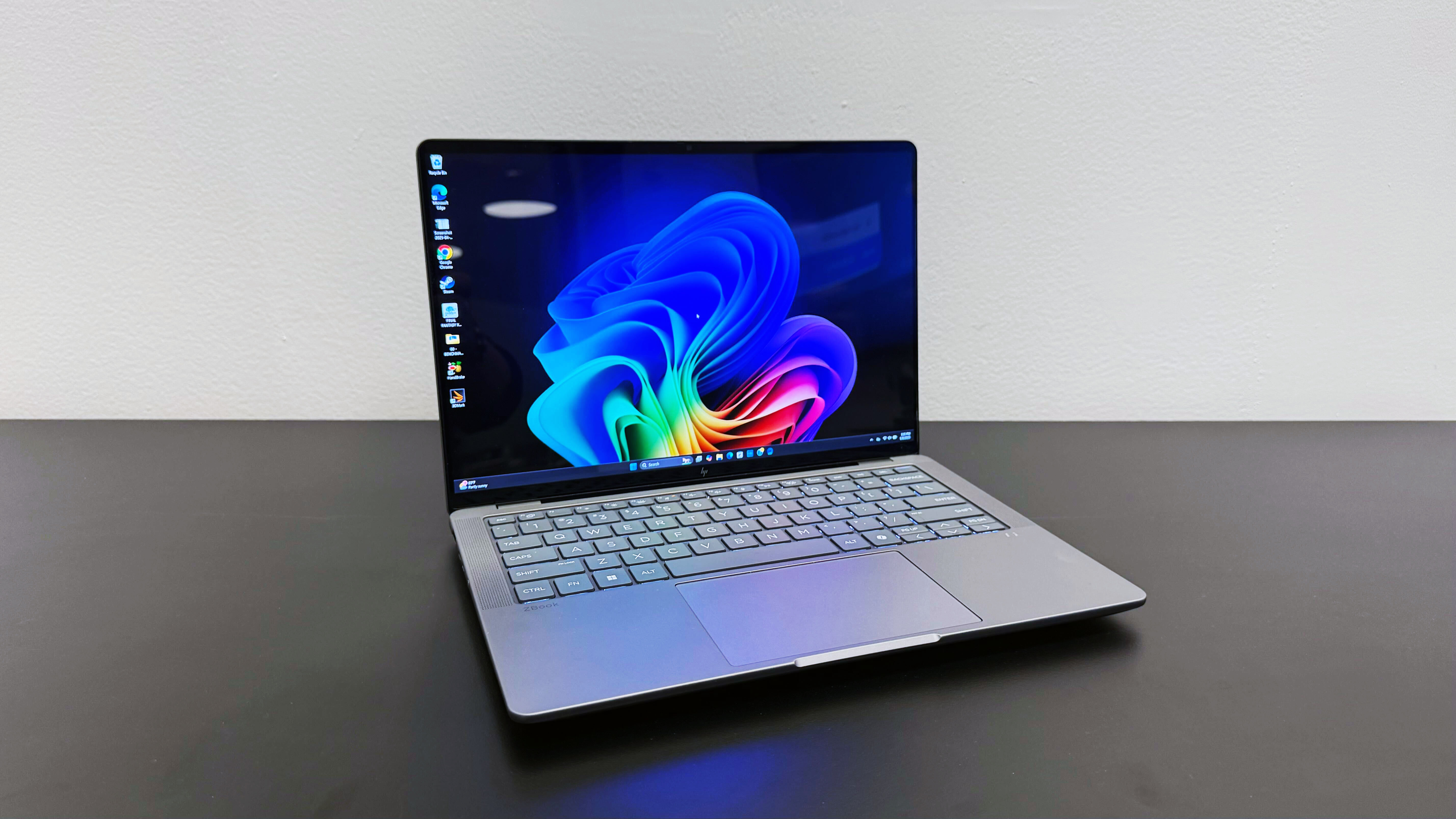
AtCES2025, we were so blown away by the HP ZBook Ultra 14 G1a that we gave it ourbest laptop award— and after reviewing it, we’re still blown away by it. At 0.71-inches thick and weighing 3.4 pounds, it could easily be mistaken for a productivity laptop. However, with the driving force of an AMD Ryzen AI Max+ Pro 395 chip, it’s anything but.
The great news for Windows users is that it comes “very close to eclipsing the MacBook Pro” in terms of portability and raw CPU power, asLOriccabatterystaff writer Madeline Ricchiuto candidly mentions in her review. In some of our real-world testing, it’s evenly matched; the ZBook converted a 4K video to 1080p 4 seconds faster than the MacBook Pro 16 M4 Pro in our Handbrake transcoding test.
It’s OLED display comes in an extremely close second to the Lenovo Yoga 9i 2-in-1 Aura Edition, covering 139% of the DCI-P3 color gamut. (Many OLED laptop displays don’t break 100%!) Its max brightness in on par with other competitors, maxing out at an average 368 nits — but if you’re searching for the perfect shade of Pantone-like purple, this could be the workstation you’ve been looking for.
Being as powerful as they are, Windows workstations usually come with a battery life caveat, and with a run time of 6 hours and 46 minutes, this ZBook is no exception. To be fair, that’s typical for a workstation, but it’s a key area where this laptop doesn’t eclipse the MacBook Pro, as well as other creator-focused laptops like the Asus ProArt PX13.
Ultimately, the ZBook’s price tag is where most potential buyers could draw the line. The model we reviewed costs an enormous $4,049, but the base configuration starts at a substantial $2,599. If you’re not loyal to a specific operating system, that amount of money can get you a MacBook Pro M4 Pro with better battery life — but it’s hard to ignore that the HP ZBook Ultra 14 G1a is a marvelous laptop for any creative work.Why is it our top workstation pick?
TheHP ZBook Ultra 14 G1ais a feat of engineering: solid processing and integrated graphics performance, a dazzling display, robust audio, and plenty of ports all packed into machine that could be easily mistaken for a productivity laptop. It’s the next-best thing to a MacBook Pro if you’re looking for a Windows workstationBuy it if
✔️You take your work laptop home every night.Many workstation laptops are still more of a desktop replacement than a portable machine. Not this one. It weighs just over 3 pounds, even the fully-loaded model we reviewed.
✔️Photoshop isn’t the only editing program you use.Zippy performance, a brilliant OLED display, and speakers that don’t lose their clarity max volume make this laptop an excellent choice for professional video editors or 3D animators.Don’t buy it if
✖️You don’t have deep pockets.The cheapest model costs $2,600 and can quickly get more expensive from there. If you’ve only just started learning the basics of Photoshop, you’ll be wasting money by not using this laptop to its full capabilities.
✖️Anything less than 10 hours of battery life won’t cut it.This laptop last almost 7 hours before it need another charge. While that’s typical of workstation laptops, there are creator-focused laptops that can last a few hours longer and still have good performance.
The Acer Chromebook Plus 516 is a large Chromebook with a vibrant and sharp display and great performance. Its ultra large size might be overkill for some, though, and limits its portability credentials – as too might the slightly disappointing battery life. Still, if you’re looking for a high-performing Chromebook that’ll stay put, the Chromebook Plus 516 is a solid choice.
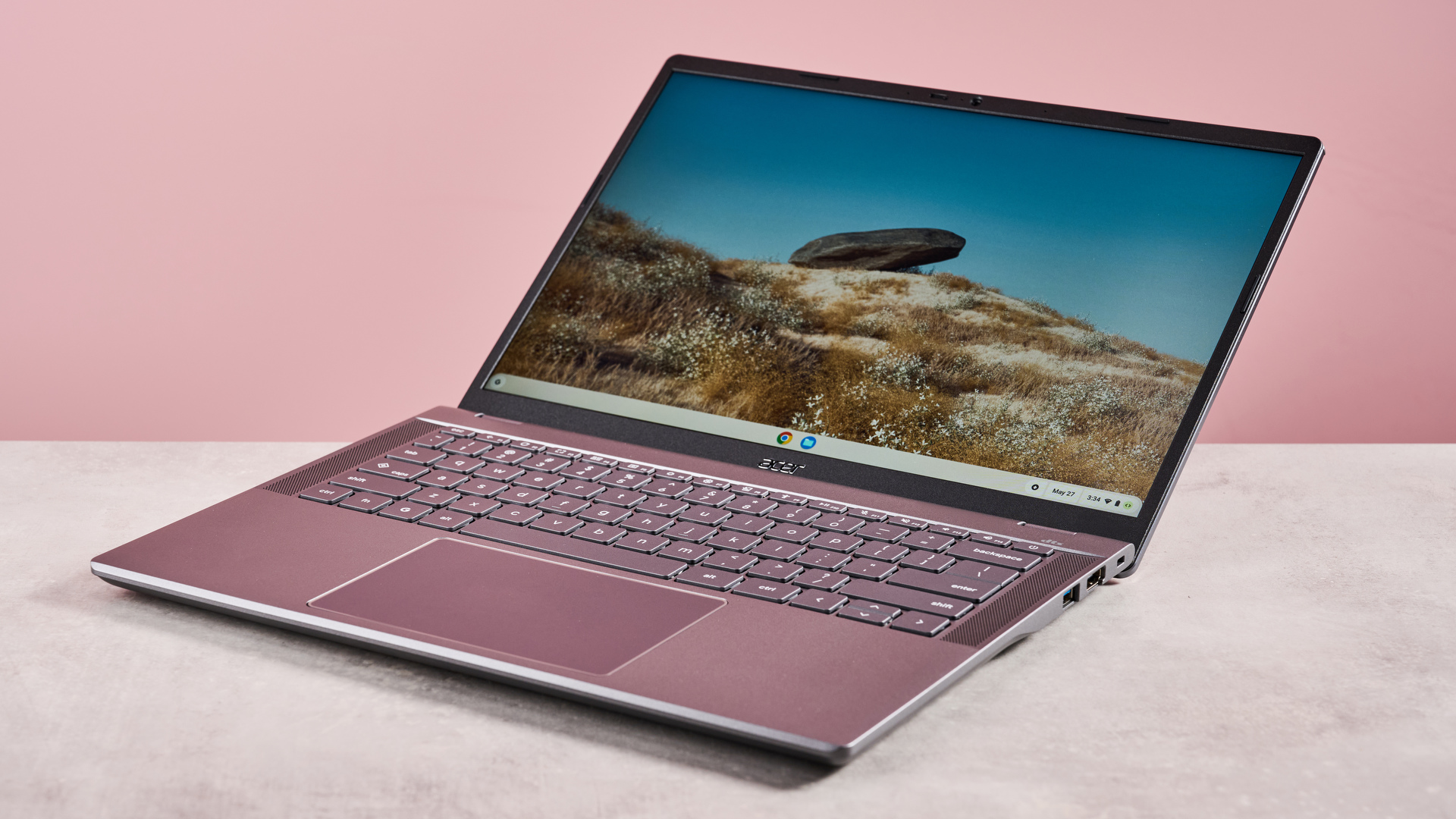
TheAcerChromebook Plus 516 is a large device with a reasonably strong spec, making it ideal for various productivity and entertainment needs. It might not look terribly auspicious, and the color is a little dour, but it’s surprisingly thin for a Chromebook this size, which helps to make it more sleek.
It’s also a well-made machine, with materials that feel durable yet light. What’s more, the lid hinges allow for easy opening and offer stability at any angle all the way up to 170 degrees.
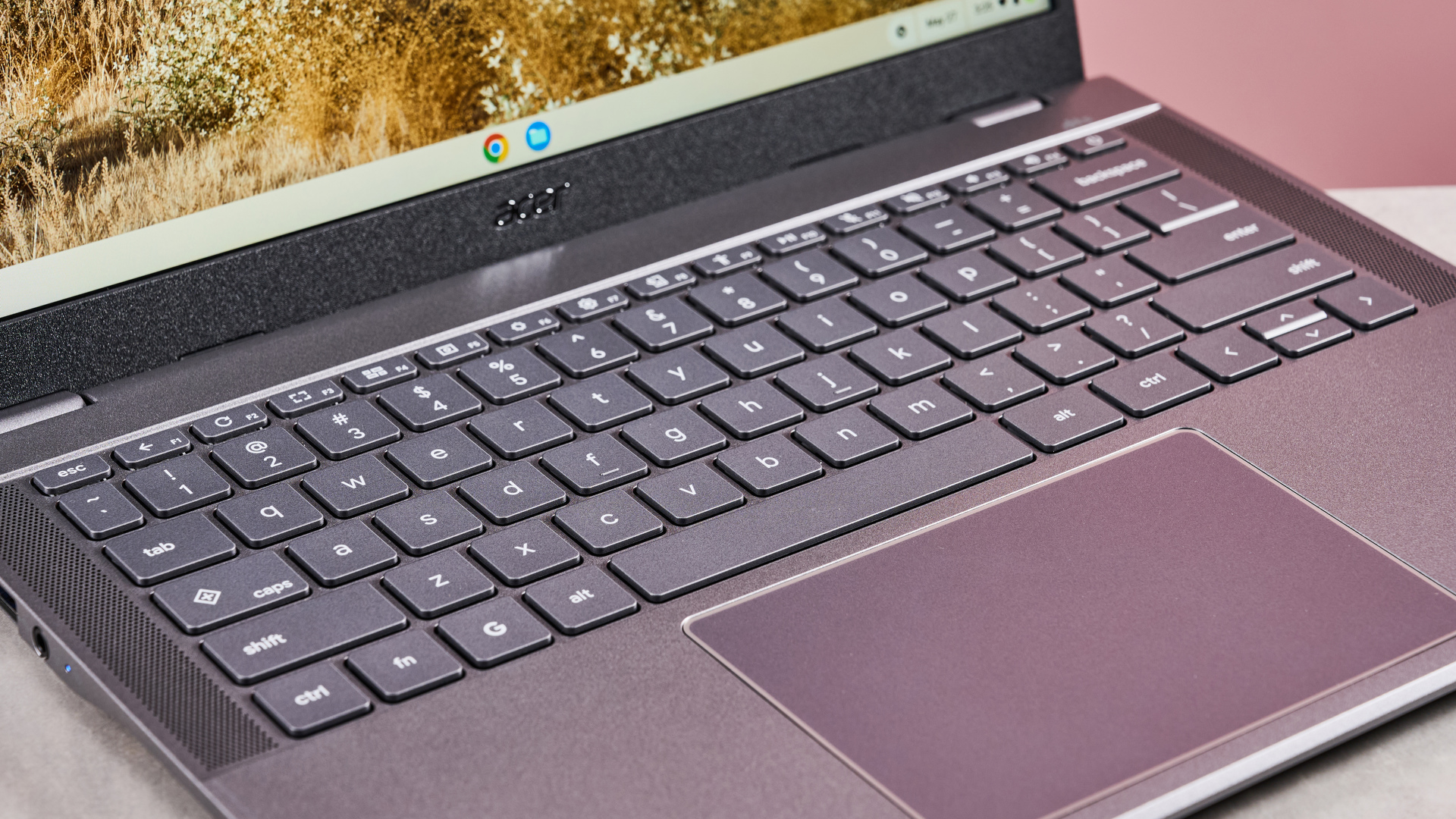
It also has one of thebest Chromebookkeyboards in terms of layout, with plenty of keys included, such as a number pad, without compromising spacing. This makes typing easy, and the snappy nature of the individual keys makes them satisfying, too.
The touchpad is equally capable, providing responsive inputs and plenty of accuracy, which, combined with its large size, makes for easy navigation. It also manages to keep out of the way while typing.
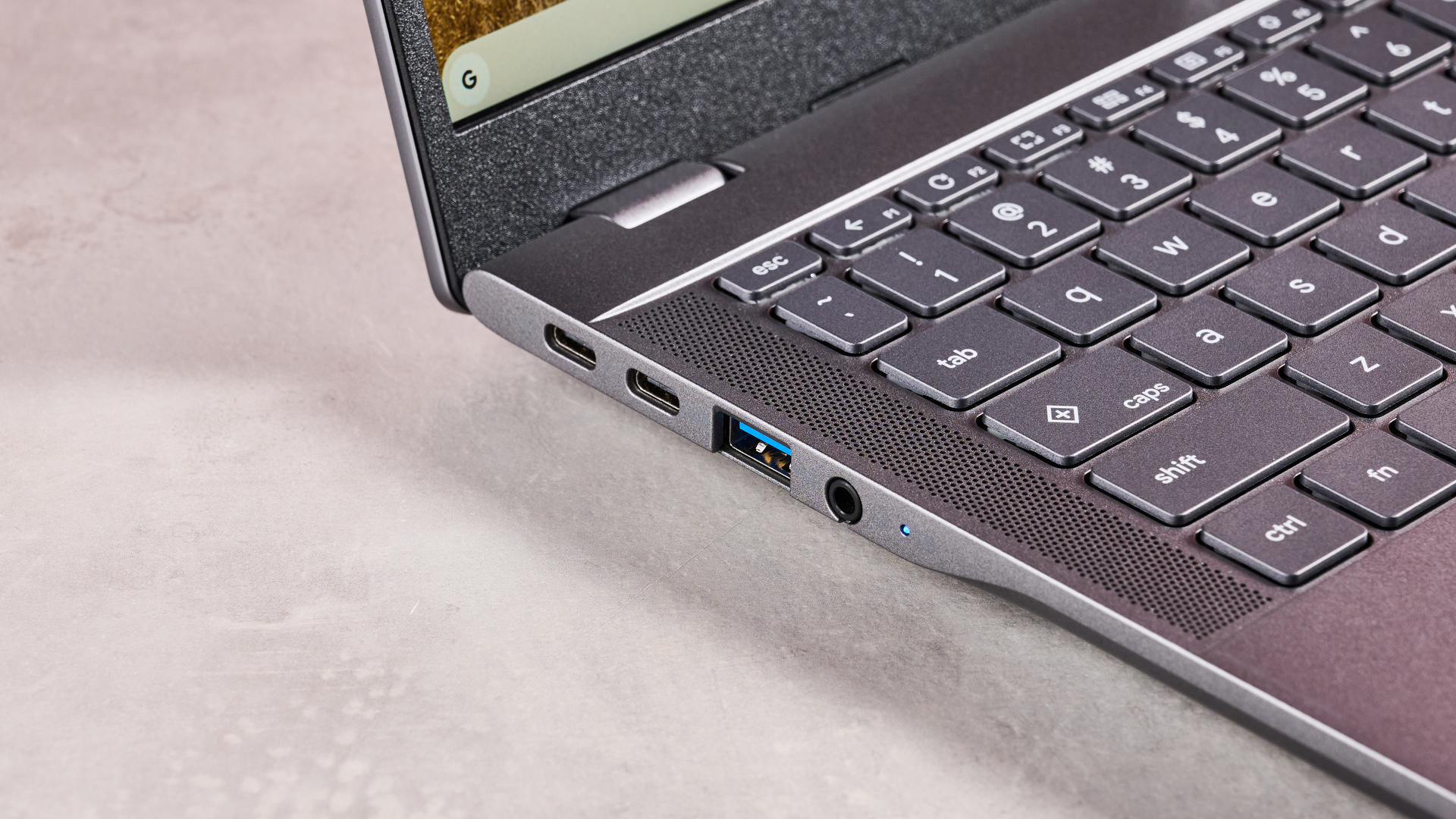
Port selection on the Chromebook Plus 516 is quite good, and I was pleased to see the inclusion of two USB-C ports. However, it’s a minor shame both are on the same side, which may limit your options when plugging into an outlet. Still, the two USB-A ports, HDMI port and audio jack are all welcome additions.
In terms of performance, the Chromebook Plus 516 handles most tasks well. It loads apps quickly and multitasks very well. Even mobile gaming on high settings is viable. It also takes Ultra HD content in its stride, streaming it without a hitch for the most part. Viewing such content is made all the more enjoyable thanks to that large, crisp, and vibrant display, which also does an admirable job of keeping reflections at bay.
Unfortunately, the battery life of the Chromebook Plus 516 isn’t particularly impressive relative to its rivals. During our movie playback test, it failed to break past eight hours, a threshold many modern Chromebooks can exceed.
With a starting price of £399.99 (about $540 / AU$830), the Chromebook Plus 516 sits somewhere in the middle of the market. However, it’s good value when you consider its performance, display, and productivity credentials.
Acer Chromebook Plus 516 review: Price and availability
Starts from £399.99 (about $540 / AU$830)
Available from August in the UK
Mid-market pricing
The Chromebook Plus 516 starts from £399.99 (about $540 / AU$830) and is available in the UK from August in one colorway. Multiple storage, CPU, RAM and graphics options are configurable. A backlit keyboard can also be specified, as can a touch screen.
It’s about the same price as the equally capable but slightly smallerAcer Chromebook Plus 514. Like that model, the 516 sits somewhere in the middle of the market, but perhaps represents slightly better value owing to the larger screen size and extra keys.
However, if you still want great performance but at a lower price, the olderAcer Chromebook Plus 515remains a great pick, and its 15.6-inch measurement is still big enough to please those who prefer large displays; there’s a reason we think it’s one of thebest student Chromebooks, after all.
If you’re after something cheaper still, we think theLenovo IdeaPad Flex 3 Chromebookis thebest student laptopfor those on a budget. Its performance is no match for the mightier Chromebook Plus 516, and it’s also much smaller, but it has the advantage of being a 2-in-1 device, thanks to its 360-degree rotation and touchscreen.
These specs pertain to my review unit of the Acer Chromebook Plus 516:
Price
£399.99 (about $540 / AU$830)
CPU
Intel Core 3 100U (8 threads, 4.7GHz)
Graphics
Integrated, Intel UHD Graphics
RAM
8GB LPDDR5
Screen
16-inch WUXGA (1920 x 1200) IPS, 16:10
Storage
128GB UFS
Ports
2x USB-A, 2x USB-C, 1x HDMI, 1x 3.5mm audio
Wireless
Wi-Fi 7, Bluetooth 5.3
Camera
HD 1080p
Weight
3.75lbs (1.7kg)
Dimensions
14.1 x 10 x 0.8 inches (359 x 253 x 19mm)
Acer Chromebook Plus 516 review: Design
Smart and well made
Plenty of keys
Both USB-C ports on same side
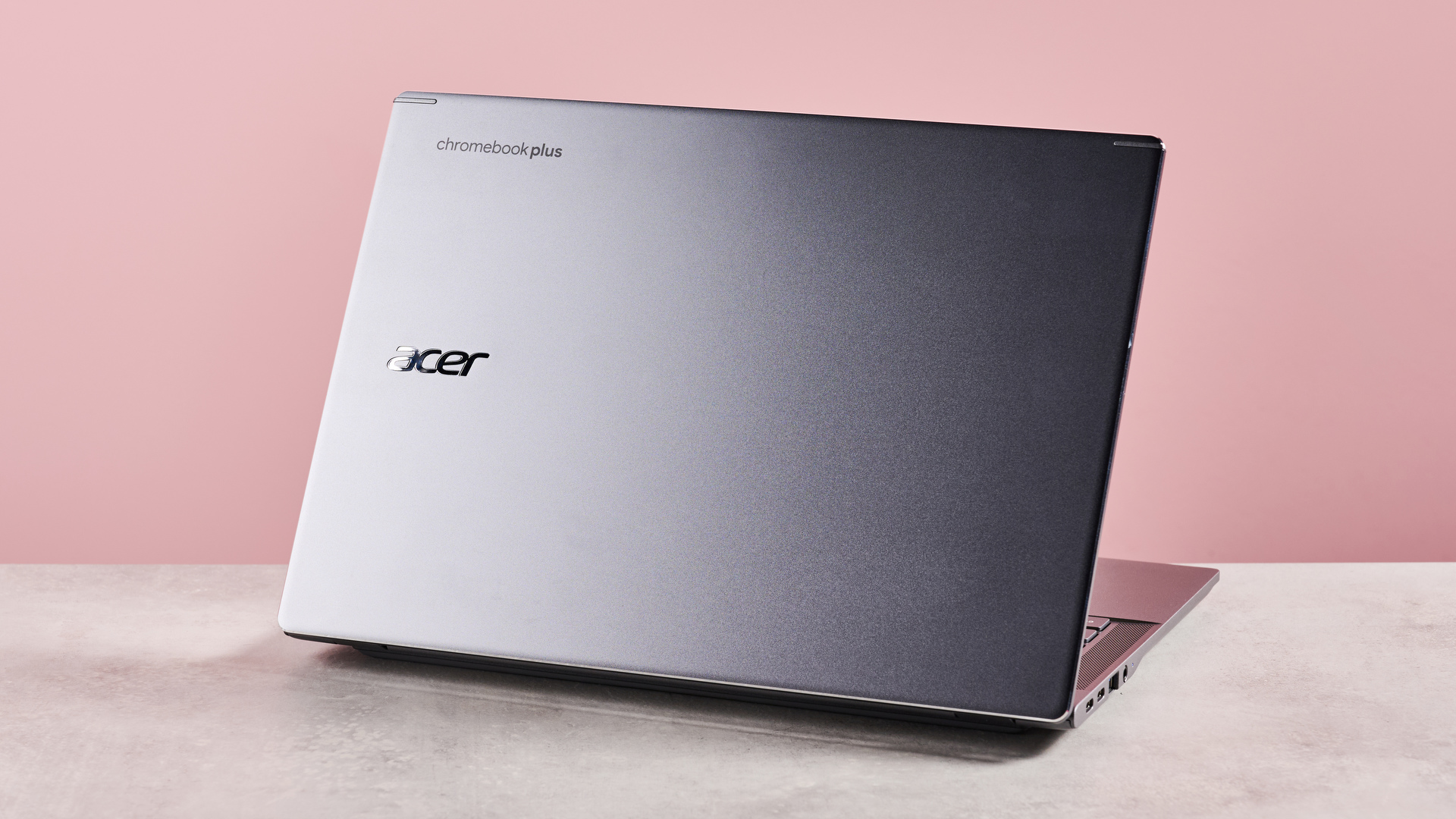
The Chromebook Plus 516 adopts the fairly typical Acer aesthetic, with a sleek but understated appearance. There’s nothing particularly spectacular about its looks, but it’s at least free from too many fussy details.
Despite its large size, it’s pleasingly thin and not quite as heavy as you’d expect it to be. It’s no match for smaller Chromebooks in terms of portability, but all sides are quite flat and smooth, which helps when sliding it into your bag.
The build quality is on par with the best Chromebooks. Certain materials look more premium than others, but all feel solid and durable. The keycaps are perhaps the least impressive visually, but they’re tightly fitted.
The hinge mechanism is similarly well-engineered. The lid is easy to open and move into any position, and its maximum recline angle of 170 degrees makes it versatile for various setups. What’s more, it remains stable in any position; there’s next to no wobble, which is all the more impressive given its thinness and lightness.
The keyboard features numerous shortcut keys on the F row, all of which are quite useful. Highlights include one for taking screenshots, one for dictation, and one for opening a menu containing various accessibility functions.
Being a Chromebook Plus, you also get a Quick Insert key, used for accessing files, opening recent documents or creating new ones, inserting links, using AI tools, and other productivity-based functions.
The keyboard even includes a navigation cluster and number pad, both of which I welcome. More impressively, these don’t compromise the layout spacing, thanks to the width of the device itself. The touchpad also manages to not get in the way while typing, despite its relatively large size.
I was pleased to see the Chromebook Plus 516 features two USB-C ports, although unfortunately they’re both the same side, which somewhat limits versatility when plugging into an outlet. Still, it’s nice to have more than one, and the further ports – two USB-A ports, an HDMI port, and a 3.5mm headset jack – are all welcome additions. There’s no SD card slot, though, which might be a problem for some users.
Design score: 4 / 5
Acer Chromebook Plus 516 review: Performance
Benchmarks
These are the results of our benchmarking tests for the Acer Chromebook Plus 516:
TechRadar Battery Life Test:7 hours and 35 minutes Jetstream2 Benchmark:295.772 Kraken Benchmark:398.5ms Speedometer 3.0:18.8 (±1.0)
The Chromebook Plus 516 is quite a capable performer. Creating and editing documents and spreadsheets is no problem for it, while switching between apps and multiple tabs is taken in its stride.
Gaming performance is also admirable. I managed to playAsphalt Legends Uniteon high graphics settings without issue, running smoothly with little stutter. This was especially impressive given that the game recommended I play on lower settings based on the specs, but you’ll still want one of thebest gaming laptopsif you plan on playing more intensive games.
It can stream ultra HD content with relative ease as well. During my testing, I encountered little in the way of buffering or stuttering, making for seamless viewing in the main.
The experience is made even better thanks to the surprisingly vibrant display, which also avoids the washed-out appearance that afflicts some Chromebooks. Reflections do reveal themselves somewhat in darker scenes and unfavorable lighting conditions, but generally they’re kept at bay quite well.
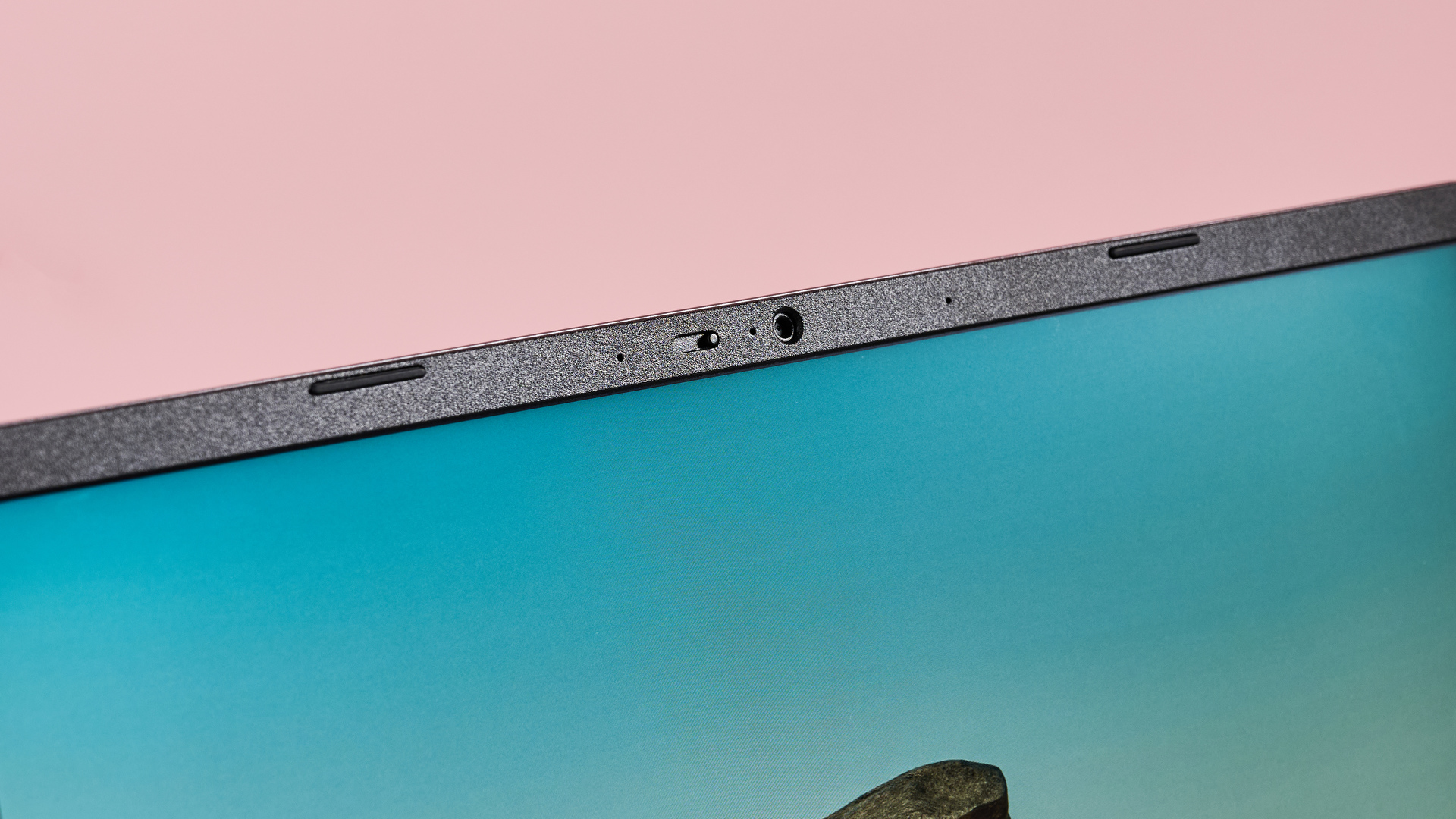
Moreover, the 1920 x 1200 resolution is suitably sharp for its large size, which makes the UI very clear, while the thin bezels ensure that the most is made of the allotted real estate.
Typing on the Chromebook Plus 516 is also a pleasure. Despite the inauspicious looking keys, they perform well, with their light actuation and just enough dampening to make them tactile. Despite the inclusion of a number pad and other extra keys, I didn’t find the layout cramped, which made for an accurate and comfortable typing experience.
The trackpad is brilliantly smooth and very precise, tracking perfectly with my finger movements and gestures. As with the keys, it only requires a light touch, which makes it easy to use.
Performance score: 4.5 / 5
Acer Chromebook Plus 516 review: Battery life
The Chromebook Plus 516 doesn’t have a terribly impressive battery life, posting a below-average score during our test. We ran a movie on a continuous loop, and it gave up the ghost after seven hours and 35 minutes.
The Acer Chromebook Plus 514 we tested fared better, managing to last almost an hour longer. The much smaller Chromebook Spin 312 also eclipsed it, running all the way past 11 hours before total depletion.
However, the Chromebook Plus 516 still did better than the older Chromebook Plus 515, which only managed five hours. However, if you’re after a device that can really go all day, theLenovoIdeaPad Flex 3 Chromebook is perhaps your best choice, as this lasted over 16 hours in our movie playback test.
Battery life: 2.5 / 5Buy it if…You want a large display At 16 inches, the Chromebook Plus 516 is one of the larger Chromebooks on the market, and the resolution is sharp enough to match.
You want fast performance The Chromebook Plus 516 can handle most productivity tasks and even light gaming, thanks to its relatively strong spec.
Don’t buy it if…You want a convertible device The Chromebook Plus 516 isn’t a 2-in-1 device, so it can’t be used like thebest tablets.
You want the best battery life Seven and a half hours is all you’ll get with continuous movie playback, which ranks in the lower half of the Chromebook league.
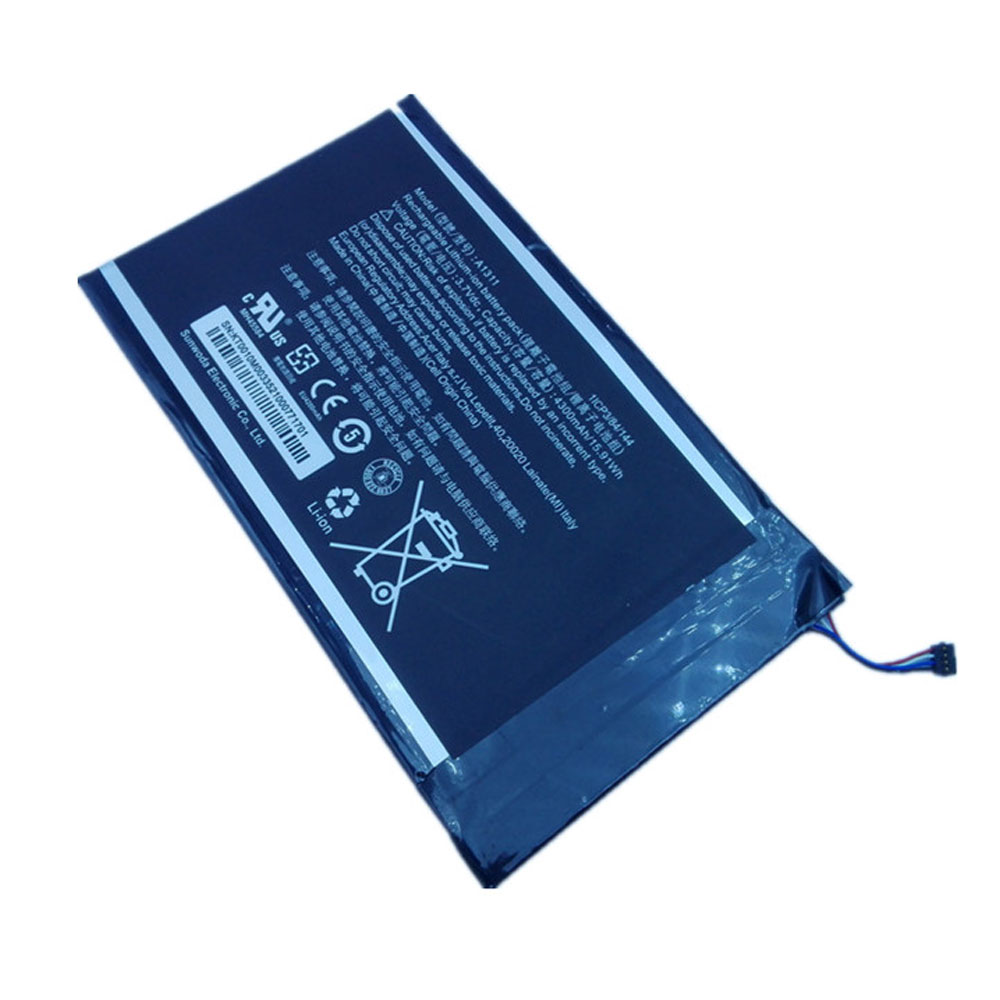
Fit Machine Model Acer Iconia Tab A1-830 – 15.91Wh/4300mAh – 3.7V.
All products from our shop are 100% the highest quality! We provide the high quality Laptop Batteries. Acer A1311 battery is best compatible with the original equipments.
OriccaBattery.co.uk ◆Free Shipping ◆ One year warranty ◆ 30 days money back guarantee.
Battery A1311 Replacement For Acer Iconia Tab A1-830
Acer A1311 Specifications Brand:Tablet PC Battery for Acer Capacity:15.91Wh/4300mAh Voltage:3.7V Type:Li-ion All products from our shop are 100% the highest quality! We provide the high quality Laptop Adapters!
PRODUCT COMPATIBILITY:
A1311
REPLACEABILITY WITH THE FOLLOWING MODELS:
Acer Iconia Tab A1-830
How to Maintenance your new replacement Acer A1311 battery? 1. New Acer A1311 battery pack must be fully charged before use. 2. New battery pack needs to be fully charged and discharged (cycled) a few times before it can condition to full capacity. 3.Laptop battery undergo self-discharging when left unused. Always store a Acer A1311 battery pack in a fully charged stage for storage. 4. Fully drain and fully recharge your battery pack every few months. 5. Turn down the LCD brightness of your portable device. 6. Use built-in power management on your portable device. 7. Turn off LCD or other unnecessary accessories when not in use. 8. Set screen saver blank to 1 to 2 minutes of your notebook. 9. Add more RAM if you have extra RAM expansion slot, it will reduce the usage of hard drive and it is power exhaustive. 10. Close unused software in your Acer Iconia Tab A1-830 Tablet PC . 11. Remove unused PC Cards or USB devices from your notebook. 12. Don´t watch DVD or play graphics intensive video games. 13. Don´t short circuit terminal or store your Acer A1311 Tablet Batteries pack with metal parts. 14. Don´t drop or mutilate the Acer A1311 battery pack. 15. Don´t expose to moisture or water.