Ulefone S8 S8 Pro Ulefone S8 Battery

Buy Ulefone S8 Cell Phone Battery replacement for Ulefone S8 S8 Pro.

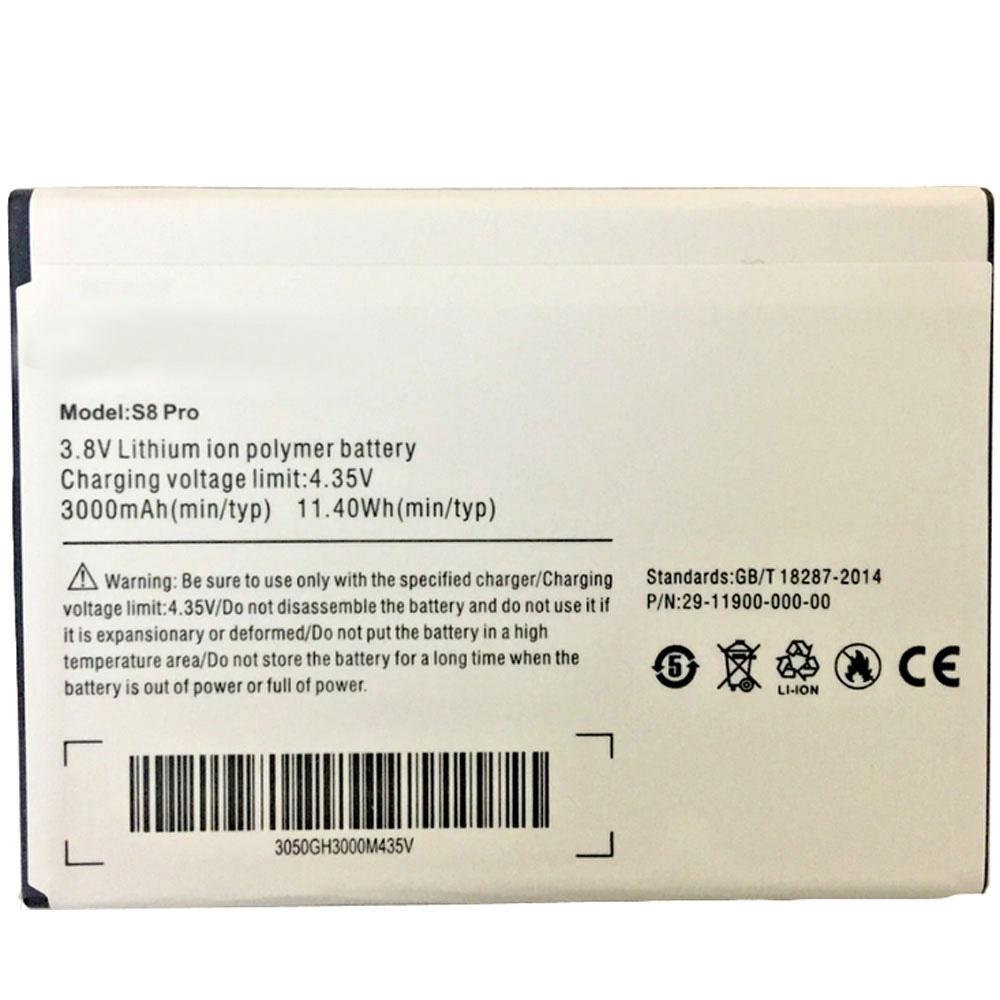
Fit Machine Model Ulefone S8 S8 Pro – 3000MAH /11.4WH – 3.8V/4.35V.

All products from our shop are 100% the highest quality! We provide the high quality Laptop Batteries. Ulefone S8 battery is best compatible with the original equipments. 

OriccaBattery.co.uk ◆Free Shipping ◆ One year warranty ◆ 30 days money back guarantee.

Battery S8 Replacement For Ulefone S8 S8 Pro
S8

Ulefone S8 Specifications
Brand:Cell Phone Battery for Ulefone
Capacity:3000MAH /11.4WH
Voltage:3.8V/4.35V
Type:Li-ion
Color:white
All products from our shop are 100% the highest quality! 
We provide the high quality Laptop Adapters!

PRODUCT COMPATIBILITY:

S8

REPLACEABILITY WITH THE FOLLOWING MODELS:

Ulefone S8 S8 Pro 

How to Maintenance your new replacement Ulefone S8 battery?
1. New Ulefone S8 battery pack must be fully charged before use.
2. New battery pack needs to be fully charged and discharged (cycled) a few times before it can condition to full capacity.
3.Laptop battery undergo self-discharging when left unused. Always store a Ulefone S8 battery pack in a fully charged stage for storage.
4. Fully drain and fully recharge your battery pack every few months.
5. Turn down the LCD brightness of your portable device.
6. Use built-in power management on your portable device.
7. Turn off LCD or other unnecessary accessories when not in use.
8. Set screen saver blank to 1 to 2 minutes of your notebook.
9. Add more RAM if you have extra RAM expansion slot, it will reduce the usage of hard drive and it is power exhaustive.
10. Close unused software in your Ulefone S8 S8 Pro phone .
11. Remove unused PC Cards or USB devices from your notebook.
12. Don´t watch DVD or play graphics intensive video games.
13. Don´t short circuit terminal or store your Ulefone S8 Cell Phone Batteries pack with metal parts. 14. Don´t drop or mutilate the Ulefone S8 battery pack.
15. Don´t expose to moisture or water.

Related popular recommendations:
58-000049 Battery Compatible Amazon Kindle PaperWhite 2nd Gen 6″
L14M2P21 Battery Compatible Lenovo S41-70 S41-70AM
ACDP-100D01 Laptop Adapters For Sony Vaio PCGA AC19V4 ACDP-100D01
TLI017C1 Battery Compatible Alcatel One Touch OT-5027B DAWN OT-4060O STREAK OT-4060A IDEAL
088796 Battery Compatible Bose Soundlink Mini 2 Pack
PA5162U-1BRS Battery Compatible Toshiba Portege R30 R30-A series
061384 Battery Compatible BOSE SOUNDLINK Mini Series
82-71363-04 Battery Compatible MOTOROLA MC70 MC75 FR68
FX30 Battery Compatible Motorola XT1575 Moto X Pure Edition / Moto X Style

Google DVT3-2 Project Tango Tablet Google DVT3-2 Battery

Buy Google DVT3-2 Tablet PC Battery replacement for Google DVT3-2,Project Tango Tablet.

Fit Machine Model Google DVT3-2,Project Tango Tablet – 2480MAH /18.8WH – 7.6V/4.2V.

All products from our shop are 100% the highest quality! We provide the high quality Laptop Batteries. Google DVT3-2 battery is best compatible with the original equipments. 

OriccaBattery.co.uk ◆Free Shipping ◆ One year warranty ◆ 30 days money back guarantee.

Battery DVT3-2 Replacement For Google DVT3-2,Project Tango Tablet

DVT3-2

Google DVT3-2 Specifications
Brand:Tablet PC Battery for Google
Capacity:2480MAH /18.8WH
Voltage:7.6V/4.2V
Type:Li-ion
All products from our shop are 100% the highest quality! 
We provide the high quality Laptop Adapters!

PRODUCT COMPATIBILITY:

DVT3-2

REPLACEABILITY WITH THE FOLLOWING MODELS:

Google DVT3-2,Project Tango Tablet 

How to Maintenance your new replacement Google DVT3-2 battery?
1. New Google DVT3-2 battery pack must be fully charged before use.
2. New battery pack needs to be fully charged and discharged (cycled) a few times before it can condition to full capacity.
3.Laptop battery undergo self-discharging when left unused. Always store a Google DVT3-2 battery pack in a fully charged stage for storage.
4. Fully drain and fully recharge your battery pack every few months.
5. Turn down the LCD brightness of your portable device.
6. Use built-in power management on your portable device.
7. Turn off LCD or other unnecessary accessories when not in use.
8. Set screen saver blank to 1 to 2 minutes of your notebook.
9. Add more RAM if you have extra RAM expansion slot, it will reduce the usage of hard drive and it is power exhaustive.
10. Close unused software in your Google DVT3-2,Project Tango Tablet Tablet PC .
11. Remove unused PC Cards or USB devices from your notebook.
12. Don´t watch DVD or play graphics intensive video games.
13. Don´t short circuit terminal or store your Google DVT3-2 Tablet Batteries pack with metal parts. 14. Don´t drop or mutilate the Google DVT3-2 battery pack.
15. Don´t expose to moisture or water.

Related popular recommendations:
58-000049 Battery Compatible Amazon Kindle PaperWhite 2nd Gen 6″
L14M2P21 Battery Compatible Lenovo S41-70 S41-70AM
ACDP-100D01 Laptop Adapters For Sony Vaio PCGA AC19V4 ACDP-100D01
TLI017C1 Battery Compatible Alcatel One Touch OT-5027B DAWN OT-4060O STREAK OT-4060A IDEAL
088796 Battery Compatible Bose Soundlink Mini 2 Pack
PA5162U-1BRS Battery Compatible Toshiba Portege R30 R30-A series
061384 Battery Compatible BOSE SOUNDLINK Mini Series
82-71363-04 Battery Compatible MOTOROLA MC70 MC75 FR68
FX30 Battery Compatible Motorola XT1575 Moto X Pure Edition / Moto X Style

Microsoft Nokia BL-L4D Microsoft BL-L4D Battery

Buy Microsoft BL-L4D Cell Phone Battery replacement for Microsoft Nokia BL-L4D.

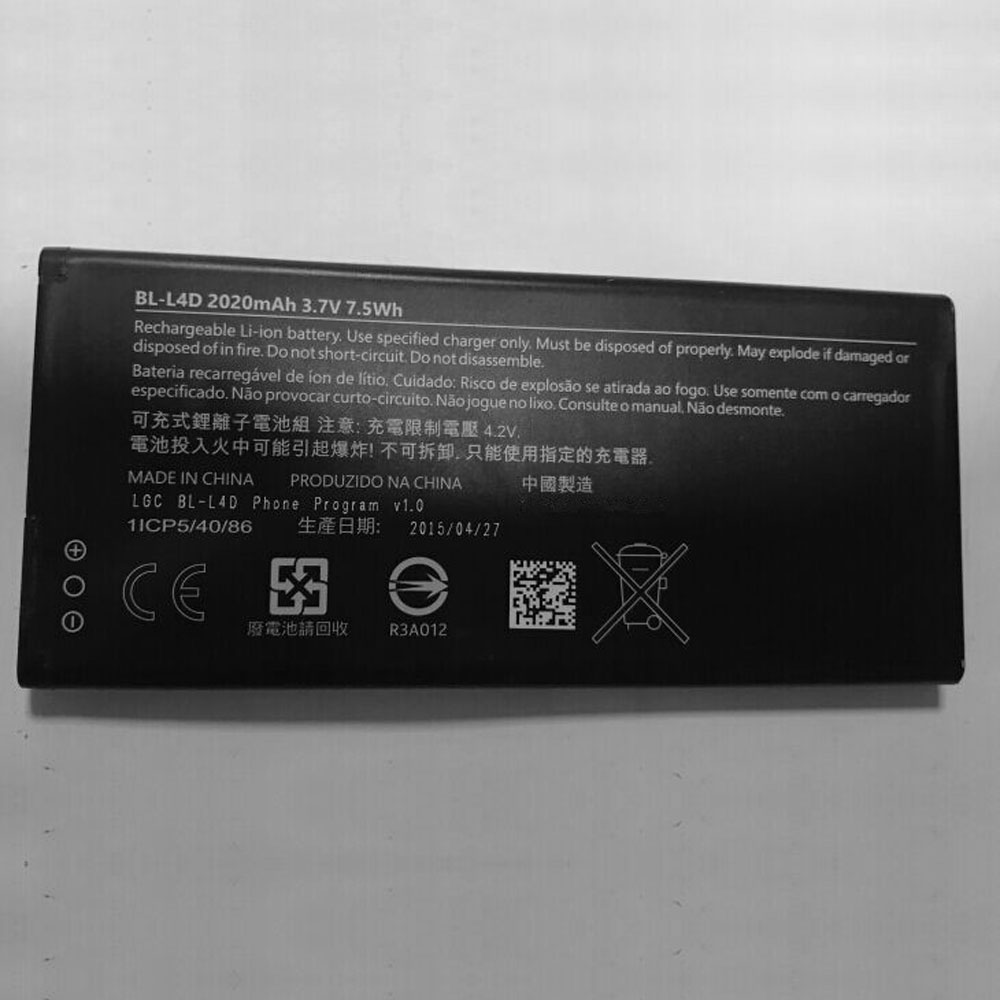
Fit Machine Model Microsoft Nokia BL-L4D – 2020mAh /7.5WH – 3.7V/4.2V.

All products from our shop are 100% the highest quality! We provide the high quality Laptop Batteries. Microsoft BL-L4D battery is best compatible with the original equipments. 

OriccaBattery.co.uk ◆Free Shipping ◆ One year warranty ◆ 30 days money back guarantee.

Battery BL-L4D Replacement For Microsoft Nokia BL-L4D

BL-L4D

Microsoft BL-L4D Specifications
Brand:Cell Phone Battery for Microsoft
Capacity:2020mAh /7.5WH
Voltage:3.7V/4.2V
Type:Li-ion
All products from our shop are 100% the highest quality! 
We provide the high quality Laptop Adapters!

PRODUCT COMPATIBILITY:

BL-L4D

REPLACEABILITY WITH THE FOLLOWING MODELS:

Microsoft Nokia BL-L4D 

How to Maintenance your new replacement Microsoft BL-L4D battery?
1. New Microsoft BL-L4D battery pack must be fully charged before use.
2. New battery pack needs to be fully charged and discharged (cycled) a few times before it can condition to full capacity.
3.Laptop battery undergo self-discharging when left unused. Always store a Microsoft BL-L4D battery pack in a fully charged stage for storage.
4. Fully drain and fully recharge your battery pack every few months.
5. Turn down the LCD brightness of your portable device.
6. Use built-in power management on your portable device.
7. Turn off LCD or other unnecessary accessories when not in use.
8. Set screen saver blank to 1 to 2 minutes of your notebook.
9. Add more RAM if you have extra RAM expansion slot, it will reduce the usage of hard drive and it is power exhaustive.
10. Close unused software in your Microsoft Nokia BL-L4D phone .
11. Remove unused PC Cards or USB devices from your notebook.
12. Don´t watch DVD or play graphics intensive video games.
13. Don´t short circuit terminal or store your Microsoft BL-L4D Cell Phone Batteries pack with metal parts. 14. Don´t drop or mutilate the Microsoft BL-L4D battery pack.
15. Don´t expose to moisture or water.

Related popular recommendations:
58-000049 Battery Compatible Amazon Kindle PaperWhite 2nd Gen 6″
L14M2P21 Battery Compatible Lenovo S41-70 S41-70AM
ACDP-100D01 Laptop Adapters For Sony Vaio PCGA AC19V4 ACDP-100D01
TLI017C1 Battery Compatible Alcatel One Touch OT-5027B DAWN OT-4060O STREAK OT-4060A IDEAL
088796 Battery Compatible Bose Soundlink Mini 2 Pack
PA5162U-1BRS Battery Compatible Toshiba Portege R30 R30-A series
061384 Battery Compatible BOSE SOUNDLINK Mini Series
82-71363-04 Battery Compatible MOTOROLA MC70 MC75 FR68
FX30 Battery Compatible Motorola XT1575 Moto X Pure Edition / Moto X Style

OnePlus 5T, OnePlus 5 OxygenOS Open Beta Updates Bring Zen Mode, Improved Weather App, and More

OnePlus has begun the rollout of new beta updates for the OnePlus 5 and OnePlus 5T duo. The OxygenOS Open Beta 33 update for the OnePlus 5T and the OxygenOS Open Beta update for the OnePlus 5 finally bring Zen Mode to the two phones. Additionally, the updates bring improvements to the OnePlus Weather app as well as the Phone app. A minor but helpful addition is the ability to edit quick responses in the phone app, aside from optimisations to the quick response feature for declined calls.

The changelog of the OxygenOS Open Beta 33 update for the OnePlus 5T and the OxygenOS Open Beta 35 update for the OnePlus 5 has been shared on the official OnePlus forum. The most notable arrival is Zen Mode, which allows users to switch off the screen activity and block notifications in order to take a break from their phone for a while. To recall, Zen Mode made its way to the OnePlus 6 and OnePlus 6T as well with open beta updates last month.

The OnePlus Weather app has also received some tweaks with the new OxygenOS Open Beta updates. The app will now offer an enhanced scrolling experience while switching between pages and can now also be used even if GPS access permission of the app has been disabled. Lastly, users can now rearrange or delete weather cards for multiple cities by tapping and holding them.

The Phone app has also been subjected to some improvements with the new beta updates. To start off, the animation effect that can be seen while switching between pages has been improved, and contact search experience is also better now. Moreover, users can now edit quick responses as well.

Oneplus Cell Phone Batteries – Shop a wide selection of Oneplus Cell Phone Batteries at www.oriccabattery.co.uk Fast Shipping. 30 Day Replacement Guarantee.

Samsung Galaxy Note 10 Series Case Renders Leak, Showing No Headphone Jack, Single Speaker

The floodgates seemed to have opened up on the Samsung Galaxy Note 10 leaks as we have yet again, some more case renders, which show both the phones in more detail. These images, if true, confirm a lot of the previous leaks about the Galaxy Note 10 series ditching the headphone jack, having a single bottom-firing speaker, and no Bixby button. The renders also showcase the different rear camera setups on the Galaxy Note 10 and the Galaxy Note 10 Pro.

The first set of Samsung Galaxy Note 10 case renders were tweeted by Sudhanshu Ambhore (@Sudhanshu1414), who had previously tweeted live images of a silicone case for the Galaxy Note 10 and Galaxy Note 10 Pro. The new images show a render of the top and bottom portion of the Galaxy Note 10 in the case. The top portion clearly shows the left-mounted triple cameras and a single cutout for the LED flash. We can also see two cutouts on the top, which we assume are for the microphone and the rumoured IR blaster. The bottom portion of the phone shows a single speaker, USB Type-C port, a microphone, and the slot for the S Pen.

The renders shared by Ambhore appear to be full-bodied cases (with a top and bottom cover). Other clear cases from case-maker Olixar are also live online, which show the backs of both version of the Galaxy Note 10. The case for the Galaxy Note 10 shows the same triple-camera setup and single LED flash and all three buttons, which are placed on the left of the phone. The case render for the Galaxy Note 10 Pro, has the same three cameras but two additional cutouts for extra sensors, placed just below the LED flash. One of them could be for laser sensor for autofocus while the other could be a Time of Flight (ToF) sensor for depth information. Another render of a tempered glass for the Galaxy Note 10 clearly shows a single cutout for the selfie camera, which is placed in the middle of the display.

The phone is still a couple of months away from launching but we expect a lot more details to leak till that happens, which would confirm many of the rumours we’ve had thus far. We recently heard that Samsung might finally stop support for expandable storage with the Galaxy Note 10 and it might remove the earpiece too, in favour of a ‘Sound on Display’ technology. Thankfully, we’ll still have physical volume and power buttons, which the above images also show.

Samsung Cell Phone Batteries – Shop a wide selection of Samsung Cell Phone Batteries at www.oriccabattery.co.uk Fast Shipping. 30 Day Replacement Guarantee.