We special in laptop battery ,laptop adapters for most of top brands, such as apple,acer, asus, dell, fujitsu,hp, compaq, ibm, lenovo, toshiba, samsung, sony on UK,all the ac power adapters, laptop batteries are high quality and low price.
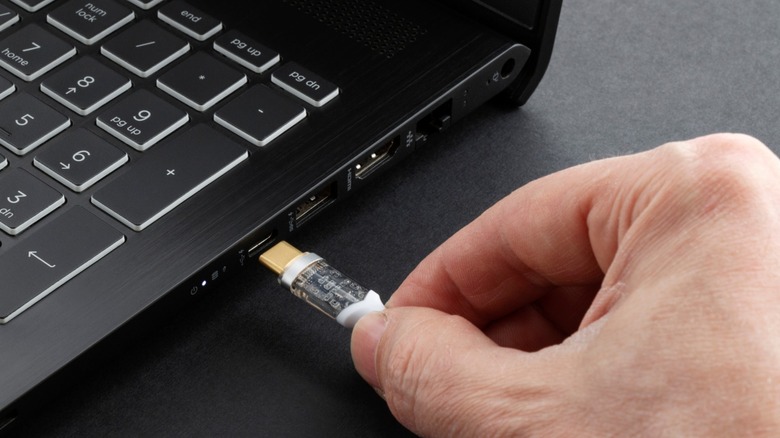
Thin and light laptops now pack in enough performance to get you by most CPU or GPU-intensive tasks you throw at them, and yet, a few bucks spent on laptop accessories can skyrocket your productivity. An external monitor is inarguably the most effective way to do so, allowing you to view and work with multiple app windows without having to furiously alt-tab every few seconds.Setting up an external monitor is straightforward — you hook it up to a power source and connect it to your laptop or desktop over HDMI or DisplayPort. This works well if you often dock your laptop in a designated workspace, but most monitors simply aren’t portable enough, given their size and the fact that you would need to carry around a bulky power adapter. Seeing how universal and convenient USB-C has become, the idea of connecting and powering an external display using just one cable must have struck your mind, but can it actually be done?The short answer is yes, but you will need a compatible display as well as a relatively modern laptop that offers this functionality. With exponential leaps in charging speeds and data transfer rates, the right USB-C port and cable can not only carry a video signal to a portable monitor but also power it over the same connection. Here’s how to check if your laptop can power a monitor via USB-C and what to look for when shopping for one.>>>Replacement battery for Clevo NJ50MU NJ51MU NJ70MU NJ70PU NJ71PUExploring plug and play portable monitors
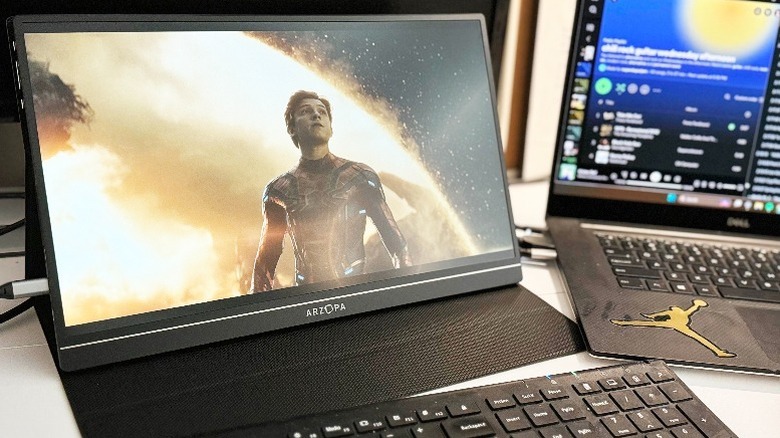
A quick search on Amazon reveals several listings for portable monitors from various brands, often coming in at sizes quite similar to most laptop screens. This way, you’re essentially doubling the screen real estate without being affixed to a traditional desk setup. Some of these options even offer touchscreen functionality, which can open interesting opportunities for working with interactive content. However, it’s important to go through each of the options you’re considering and look at how the portable monitor is being powered. Products like the Arzopa Portable Monitor that we went hands-on with feature this functionality, meaning you get a fully working external display powered by USB-C and displaying a video feed using the same connection. Displays that support both video and power over USB-C will list this feature explicitly, so be sure to look for it in the tech specs section.>>>Replacement battery for Clevo NH50ED NH50RA NH50RD NH70RAQ CNH5S01A plug-and-play portable monitor is only half the equation — in order to use USB for displays, you will also need to make sure your laptop features a USB-C port with both Power Delivery and DisplayPort Alt Mode. Most modern laptops, including MacBooks, offer this convenience, but it’s best to look for this functionality by visiting the product page. You can also directly connect a portable display to a smartphone or handheld consoles like the Nintendo Switch — although certain scenarios may have you relying on an external power source such as a power bank.
The main Google I/O 2025 keynote happens a week from now, but that event will probably be so Gemini AI-heavy thatGoogledecided to giveAndroida special presentation on Tuesday, in the form of an Android Show eventstreamedon YouTube.
The company announced various novelties coming to its Android-powered ecosystem, including expanded Gemini access to wearables and cars, better security features for Android (including scam protections and anti-theft features), and a rebrand of Find My Device, now called Find Hub. But there’s no question that the fresh coat of paint Android got was a standout announcement from Google’s Android-centric mini event.
Android 16 will usher in a new era of design called Material 3 Expressive. If it sounds familiar, that’s becauseGoogle accidentally leaked the Material 3 Expressive announcementa few days ago, revealing the massive design overhaul coming to Android.
As we learned from the leaked blog, Material 3 Expressive is meant to improve not just the look of your Android 16 phone and tablet, but also the usability of apps. Google conducted various studies to understand how mobile device users interact with their gadgets and developed ways to make apps more user-friendly than before, without compromising their appearance.
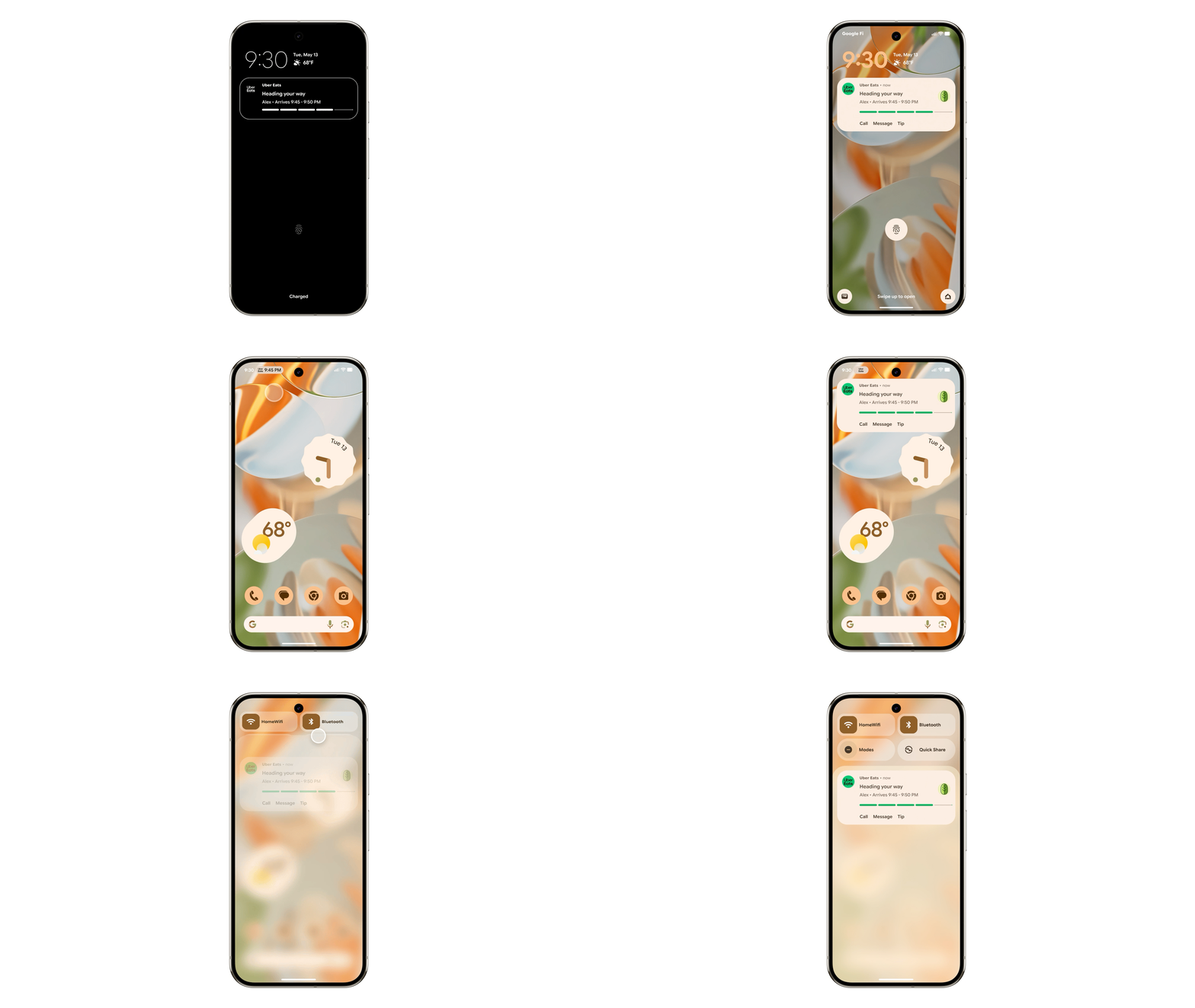
Material 3 Expressive is an evolution of Material You, shaped by what Google has learned. The new design changes, seen in the images above and below, will be immediately obvious to longtime smartphone users, especially Android fans.
Android 16 Material 3 Expressive design: New effects for dismissing notifications. Image source: Google
The UI in Google’s examples pops immediately. It has a distinct personality, and that’s likely what Google is aiming for. It wants its apps to elicit emotion, and the Android 16 design language is set to deliver that while keeping your color and theme customizations in place.
You’ll see more colorful menus, floating toolbars that take up less space, and buttons that stand out, showing you exactly what you need to tap.
Android 16 Material 3 Expressive design: The background blur. Image source: Google
Google is also introducing more shapes for UI elements, offering developers a variety of choices for their apps. While the Material 3 Expressive design will debut with Google apps on Android 16, Google is encouraging developers to adopt it as well.
Google has also paid close attention to typography in Material 3 Expressive to better highlight the UI elements you’re most likely to use.
Overall, Android 16 apps should feel more dynamic than before, with new animations and added fluidity throughout the system.
Android 16 Material 3 Expressive design coming to Google apps, including Fitbit, Gmail, and Photos. Image source: Google
In practice, that means you can dismiss a notification individually from a group on your lock screen. You’ll feel the snap as it’s separated, along with a haptic rumble for tactile feedback.
Other actions, like closing apps or adjusting volume, will trigger similar responses. Google is also adding background blur effects to create a sense of depth while you focus on apps and menus in the foreground.
Android 16’s Material 3 Expressive redesign also includes a new Live Updates feature that works similarly to the iPhone’s Dynamic Island around the front camera cutout.
Android 16 Material 3 Expressive design: Live Updates for Uber Eats. Image source: Google
Live Updates let you interact with apps that need regular checking, without opening them. Think delivery apps like Uber Eats, which let you track your order on the lock screen via tappable Live Updates.
The Live Update button appears at the top of the screen, just to the left of the selfie cam.
That said, Android 16’s big Material 3 Expressive redesign isn’t rolling out immediately with Android 16 this summer. It’ll follow the OS launch in June, with Pixels getting first access to Google’s redesigned apps. More updates will roll out throughout the year.
Google listed a few apps that are set to receive the Material 3 Expressive treatment down the line, including Gmail, Fitbit, and Google Photos.
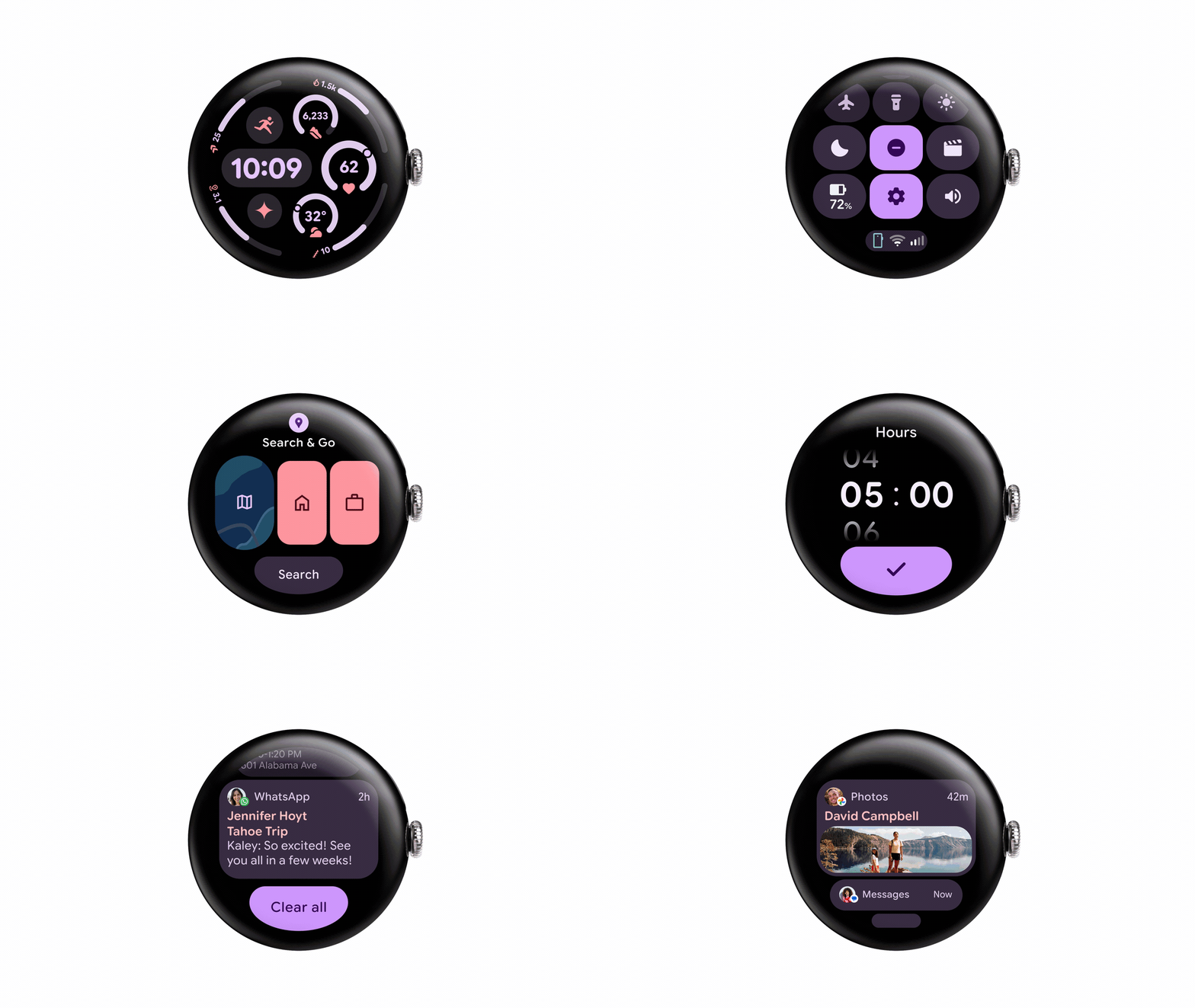
Android 16 Material 3 Expressive design is coming to Wear OS 6 wearables. Image source: Google
Material 3 Expressive isn’t limited to phones and tablets. Wear OS 6 smartwatches will see similar UI improvements. The new animations and responsive feedback won’t impact battery life—Google says Wear OS 6 should deliver up to 10% longer battery life across supported devices, according to a media briefingBGRattended.
As for Google apps on iPhone, it’s still unclear whether they’ll adopt the Material 3 Expressive design or continue to follow the iPhone’s design standards.
You can read more about Material 3 Expressivein Google’s blog post.
Nvidia has raised prices on nearly all products—including a 10 percent increase on the GeForce RTX 5090 and 5 to 15 percent hikes across its datacenter modules—to offset a $5.5 billion China loss and higher costs from TSMC.
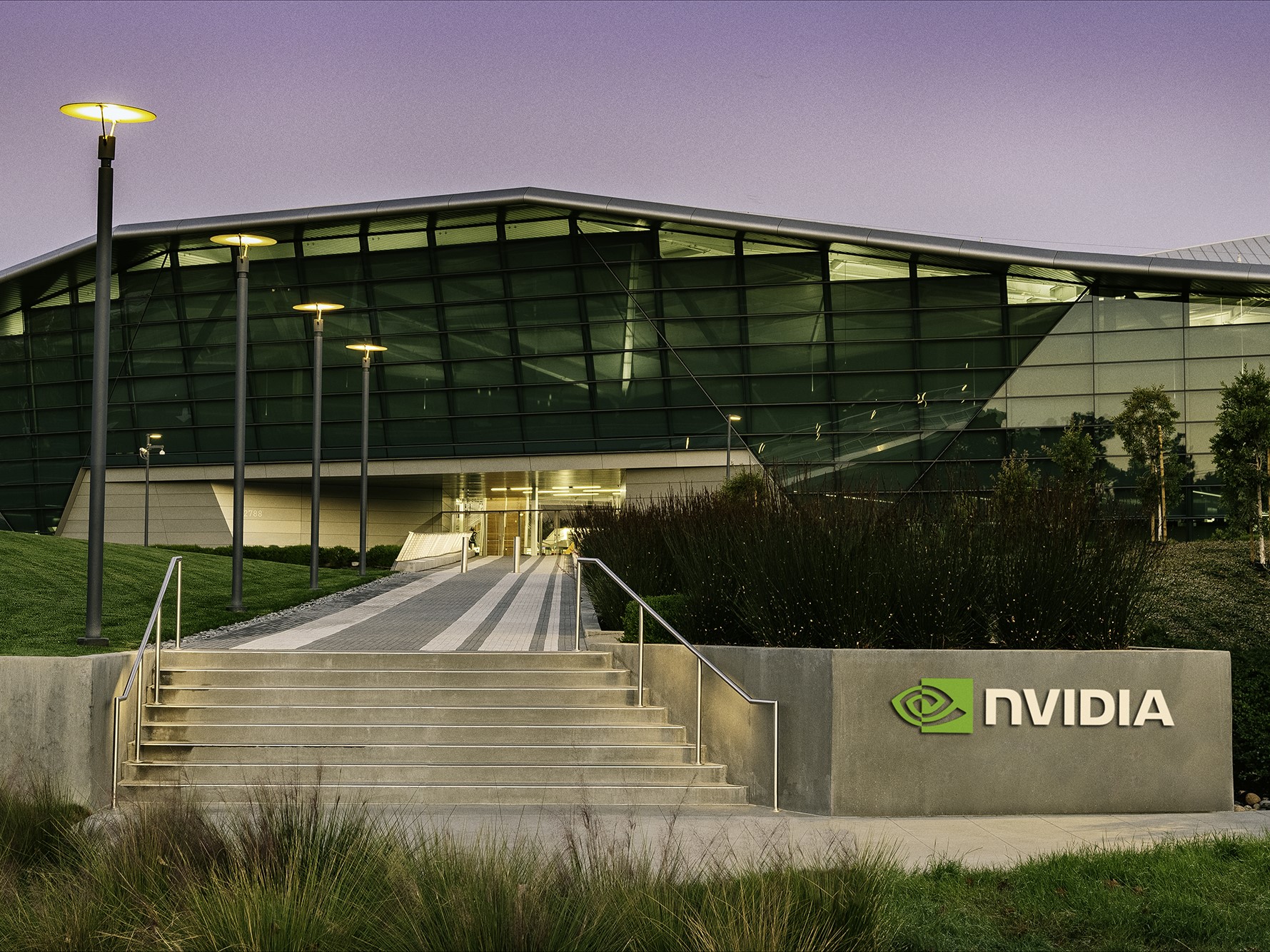
Nvidia faces financial pressure from US-China AI chip ban, raises product prices. Pictured: Nvidia’s Endeavor office (Image source: Nvidia)
Nvidia is adjusting its pricing strategy in response to a convergence of external pressures. According to supply-chain information reported byDigitimes Taiwan, the company took a $5.5 billion loss after Washington blocked shipments of its H20 chips to China. Concurrently, the shift of Blackwell production to TSMC’s Arizona fab—and the higher material, logistics, and tariff expenses that come with it—has driven costs sharply upward.
To protect margins, Nvidia has raised official prices “for almost all of its products” and authorized board partners to follow suit. Channel pricing for the flagship GeForce RTX 5090 has climbed from around NT$90,000 to NT$100,000 ($2,966 to $3,295)—an increase of more than 10 percent since launch—while other RTX 50-series cards are up by 5-10 percent. Datacenter hardware has not been spared: H200 and B200 modules now cost roughly 10-15 percent more, a rise that server vendors have begun to pass on to customers.
Despite the export ban and higher tariffs, demand for AI silicon from U.S. and international cloud service providers remains strong. Supply-chain contacts, therefore, expect Nvidia’s results for the quarter ending in late May to land within earlier guidance and show “excellent profit performance.” The company booked revenue of $39.3 billion in its most recent quarter and has guided to about $43 billion for the current period, implying year-on-year growth of roughly 65 percent.
Our laptop expert breaks down confusing computer jargon.
Convoluted, jargon-laden hardware specifications (specs) can make laptop shopping difficult for those of us who aren’t especially tech-savvy. But as Oriccabattery’s residentlaptopexpert, I know that being able to decipher them is essential to pinpointing PCs that fit your needs and identifying whendeals are actually worthwhile. So, a basic working knowledge is valuable.
Below, I walk through common specs for today’sApple MacBookandWindows laptopcomponents in plain language, and dole out some recommendations for different types of users. (For a deeper dive into specs forChromebooks, which are cloud-based laptops that run on Google’s ChromeOS, read our dedicated”Chromebooks versus laptops” guide.) Spoiler alert: The RAM in question is not a horned sheep, the chiclets are not edible, and the nits you’ll encounter don’t have the potential to hatch your scalp.
The central processing unit (orCPU) is a chip inside a laptop’s motherboard that’s responsible for executing all tasks and commands. It’s often referred to as the machine’s brain or control center.
Modern MacBooks run on Apple’s custom-made M-series chips. In Windows laptops, you’ll find CPUs made by Intel, AMD, and Qualcomm (i.e., its Snapdragon line). Qualcomm processors are based on a different kind ofWindows architecturethanIntel and AMD chips, and as such, they don’t work with some games and certainspecialty apps.
I don’t typically recommend buying a laptop with a processor that’s more than two generations removed unless your needs are basic, or if you care more about saving money than future-proofing. (Older laptops tend to be way cheaper and easier to find on sale than newer ones.) It’s really easy to tell the age of a MacBook’s CPU: The bigger the number in its M-something processor name, the newer and faster it is. Intel andAMD’s naming schemais a bit more complex — the former has aCPU generation guideon its website — but put simply, they follow the same “higher model number equals newer/better” logic.
Shoppers can pick from three different Qualcomm chips in Windows laptops as of mid-2025: the Snapdragon X, Snapdragon X Plus, and Snapdragon X Elite. I’ve listed them in order from least to most powerful, but the low-endSnapdragon X chipis the company’s latest release.
Graphics processor
The graphics processing unit (orGPU) is a specialized chip that’s responsible for rendering the visuals on a laptop’s screen.
There are two different species of GPUs out there. One is anintegrated GPU, which is built into the laptop’s CPU and shares its memory with it. They’re cheaper than the alternative, but they’re also not powerful enough for serious gaming or multimedia editing. Integrated GPUs have the same manufacturer as their CPU (Intel goes with Intel, Qualcomm with Qualcomm, etc.).
The other type of GPU you’ll come across is a dedicated GPU, akadiscrete GPU, which is a standalone graphics card that has its own memory. They offer more power for intensive tasks but consume a lot more of it: Laptops with dedicated GPUs (e.g., gaming laptops) tend to have lousy battery lives. They also cost a premium. Among dedicated GPUs, the biggest names areNvidia’s GeForce RTX seriesandAMD’s Radeon RX series. GeForce RTX GPUs can be paired with CPUs from any manufacturer, but Radeon RX GPUs only come with AMD CPUs.
In comparing dedicated GPUs between different laptops, I usually advise prospective buyers to go up to two generations back if they want a good deal or if they mainly playcasual and indie games. If you’re someone who keeps up with the latestTriple-A games(and you’ve got cash to burn), a current-gen GPU is worth the investment. When it comes to decoding GPU model numbers, higher numbers still indicate brawn and brand-newness.
A laptop’s random-access memory (RAM) is where it temporarily stashes the data its CPU needs for any active applications. The more RAM a machine has, the more tasks its system can handle simultaneously.
Sixteen gigabytes of RAM has become the industry standard as of late,even among MacBooks, and that’s going to be a great starting point for most people. You can bump that up to the next configuration tier (usually 32GB) or higher if you do a lot of demanding gaming orcontent creation. Those with basic workloads can get away with 8GB of memory — “basic” meaning sending emails, writing documents, watching YouTube, and maybe playingMinecraft— but don’t go any lower than that.
As mentioned, dedicated GPUs have ready access to their own little stockpile of RAM calledVRAM, or video random-access memory, for handling graphics data. The more visually intricate Triple-A games you play, the more VRAM you’ll want.
A laptop’s storage is the space where it keeps long-term data — your documents, downloads, photos, videos, and audio files.
You’ll run into a few different types of storage at different pricing levels. SSD (Solid-State Drive) storage is used in mid-range and premium laptops, while UFS (Universal Flash Storage) and eMMC (embedded MultiMediaCard) flash storage are common in budget PCs. They go in that exact order from fastest to slowest data transfer speeds.
Casual users can get by with 256GB of storage, the standard starting configuration for most laptops, but you’ll want to upgrade to at least 512GB for a daily driver, especially if you do any sort of regular gaming or creative work. Keep in mind that the laptop’s operating system takes up a chunk of its storage space, so you won’t get to utilize the full advertised capacity.
Display
A laptop’s display (or screen) is the panel on which it produces text and visuals. It’s the focal point of the device’s lid, the thin slab attached to its base (or chassis) with hinges. It also serves as your main way of interacting with the laptop’s software, so it’s crucial that it’s relatively nice and apt for your needs. Consider the following display specs:
Screen size
Laptop screens range in size from 11 to 18 inches, and like TV screens, they’re measured diagonally from corner to corner. Stick with the lower end of that range (11 to 13 inches) if you frequently work on the go and prioritize portability. Stay in the middle (14 to 15 inches) if you want a machine that has more power and screen real estate for multitasking, but is still relatively easy to tote around. Go for the upper end (16 to 18 inches) if you’ll mainly be using your laptop for gaming or multimedia work, and you’re OK with it staying parked in one spot most of the time.
Screen type
Delving intolaptop display technologiesgets convoluted and acronym-heavy fast, so I’ve done my best to compile a brief, no-nonsense rundown of the two-ish types you’ll encounter most often.Touchscreenscome in both varieties, for what it’s worth.
LCDscreens are the standard among low-end to mid-range laptops. They look fine and don’t suck up a ton of power. There are two notable LCD subtypes, one beingIPSdisplays, which have better, more realistic colors from wider viewing angles compared to regular LCD displays. The other ismini-LEDdisplays, which are brighter and have better contrast. They’re newer and pricier.
The other main type of laptop screen out there is the thinOLEDdisplay, which features rich colors with deep blacks and stark contrast. They can be decently energy-efficient if their picture isn’t constantly super bright or white. (The main trade-off is a proclivity forburn-in.) They used to be reserved for high-end laptops, but nowadays they’re available on models at a variety of price points.
Resolution
A laptop screen’sresolutionrefers to its dimensions in pixels. (Pixelsare teeny little light-emitting dots that make up the screen’s picture.) The higher the resolution, the sharper the picture is going to be. Full HD (or 1920 x 1080 pixels) is a good baseline for general-purpose usage and even some gaming, but feel free to go up from there if there’s some wiggle room in your budget, or if your workflow necessitates it. Gamers and creatives who like detailed visuals should look into QHD (2560 x 1440) or 4K UHD (3840 x 2160) options.
Resolution is directly tied to another minor display spec calledaspect ratio, which is basically just a width to height comparison. A wider 16:9 aspect ratio has traditionally been the go-to, but 16:10 and 3:2 aspect ratios with more vertical space are getting more popular. They’re considered better for general productivity versus entertainment.
Refresh rate
A laptop screen’srefresh rate(measured in hertz) refers to the number of times it updates its picture per second. The higher the refresh rate, the smoother motion looks. General-purpose laptops typically have 60Hz displays, while fancier gaming laptops range from 120Hz to 240Hz so action-packed titles look clean. There are some gaming laptops out there that go all the way up to 480Hz,but that’swayoverkill.
Brightness
The brightness of a laptop’s screen (that is, the amount of light it produces) is measured in nits. The more nits, the brighter the screen and the easier it is to see its picture in direct sunlight.
Laptop displays generally range from 250 nits on budget models to 600 nits on premium PCs, with some elite content creation laptops capable of cranking up to 1,000 nits and beyond. I wouldn’t go any lower than 300 nits, but I also don’t think it’s necessary to buy the brightest screen possible: There’s a good chance you’ll hardly use it at its maximum setting because it’ll strain your eyes. It’ll also zap the laptop’s battery life. (For reference, I can work all day with my 500-nit MacBook Pro set to about 75 percent brightness.)
Webcam
A laptop’s webcam is the front-facing camera built into its display. It’s located in the top bezel (screen border), or in the case of MacBooks, in a small notch that juts down into the screen. Some webcams come with physical privacy shutters that you can slide open or closed with a finger.
Laptop webcams aren’t as lousy as they used to be: While some gaming PCs still have 720p webcams, manufacturers have mostly (finally) moved on to 1080p as the standard resolution, and many newer models boast 5MP, 9MP, or 12MP options. That said, most of them are still pretty lousy compared tosmartphones’ front-facing cameras, no matter the resolution. If you care deeply about video call quality, I’d just resolve to buy anexternal webcam.
Keyboard
Laptops have “island-style” keyboards with low-profile, spaced-out keys. They’re also frequently called “chiclet” keyboards (as in Chiclets, the square-shaped gum candies). Some include numeric keypads, or numpads, next to theirQWERTYsetups, but they feel rarer nowadays, with most keyboards opting for just the top row of numbers.
Most modern laptops have backlit keyboards; snazzy gaming laptops’ keyboards sport colorful “RGB” backlighting. They also typically have fingerprint readers built into one of their keys for security purposes. Windows laptops from 2024 on have dedicatedCopilot keys— Copilot being Microsoft’s AI assistant.
Touchpad or trackpad
A laptop’s touchpad or trackpad is the touch-sensitive rectangle below the keyboard that allows you to control its cursor without needing a separate mouse. It can be made of plastic (on cheap laptops) or glass (on nicer laptops).
Touchpads onMacBooksandWindows laptopssupport gestures — e.g., pinching your fingers on the surface to zoom. Some higher-end models havehaptictouchpads that produce subtle vibrations when certain actions are performed.
Connectivity
Every laptop has a selection of ports on the side of its chassis — or in the case of some gaming laptops, the rear portion below its hinges — which let the user connect differentaccessories and peripherals. Think external monitors, keyboards, and wired headphones.
Common ports on today’s laptops includeUSB-Cports,Thunderbolt 4ports, 3.5mm audio jacks, and a charging port. Some models still tack on aUSB-Aport, but those are being phased out. (Such older ports are referred to as legacy ports.) Laptops geared towardmultimedia editingcome equipped withHDMIports andSD/microSD cardslots.
Battery life
A laptop’s battery life is a measure of how long it lasts on a single full charge. This can vary greatly depending on the specs of its other components, their settings, and the tasks the machine runs throughout the battery cycle. Manufacturers typically list laptops’ battery lives as potentials — “up to 18 hours,” for example — and in my experience, they rarely hit their advertised maximum in practice.
Weight
Laptops keep getting thinner and lighter as time goes on, which is stellar if you value portability and sleekness. (Models under three pounds are deemed lightweight.) However, gamers and creative professionals shouldn’t shy away from heavier options. In the laptop world, heft is associated with power.
Our laptop expert breaks down confusing computer jargon.
Convoluted, jargon-laden hardware specifications (specs) can make laptop shopping difficult for those of us who aren’t especially tech-savvy. But as Oriccabattery’s residentlaptopexpert, I know that being able to decipher them is essential to pinpointing PCs that fit your needs and identifying whendeals are actually worthwhile. So, a basic working knowledge is valuable.
Below, I walk through common specs for today’sApple MacBookandWindows laptopcomponents in plain language, and dole out some recommendations for different types of users. (For a deeper dive into specs forChromebooks, which are cloud-based laptops that run on Google’s ChromeOS, read our dedicated”Chromebooks versus laptops” guide.) Spoiler alert: The RAM in question is not a horned sheep, the chiclets are not edible, and the nits you’ll encounter don’t have the potential to hatch your scalp.
The central processing unit (orCPU) is a chip inside a laptop’s motherboard that’s responsible for executing all tasks and commands. It’s often referred to as the machine’s brain or control center.
Modern MacBooks run on Apple’s custom-made M-series chips. In Windows laptops, you’ll find CPUs made by Intel, AMD, and Qualcomm (i.e., its Snapdragon line). Qualcomm processors are based on a different kind ofWindows architecturethanIntel and AMD chips, and as such, they don’t work with some games and certainspecialty apps.
I don’t typically recommend buying a laptop with a processor that’s more than two generations removed unless your needs are basic, or if you care more about saving money than future-proofing. (Older laptops tend to be way cheaper and easier to find on sale than newer ones.) It’s really easy to tell the age of a MacBook’s CPU: The bigger the number in its M-something processor name, the newer and faster it is. Intel andAMD’s naming schemais a bit more complex — the former has aCPU generation guideon its website — but put simply, they follow the same “higher model number equals newer/better” logic.
Shoppers can pick from three different Qualcomm chips in Windows laptops as of mid-2025: the Snapdragon X, Snapdragon X Plus, and Snapdragon X Elite. I’ve listed them in order from least to most powerful, but the low-endSnapdragon X chipis the company’s latest release.
Graphics processor
The graphics processing unit (orGPU) is a specialized chip that’s responsible for rendering the visuals on a laptop’s screen.
There are two different species of GPUs out there. One is anintegrated GPU, which is built into the laptop’s CPU and shares its memory with it. They’re cheaper than the alternative, but they’re also not powerful enough for serious gaming or multimedia editing. Integrated GPUs have the same manufacturer as their CPU (Intel goes with Intel, Qualcomm with Qualcomm, etc.).
The other type of GPU you’ll come across is a dedicated GPU, akadiscrete GPU, which is a standalone graphics card that has its own memory. They offer more power for intensive tasks but consume a lot more of it: Laptops with dedicated GPUs (e.g., gaming laptops) tend to have lousy battery lives. They also cost a premium. Among dedicated GPUs, the biggest names areNvidia’s GeForce RTX seriesandAMD’s Radeon RX series. GeForce RTX GPUs can be paired with CPUs from any manufacturer, but Radeon RX GPUs only come with AMD CPUs.
In comparing dedicated GPUs between different laptops, I usually advise prospective buyers to go up to two generations back if they want a good deal or if they mainly playcasual and indie games. If you’re someone who keeps up with the latestTriple-A games(and you’ve got cash to burn), a current-gen GPU is worth the investment. When it comes to decoding GPU model numbers, higher numbers still indicate brawn and brand-newness.
A laptop’s random-access memory (RAM) is where it temporarily stashes the data its CPU needs for any active applications. The more RAM a machine has, the more tasks its system can handle simultaneously.
Sixteen gigabytes of RAM has become the industry standard as of late,even among MacBooks, and that’s going to be a great starting point for most people. You can bump that up to the next configuration tier (usually 32GB) or higher if you do a lot of demanding gaming orcontent creation. Those with basic workloads can get away with 8GB of memory — “basic” meaning sending emails, writing documents, watching YouTube, and maybe playingMinecraft— but don’t go any lower than that.
As mentioned, dedicated GPUs have ready access to their own little stockpile of RAM calledVRAM, or video random-access memory, for handling graphics data. The more visually intricate Triple-A games you play, the more VRAM you’ll want.
A laptop’s storage is the space where it keeps long-term data — your documents, downloads, photos, videos, and audio files.
You’ll run into a few different types of storage at different pricing levels. SSD (Solid-State Drive) storage is used in mid-range and premium laptops, while UFS (Universal Flash Storage) and eMMC (embedded MultiMediaCard) flash storage are common in budget PCs. They go in that exact order from fastest to slowest data transfer speeds.
Casual users can get by with 256GB of storage, the standard starting configuration for most laptops, but you’ll want to upgrade to at least 512GB for a daily driver, especially if you do any sort of regular gaming or creative work. Keep in mind that the laptop’s operating system takes up a chunk of its storage space, so you won’t get to utilize the full advertised capacity.
Display
A laptop’s display (or screen) is the panel on which it produces text and visuals. It’s the focal point of the device’s lid, the thin slab attached to its base (or chassis) with hinges. It also serves as your main way of interacting with the laptop’s software, so it’s crucial that it’s relatively nice and apt for your needs. Consider the following display specs:
Screen size
Laptop screens range in size from 11 to 18 inches, and like TV screens, they’re measured diagonally from corner to corner. Stick with the lower end of that range (11 to 13 inches) if you frequently work on the go and prioritize portability. Stay in the middle (14 to 15 inches) if you want a machine that has more power and screen real estate for multitasking, but is still relatively easy to tote around. Go for the upper end (16 to 18 inches) if you’ll mainly be using your laptop for gaming or multimedia work, and you’re OK with it staying parked in one spot most of the time.
Screen type
Delving intolaptop display technologiesgets convoluted and acronym-heavy fast, so I’ve done my best to compile a brief, no-nonsense rundown of the two-ish types you’ll encounter most often.Touchscreenscome in both varieties, for what it’s worth.
LCDscreens are the standard among low-end to mid-range laptops. They look fine and don’t suck up a ton of power. There are two notable LCD subtypes, one beingIPSdisplays, which have better, more realistic colors from wider viewing angles compared to regular LCD displays. The other ismini-LEDdisplays, which are brighter and have better contrast. They’re newer and pricier.
The other main type of laptop screen out there is the thinOLEDdisplay, which features rich colors with deep blacks and stark contrast. They can be decently energy-efficient if their picture isn’t constantly super bright or white. (The main trade-off is a proclivity forburn-in.) They used to be reserved for high-end laptops, but nowadays they’re available on models at a variety of price points.
Resolution
A laptop screen’sresolutionrefers to its dimensions in pixels. (Pixelsare teeny little light-emitting dots that make up the screen’s picture.) The higher the resolution, the sharper the picture is going to be. Full HD (or 1920 x 1080 pixels) is a good baseline for general-purpose usage and even some gaming, but feel free to go up from there if there’s some wiggle room in your budget, or if your workflow necessitates it. Gamers and creatives who like detailed visuals should look into QHD (2560 x 1440) or 4K UHD (3840 x 2160) options.
Resolution is directly tied to another minor display spec calledaspect ratio, which is basically just a width to height comparison. A wider 16:9 aspect ratio has traditionally been the go-to, but 16:10 and 3:2 aspect ratios with more vertical space are getting more popular. They’re considered better for general productivity versus entertainment.
Refresh rate
A laptop screen’srefresh rate(measured in hertz) refers to the number of times it updates its picture per second. The higher the refresh rate, the smoother motion looks. General-purpose laptops typically have 60Hz displays, while fancier gaming laptops range from 120Hz to 240Hz so action-packed titles look clean. There are some gaming laptops out there that go all the way up to 480Hz,but that’swayoverkill.
Brightness
The brightness of a laptop’s screen (that is, the amount of light it produces) is measured in nits. The more nits, the brighter the screen and the easier it is to see its picture in direct sunlight.
Laptop displays generally range from 250 nits on budget models to 600 nits on premium PCs, with some elite content creation laptops capable of cranking up to 1,000 nits and beyond. I wouldn’t go any lower than 300 nits, but I also don’t think it’s necessary to buy the brightest screen possible: There’s a good chance you’ll hardly use it at its maximum setting because it’ll strain your eyes. It’ll also zap the laptop’s battery life. (For reference, I can work all day with my 500-nit MacBook Pro set to about 75 percent brightness.)
Webcam
A laptop’s webcam is the front-facing camera built into its display. It’s located in the top bezel (screen border), or in the case of MacBooks, in a small notch that juts down into the screen. Some webcams come with physical privacy shutters that you can slide open or closed with a finger.
Laptop webcams aren’t as lousy as they used to be: While some gaming PCs still have 720p webcams, manufacturers have mostly (finally) moved on to 1080p as the standard resolution, and many newer models boast 5MP, 9MP, or 12MP options. That said, most of them are still pretty lousy compared tosmartphones’ front-facing cameras, no matter the resolution. If you care deeply about video call quality, I’d just resolve to buy anexternal webcam.
Keyboard
Laptops have “island-style” keyboards with low-profile, spaced-out keys. They’re also frequently called “chiclet” keyboards (as in Chiclets, the square-shaped gum candies). Some include numeric keypads, or numpads, next to theirQWERTYsetups, but they feel rarer nowadays, with most keyboards opting for just the top row of numbers.
Most modern laptops have backlit keyboards; snazzy gaming laptops’ keyboards sport colorful “RGB” backlighting. They also typically have fingerprint readers built into one of their keys for security purposes. Windows laptops from 2024 on have dedicatedCopilot keys— Copilot being Microsoft’s AI assistant.
Touchpad or trackpad
A laptop’s touchpad or trackpad is the touch-sensitive rectangle below the keyboard that allows you to control its cursor without needing a separate mouse. It can be made of plastic (on cheap laptops) or glass (on nicer laptops).
Touchpads onMacBooksandWindows laptopssupport gestures — e.g., pinching your fingers on the surface to zoom. Some higher-end models havehaptictouchpads that produce subtle vibrations when certain actions are performed.
Connectivity
Every laptop has a selection of ports on the side of its chassis — or in the case of some gaming laptops, the rear portion below its hinges — which let the user connect differentaccessories and peripherals. Think external monitors, keyboards, and wired headphones.
Common ports on today’s laptops includeUSB-Cports,Thunderbolt 4ports, 3.5mm audio jacks, and a charging port. Some models still tack on aUSB-Aport, but those are being phased out. (Such older ports are referred to as legacy ports.) Laptops geared towardmultimedia editingcome equipped withHDMIports andSD/microSD cardslots.
Battery life
A laptop’s battery life is a measure of how long it lasts on a single full charge. This can vary greatly depending on the specs of its other components, their settings, and the tasks the machine runs throughout the battery cycle. Manufacturers typically list laptops’ battery lives as potentials — “up to 18 hours,” for example — and in my experience, they rarely hit their advertised maximum in practice.
Weight
Laptops keep getting thinner and lighter as time goes on, which is stellar if you value portability and sleekness. (Models under three pounds are deemed lightweight.) However, gamers and creative professionals shouldn’t shy away from heavier options. In the laptop world, heft is associated with power.