We special in laptop battery ,laptop adapters for most of top brands, such as apple,acer, asus, dell, fujitsu,hp, compaq, ibm, lenovo, toshiba, samsung, sony on UK,all the ac power adapters, laptop batteries are high quality and low price.
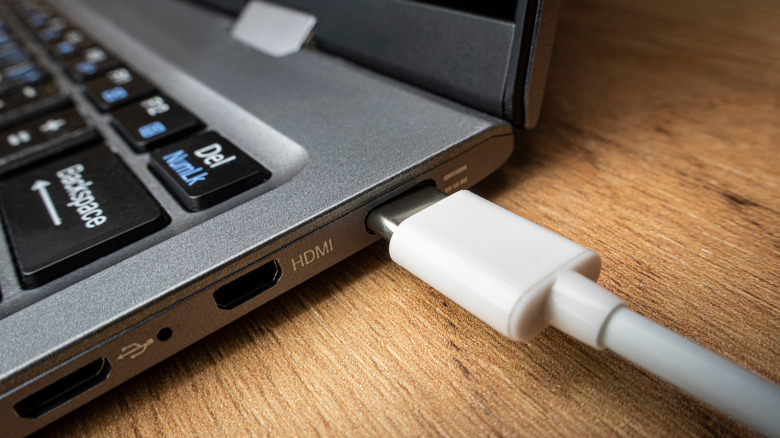
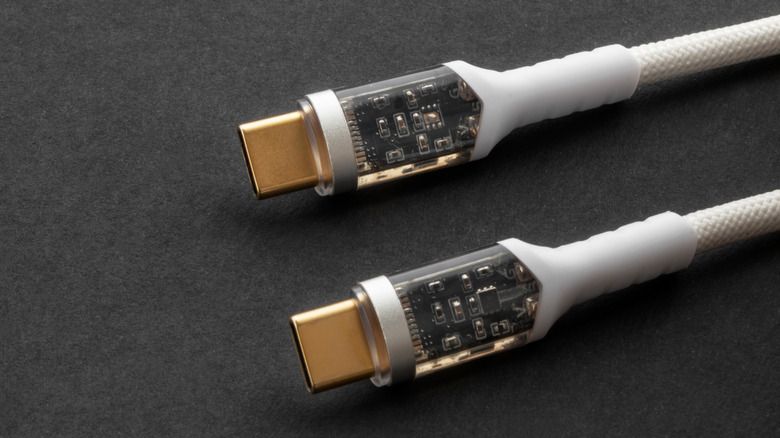
With the growing number of devices that most people use today, be it smartphones, smartwatches, laptops, wireless earbuds, and other gadgets, charging them quickly and efficiently becomes important. That’s exactly the problem USB PD aims to solve. But what exactly is USB PD, and what makes it so special? The ‘PD’ in USB PD stands for Power Delivery. USB PD is a universal fast charging standard used in most modern-day smartphones, laptops, tablets, monitors, and more. This enables you to use a single charger to power a variety of devices, eliminating the need to carry different chargers. USB PD was first launched back in 2012 and is currently in its third revision. The latest version can deliver up to 240W, while the older versions, namely USB PD 1.0 and 2.0, topped out at 100W. While those earlier versions worked with USB-A to USB-C cables, USB PD 3.0 requires USB-C on both ends. >>>Replacement battery for HP Officejet 100 150 H470Why is USB PD special?
Higher power output isn’t the only feature that makes USB PD special. It also supports multiple voltage levels like 5V, 9V, 15V, and 20V, and enables communication between both the charger and the connected device to determine the appropriate voltage level. For instance, if a smartphone only requires 18W, the USB PD charger will only supply exactly that. Similarly, a lower power headset will only receive the power it needs. This not only reduces energy waste and prevents overheating, but also makes the charging process safer. >>>Replacement battery for MSI Summit E13FlipEvo A11MT-205RU-WW71185U16GXXDX10PAnother feature that separates USB PD from other charging technologies is its bidirectional power delivery. While older USB chargers can only deliver power from the charger to the device, USB PD allows the power to flow both to and from the device. This means that you can use a smartphone that supports USB PD to charge another device, such as a laptop.To take full advantage of USB PD, you need to have a charger, a cable, and a device that all support the standard. Also, it’s important to note that while USB PD is capable of delivering up to 240W of power, most smartphones max out around 45W, and laptops usually demand up to 100W of power. That said, companies like Oppo have been working on a 240W charger, so it’s likely only a matter of time before the higher wattage support becomes a standard across devices.
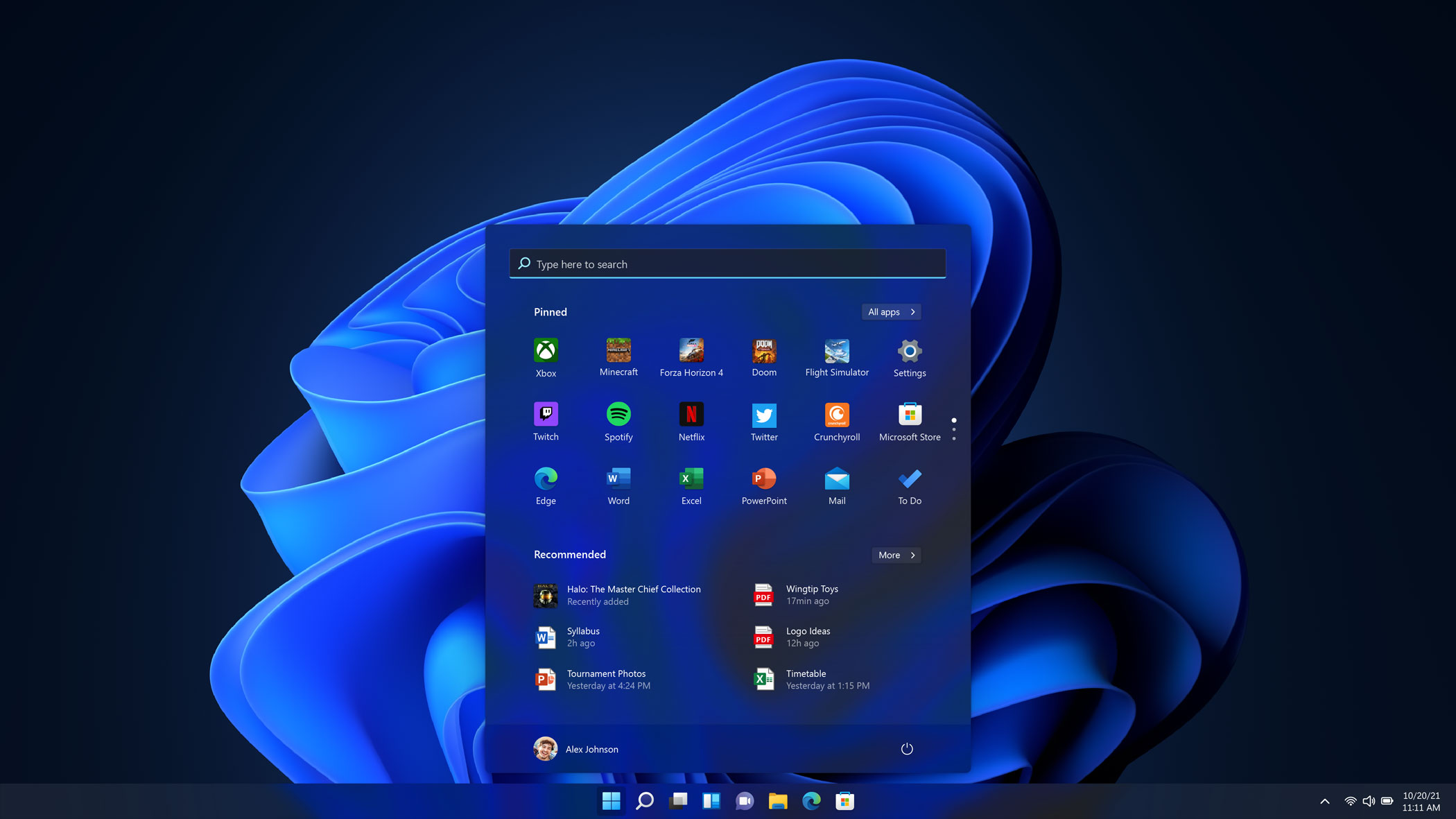
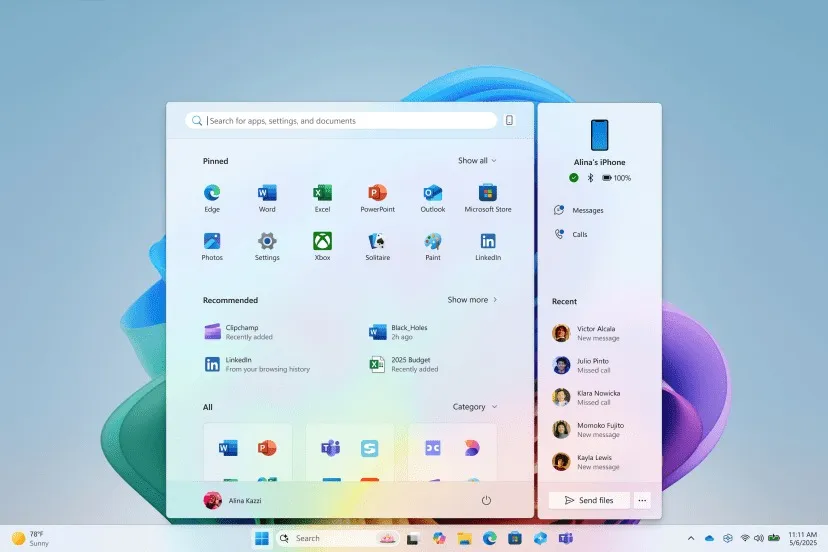
Over the next month, Microsoft is rolling out a revamp of theWindows 11Start menu alongside a number of new AI features. It’s a wider with an all apps view that is roomier and easier to scroll.
As reported byThe Verge, the updated menu will also be getting a new phone companion panel, meaning that you can access your contacts, messages, calls and more on a synced Android or iPhone device.
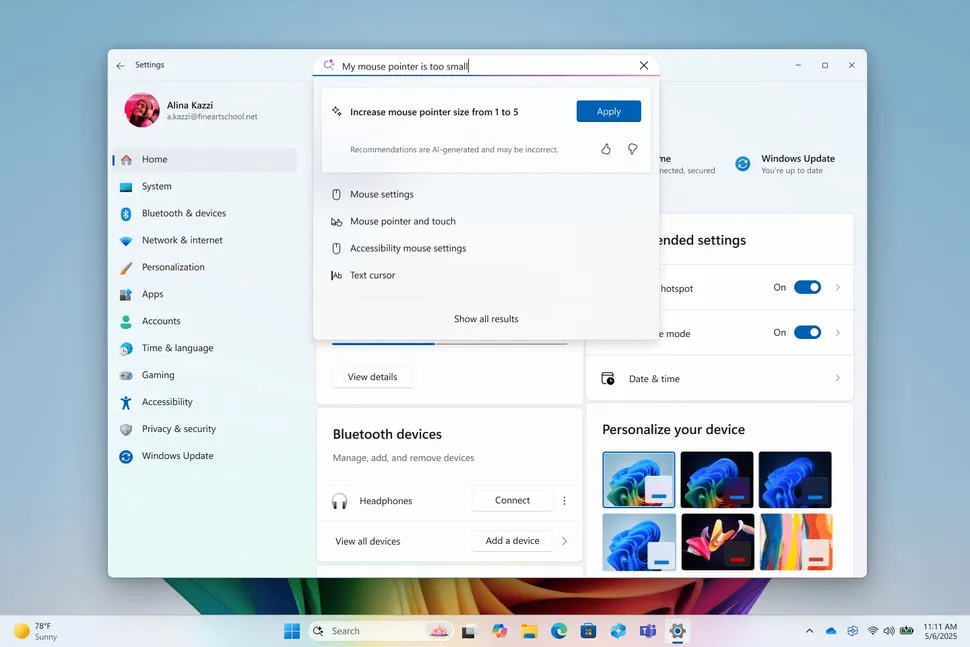
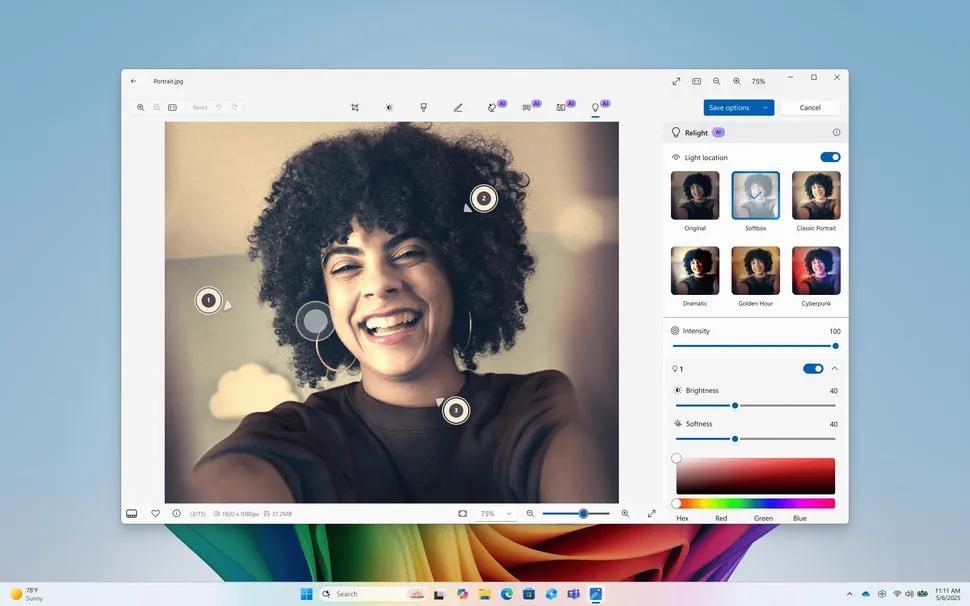
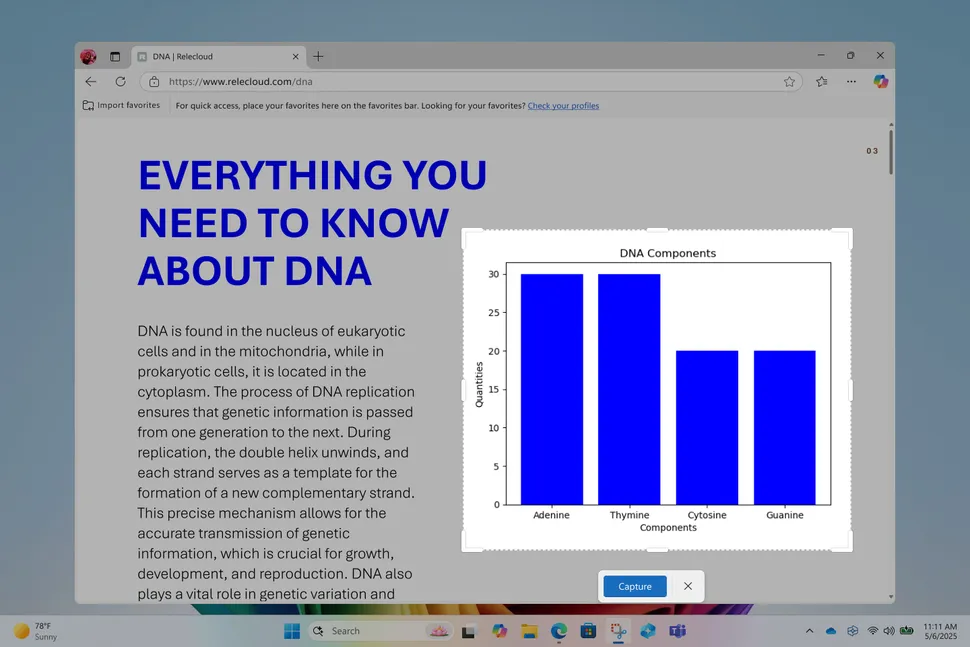
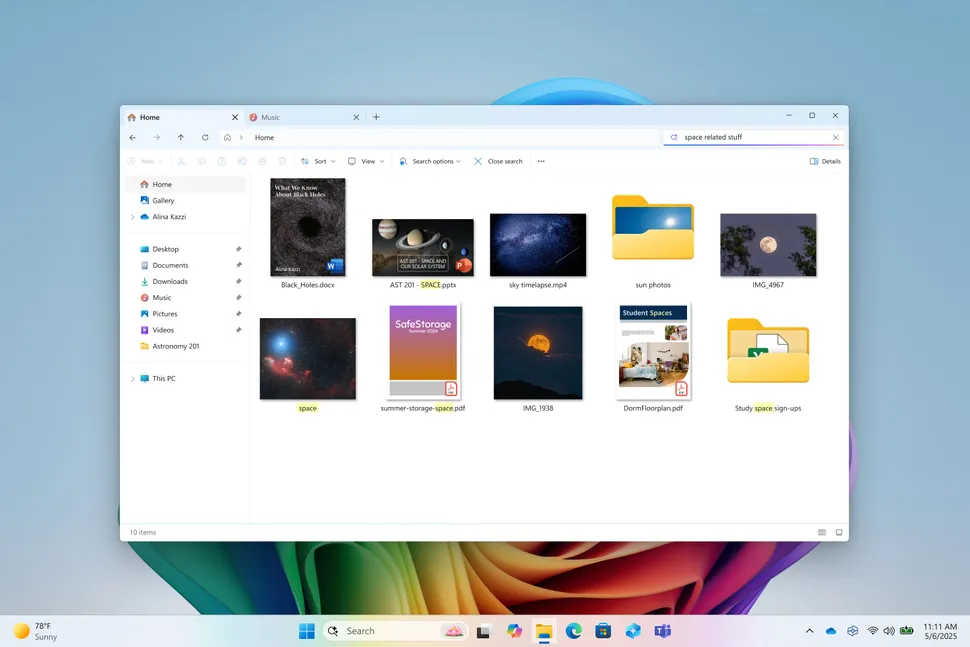
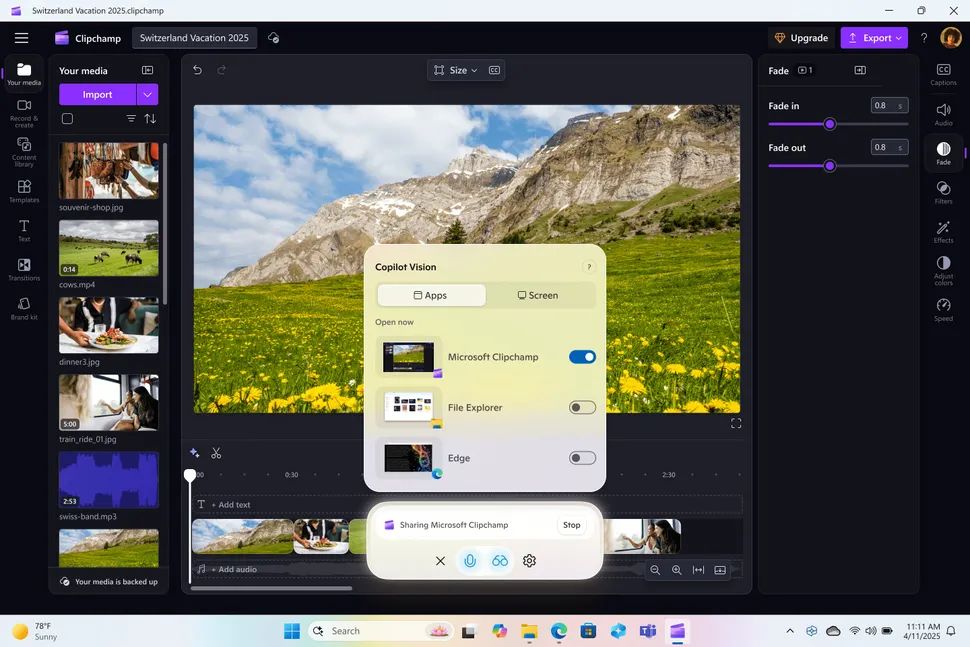
Alongside that, a number of AI features are coming that can be accessed via the Start menu or the Windows setting menu. Non-menu AI features include AI editing tools in Paint, Photos and the Snipping tool, additional Click to Do text and images actions, Copilot Vision visual search, improved Windows Search, writing functions in Notepad, and AI actions in File Explorer.
Microsoft has a blog post breaking down the features and says the new features “make our experiences more intuitive, more accessible and ultimately more useful.”
With the on-device AI, you can use it to adjust Windows Settings or troubleshoot problems.
Microsoft says that Windows will provide a warning that says, “Recommendations are AI-generated and may be incorrect.” A concerning warning to get before making changes to settings on your computer.
If you use Microsoft’s built-in apps for image editing, there are new features in three main apps. The Paint app is getting a content-aware selection tool that can add generative fill, and move or erase portions of the image. It can also be used to generate stickers via text prompts.If you use Microsoft’s built-in apps for image editing, there are new features in three main apps. The Paint app is getting a content-aware selection tool that can add generative fill, and move or erase portions of the image. It can also be used to generate stickers via text prompts.
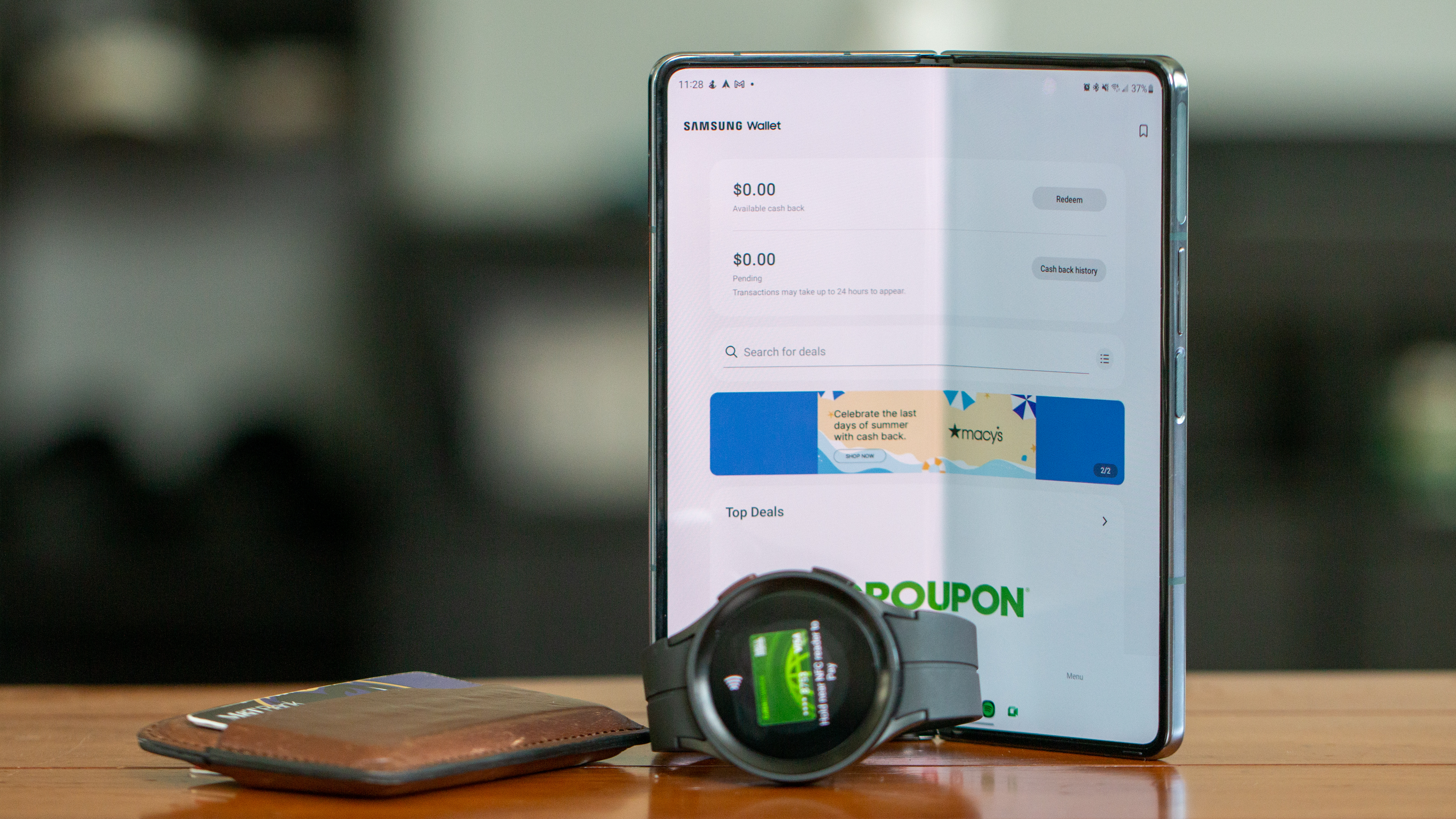
Samsung’s new Tap to Transfer makes sending money as easy as a phone bump, and it’s rolling out to the US later this month.
Debuted with the Galaxy S25, this feature is Samsung’s answer to Apple’s Tap to Cash, but more open and flexible.
It’s backed by Visa and Mastercard, so you can send money using your debit card inside Samsung Wallet.
Splitting the bill after dinner or concert tickets is always a pain. But Samsung just made things a whole lot easier with the new “Tap to Transfer” feature forSamsung Wallet.
Samsung first showed off its peer-to-peer payment method when it launched theGalaxy S25series earlier this year. It works a lot likeApple’s “Tap to Cash,” where iPhone users can just bump phones to send money.
But unlike Apple’s walled garden, Samsung’s version plays nice with a bunch of third-party digital wallets too.pay friends with just a tap.
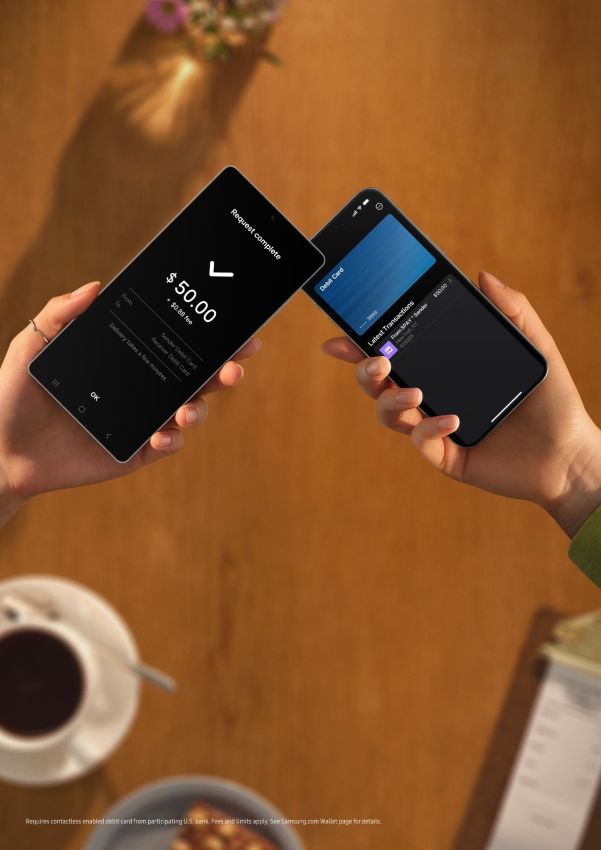
Starting later this month in the U.S., users can send money to friends and family just by tapping theirSamsung phonestogether.
Samsung says it has teamed up with Visa and Mastercard to let users send funds using their debit card stored in Samsung Wallet. If the person you’re sending to also has their debit card set up in a digital wallet, the cash moves instantly with just one tap.
(Image credit: Samsung)
Nonetheless, even if they don’t have a digital wallet, it still works — as long as they’ve got a physical debit card with tap-to-pay powers, Samsung Wallet can link up via the chip.
If you need to send money from a distance, you can just find your contact by their phone number and send cash their way, no matter where they are.
Samsung Wallet already lets you store everything from your driver’s license and student ID to that random coffee shop loyalty card you forgot existed. This new update turns it into an all-in-one life organizer and money mover.
And in case you’re wondering, the money shows up within minutes (depending on your bank).
It’s worth pointing out that Tap to Transfer isn’t locked into Samsung’s ecosystem. It’ll also work with a bunch of third-party digital wallets. That’s because it taps into your existing accounts and debit cards, not just Samsung’s own setup.
Of course, there might be some limits or fees depending on your bank, and not every card will play nice from day one. But for Galaxy users, this could mean the end of payment app hopping.
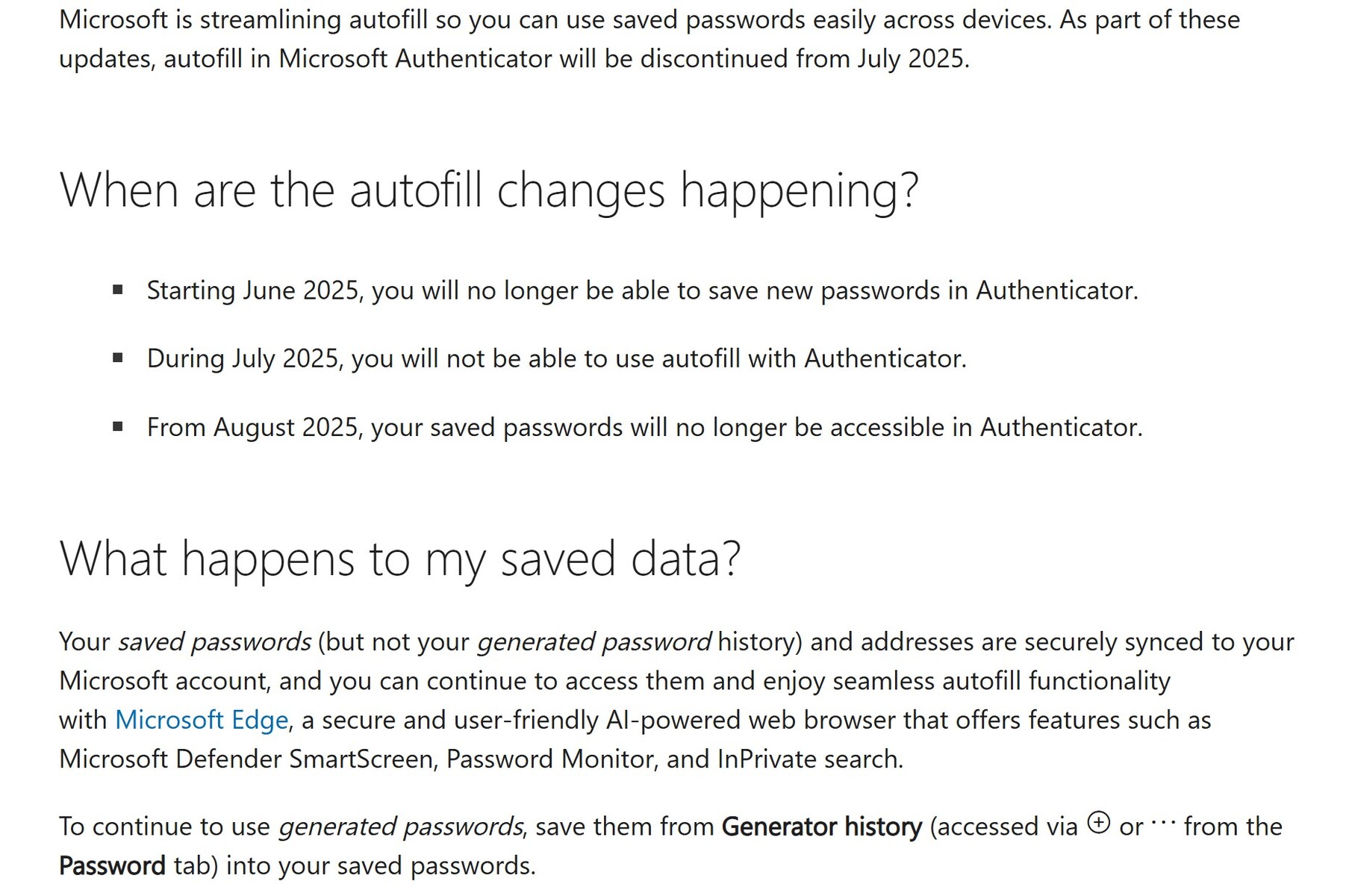
Microsoft Authenticator will lose the ability to store and autofill passwords August 1, 2025. All users of this app should immediately back up all saved and generated passwords up to prevent loss of access to email, banking, and other accounts.
Microsoft Authenticator will delete generated passwords August 2025 – Back up your passwords now. (Image source: Microsoft)
The Microsoft Authenticator app for Android and Apple iOS devices will lose password storage and autofill capabilities from August 2025.
All usersshouldimmediately back upstoredand generatedpasswordsto prevent loss of access to their important email, banking, and other online accounts.
There are two types of passwords in Authenticator – stored passwords saved to Authenticator and the linked Microsoft account, and generated passwords that have not been saved. All generated passwords will be deleted on August 1, 2025. After this date, access to ONLY saved passwords will only be possible using Microsoft Edge logged into the same Microsoft account.
Additionally, all payment information will be deleted from Authenticator on July 1, 2025.
Given the possibility of password loss during this change over, all users should write down each and every stored password as well as each and every generated password. Users can also use screenshots, copying passwords to a text file, or other means.
Make certain todouble-check each recorded password for accuracy.
Readers looking for an alternative password manager can look at open-source KeePassand itsalternatives.
Those who don’t trust software 2FA apps like Microsoft Authenticator might want to research hardware 2FA devices like the Yubico 5C NFC (sold here on Amazon). Remember to buy at least two hardware 2FA keys and store one in a bank or other offsite location.
Screenshot of Microsoft Authenticator password storage changes. (Image source: Microsoft)
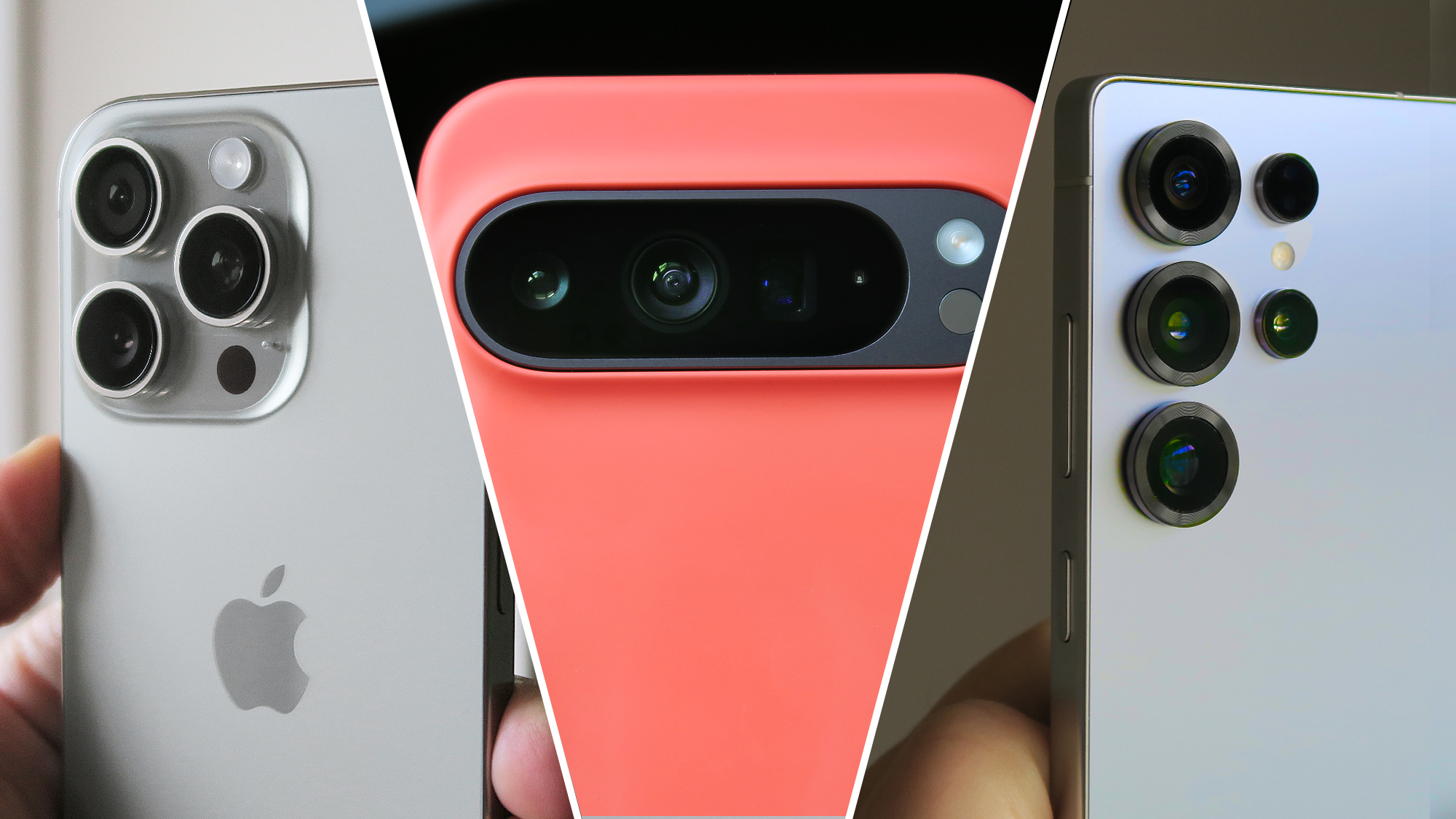
iPhone 16 Pro (left), Google Pixel 9 Pro XL in a Mous case (center), Samsung Galaxy S25 Ultra (right)
Apple,Google, andSamsunghave long battled it out in the smartphone space, and in no area is the competition more intense than camera capabilities.
The iPhone’s consistency and video prowess are the stuff of legend, Google is forever pushing the envelope with its AI-backed image processing, while Samsung tends to throw as many megapixels and lenses at the situation as possible, brute-forcing its way to photographic supremacy.
With so many variables to what defines thebest camera phone(and more importantly, the best camera phonefor you), only a direct comparison can really unpick where each of these mobile titans’ latest flagships takes the lead.
As such, in this guide, we’ve compared theiPhone 16 Pro,Pixel 9 Pro,andGalaxy S25 Ultra– aka the best camera phones Apple, Google, and Samsung currently offer – to discern their strengths, weaknesses, and if there really is an all-out winner.
Note:Unless otherwise specified, comparison shots in galleries are presented in the following order: iPhone, Pixel, Galaxy.
Camera Control, Smart HDR 5, LiDAR scanner, Apple ProRAW, Dolby Vision HDR recording at up to 4K 60fps, LOG video recording, Academy Color Encoding System, Cinematic video recording, latest-gen Photographic Styles
Pro controls, 10-bit HDR video, Magic Editor, Best Take, Add Me, Photo Unblur, Motion Mode, Real Tone, Night Sight, Astrophotography, Top Shot, Live HDR+, Video Boost
ProVisual Engine, Reflection removal, Generative fill, Astrophotography, Pro Mode, Pro VideoMode, Dual Recording, Nightography, Instant Slow-mo, Photo Assist, Super HDR, Super Steady video
Main sensor
First, we’re comparing shots from each phone’s main sensor; as if you’d just opened the camera app, framed up, and tapped the shutter. As such, no settings have been changed and the phones have been allowed to focus and expose based on their own assessment of each scene.
Not only was Liz West’s ‘Fluorescence’ evenly lit by a bright, rainy London sky – perfect for testing each phone’s dynamic range and exposure management in a high-contrast scene – but the neon wrap around the tetrahedral ‘tree’ itself was a great way to gauge each phone’s color accuracy too.
The iPhone delivered the darkest image, preserving the most cloud detail, while at the same time crushing details in the darkest parts of the scene most prominently. In contrast to its competitors, the colors of the tree also lacked the same degree of vibrancy.
Characteristically for a Pixel, the 9 Pro’s camera served up a notably warmer image than the iPhone or Galaxy. It also appeared to flatten out the scene, diminishing contrast. Despite less sky detail, it actually proved to be the sharpest shooter throughout the rest of the scene, minimizing motion blur and even picking out individual tiles on the wet roof of Coal Drops Yard, to the right of frame.
Samsung’s latest Ultra delivered the nicest image overall, showcasing the best dynamic range and characteristically vibrant colors. In the past, Samsung’s post-processing has been known to be heavy-handed, but with its last few generations of flagship, the results out of its cameras have displayed a lot more nuance, and that’s evident with what was delivered here.
Winner:Galaxy S25 Ultra
Kova Patisserie
Against this artificial lighting, the iPhone nailed the white balance, but again, it pushed contrast past what you’d consider a natural shot, crushing details in the dark grooves of the Oreo cookie.
The result from the Galaxy S25 Ultra was similar, with excessive contrast and sharpening applied to the scene, along with a magenta tinge to the phone’s white balance.
Google’s latest flagship captured a warmer image than its competitors, but only by a hair. The shot otherwise demonstrated the best command of dynamic range, color accuracy, and detail, delivering the most appetizing scene overall.
Winner:Pixel 9 Pro
St Paul’s Cathedral
London’s largest cathedral is adorned with fine sculptural detail, while the slivers of blue sky peeking through the clouds give us insight into each brand’s post-processing preferences.
The iPhone produced the most appealing shot overall, with the building’s stonework being brought into stark relief as a result of the phone’s proclivity for high-contrast processing.
There’s also obvious brightening of the subject from both Apple’s and Samsung’s phones, but the 16 Pro delivers superior results and even manages nicer color reproduction.
The Pixel prioritizes correct exposure of the sky, leaving the cathedral itself looking under-exposed and dynamically flat. Detail capture is once again excellent, however.
While all three of these phones possess dedicated macro modes – which rely on their secondary ultra-wide snappers – they’re all also capable of taking great close-up shots with their superior main sensors, which is what’s tested here.
The iPhone turned out the brightest shot, but heavy post-processing (namely too much contrast and over-saturation), as well as the least natural-looking bokeh (the background blur), resulted in an unflatteringly unrealistic-looking scene.
Samsung came in second, thanks to nicer bokeh and more consistent colors across the frame, but oversaturation and lackluster detail capture placed it behind the Pixel.
Although colors appear notably more muted than its competitors’ shots, the Pixel 9 Pro captured the best foreground detail while dressing the most convincing bokeh fall-off in the background. The color processing was also the most true-to-life; if only exposure had been a little higher, it would have been the perfect shot.
Winner:Pixel 9 Pro
Motion
When light is plentiful, unless you choose to fiddle with settings or use a specialized shooting mode, all three of these high-end phones should be able to freeze motion and deliver a crisp shot. In practice, however, the results were a little surprising.
Once again, the iPhone and Galaxy sported the most like-minded approach to the scene, albeit with superior color reproduction from the S25 Ultra, while the water pouring from the lions’ mouths was frozen well enough.
The Pixel surprised by opting for a longer exposure in the pursuit of higher detail capture compared to its peers, at the expense of motion blur in the water in the center of the frame. The shot came out uncharacteristically cool for a Pixel, too.
While this is perhaps one of the most subjective scenes in this comparison, Samsung’s phone took the best motion shot, while the Pixel captured better overall frame detail.
Winner:Galaxy S25 Ultra
Zoom
Just as withlast year’s three-way camera comparison, Samsung’s latest Ultra device once again offers the most versatile photographic hardware for zoom capture.
It boasts dedicated 3x and 5x telephoto snappers, as well as a ceiling of 100x magnification (which, although not necessarily usable in its own right, helps provide headroom to any zoom shots beyond 10x magnification). This doesn’t automatically render it the best long-range camera phone here, though.
Across the iPhone’s (above) ultra-wide, main and 5x tetraprism telephoto, you can capture lossless 0.5, 1x, 2x and 5x shots, with a peak 25x magnification.
With the high-contrast scene of Elizabeth Tower, the ultra-wide actually demonstrated impressive dynamic range, while the rest of the phone’s zoom range was consistent with itself, but otherwise badly underexposed; most evident in comparison to both the Pixel and the Galaxy.
Nonetheless, detail through its entire focal range was good, even if shots fell behind in overall presentation.
The Pixel 9 Pro’s ultra-wide and 1x shots sport noticeably different processing to the rest of its focal range, with the limitations of the phone’s dynamic range leading to a little under-exposure at these lower magnifications.
Once the bright cloud is out of frame, the images taken at 2x, 5x, 10x, and 30x offer far greater consistency and even exposure. Google’s algorithmic detail retention is impressive too, with more natural-looking fine details at higher focal lengths, compared to the S25 Ultra.
Although the Pixel put out brighter shots at higher focal lengths, the S25 Ultra proved the most consistent entry of the trio, across dynamic range, color reproduction and detail retention.
It also retained the most detail in the clouds and offered up more true-to-life color science compared to the Pixel in this particular scene. Not to mention, all of the additional telephoto hardware does result in greater versatility when shooting at range.
Winner:Galaxy S25 Ultra
Low light
Testing these phones’ low-light capture capabilities revealed some of the most stark differences between how each manufacturer tackles such scenarios. While both test scenes included obvious light sources, the settings are dark overall, and pose a complex challenge to each phone’s processing.
While the scenes used here emulate more common low-light environments, one caveat would be that extreme low-light capture and specialized shooting scenarios – such as astrophotography – are best left to the Pixel.
Neon sign
The 16 Pro delivered the most true-to-life shot, with accurate white balance and pleasing color reproduction on the neon lighting itself, with impressive detail retention towards the edge of the frame.
The Pixel 9 Pro, meanwhile, prioritized exposing the sign itself as accurately as possible, even if that meant the rest of the scene was left drab and dark.
As for the Samsung, it took things in the opposite direction, brightening the darkest areas for a flatter, brighter overall result that lacked the impact of the iPhone’s image, while also misjudging color accuracy, creating an overtly warm image, with an almost sickly green artificial look to it.
Piccadilly Circus by night
While this scene has an obvious bright spot, the rest of the frame is otherwise in darkness.
The Pixel once again prioritized correctly exposing the brightest part of the scene, at the expense of darker areas of the frame, including detail work on the Shaftesbury Memorial Fountain. Apple’s and Samsung’s phones, meanwhile, took a similar approach to one another.
The S25 Ultra handled the bloom from the screen wrapping around the fountain more handily, but overall detail, colour accuracy, and white balance have to go to the iPhone here.
Winner:iPhone 16 Pro
Conclusion
Over the ten categories explored here, the Galaxy S25 Ultra’s camera system pips both the iPhone and Pixel to the post, with its rivals tying for joint second.
There’s an undeniable degree of subjectivity here, with some of the decisions made by the camera engineering teams behind these three phones not necessarily being empirically better than another, but just preferred by the photographer.
That said, each phone demonstrated a technical superiority over its rivals in one area or another, while feature sets further deepen each phone’s camera experience beyond what’s explored here.
Regardless of which phone wins you over, know that you’re getting one of the best smartphone snappers available today.