WHAT DOES LTE STAND FOR? THE MEANING BEHIND THE ACRONYM (AND WHY IT’S USED)

LTE concept graphic

Most of us ignore that little “LTE” symbol in the corner of our screens, but real chaos is unleashed when it disappears. Suddenly, loading a single webpage feels like you’ve time-traveled back to the dial-up era. Videos refuse to play, messages take forever to send, and you’re this close to hurling your phone at the wall.LTE is the reason modern mobile internet doesn’t feel like a patience test. Introduced in the late 2000s, it was a giant leap from 3G, delivering faster speeds, smoother streaming, and call quality that doesn’t sound like a tin-can telephone. Thanks to LTE, you can scroll TikTok for hours, binge Spotify on the go, and video call without freezing mid-sentence.5G might be the current buzzword, but LTE is still the backbone of mobile networks worldwide, keeping millions connected when 5G isn’t available. Let’s break down what LTE really stands for, and why it’s still the unsung hero of today’s mobile internet.>>>Replacement battery for Nokia 105What is LTE?
LTE icon repeated on blue and orange backgrounds

LTE, short for Long Term Evolution, is the technology that powers 4G mobile networks. Developed by the 3rd Generation Partnership Project (3GPP), it was designed as a major upgrade over 3G to boost data speeds, reduce lag, and make mobile internet more reliable overall.Before LTE, 3G networks struggled with limited bandwidth and outdated infrastructure. That meant slow browsing, video buffering, and dropped connections in busy areas. LTE fixed this by switching to a faster, all-IP system that took a more efficient approach to handling data.Instead of sending data in bulky chunks like 3G, LTE breaks it down into smaller packets that travel faster and smoother. It’s like upgrading from a pothole-ridden one-lane road to a smooth, multi-lane expressway — more data can zoom through at once, and you’re less likely to hit a traffic jam. LTE also cuts down on digital delays, slashing latency from around 100 milliseconds in 3G to as low as 30–50 milliseconds. That means smoother video calls, snappier apps, and lightning-fast searches.Under the hood, LTE runs on clever tech like OFDMA (Orthogonal Frequency-Division Multiple Access) and MIMO (Multiple Input Multiple Output), which basically let your device juggle more data streams at once. That brainy backend is what made LTE fast enough to unlock modern conveniences, from ride-hailing apps to real-time maps, and set the stage for everything mobile networks would become.>>>Replacement battery for Nokia TN-BP5000N1Wait…aren’t 4G and LTE the same thing?
4G LTE concept graphic

They’re often used interchangeably, and for most people, they feel the same. Your phone says “4G,” your videos load fast, life is good. But under the hood, there’s a technical distinction. 4G is the broader category — a generation of mobile tech. LTE is the specific technology that made 4G possible in the first place. In other words, 4G is the destination and LTE is the bridge that made it possible to cross over.When LTE first launched, it failed to reach the International Telecommunication Union’s rigorous standards for what constitutes a “true 4G,” namely 100 Mbps from a mobile position, and 1 Gbps on a stationary one.  Still, because it was so much faster and more efficient than 3G, carriers (and the public) ran with it and called it 4G anyway.Eventually, LTE got a major upgrade: LTE-Advanced (and later LTE-A Pro). These versions did meet the ITU’s original 4G standards, so if we’re being technical, they’re the real 4G, and while all LTE is considered part of the 4G family, not all LTE versions are technically “true” 4G.>>>Replacement battery for Nokia 105 4GSo, will 5G replace 4G and LTE?

5G concept graphic

Not immediately, and not entirely. 5G might be the next big leap in mobile networks, but it doesn’t make 4G LTE obsolete. In fact, many 5G deployments today are non-standalone (NSA), meaning they still rely on the existing LTE infrastructure to deliver service. It makes it possible for mobile carriers rolling out 5G to do it faster and more affordably, since they’re not necessarily starting from scratch.It’s part of the broader story of how mobile networks evolve. Rather than replacing older generations outright, each new standard is an iteration in a longer chain of progress: LTE itself was a leap from 3G, which evolved from GSM and UMTS standards before it. And just like LTE paved the way for 5G, 5G will lay the groundwork for whatever comes next. It’s less like swapping phones and more like adding storeys to a skyscraper.So, will 5G eventually replace LTE? Yes, but gradually. As standalone (SA) 5G networks roll out and become the norm, LTE will gradually play a smaller role. But that transition will take years, especially in regions where LTE is still expanding.

Prices for these popular computer accessories are going up


MX Master 3S mouse

Logitech

Logitech has bumped up prices by up to 25% on a bunch of its products, probably because of tariffs on stuff coming in from China. A video breakdown byCameron Dougherty(via9to5Mac) shows that around 51% of Logitech’s lineup is feeling the impact, with an average price hike of about 14%.

For instance, the MX Master 3S mouse has increased by $20 to $119.99, the Pro X TKL keyboard shot up from $199.99 to $219.99, and the K400 Plus Wireless Touch keyboard is now $34.99 after a $7 increase (that’s a 25% jump!).

On the bright side, not everything has seen price increases—the MX Ergo mouse and the G703 gaming mouse are still at their old prices. You might even find better deals on Amazon, which could help balance out those hikes.

These price increases come right after Logitech pulled its financial outlook for 2026, thanks to “tariff uncertainty” tied to President Trump’s trade policies. It hadoriginally predictedsales for 2026 to be between $4.53 billion and $4.71 billion, but is still sticking with its2025 sales forecast.

Experts say Logitech’s pricing often sets the trend for other brands, so we might soon see similar increases from competitors.

In recent weeks, President Trump has announced various tariffs worldwide, leading to much uncertainty worldwide.

>>>Replacement battery for Logitech MX Anywhere3

Currently, China is facing exceptionally high tariff rates from the Trump administration. These began with a 10% tariff on all imports from China that took effect February 4, 2025, which was then increased by another 10% on March 4.

The tariff situation has escalated significantly, with China now facing up to a 245% tariff on some imports to the United States. This includes a 125% “reciprocal” tariff, a 20% tariff related to the fentanyl crisis, and existing Section 301 tariffs that range from 7.5% to 100% on specific goods.

>>>Replacement battery for Logitech G435 Lightspeed

Unlike other countries that received a 90-day pause on new tariffs above the 10% baseline, China has been excluded from this reprieve. While imports from most other countries maintain the 10% baseline tariff, China’s minimum tariff rate was increased to 145%.


WHAT IS A USB TO SERIAL ADAPTER USED FOR & DO YOU NEED A DRIVER FOR ONE?

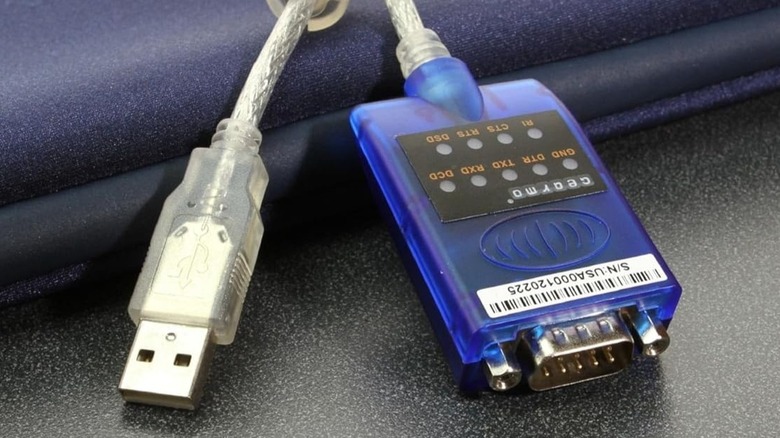
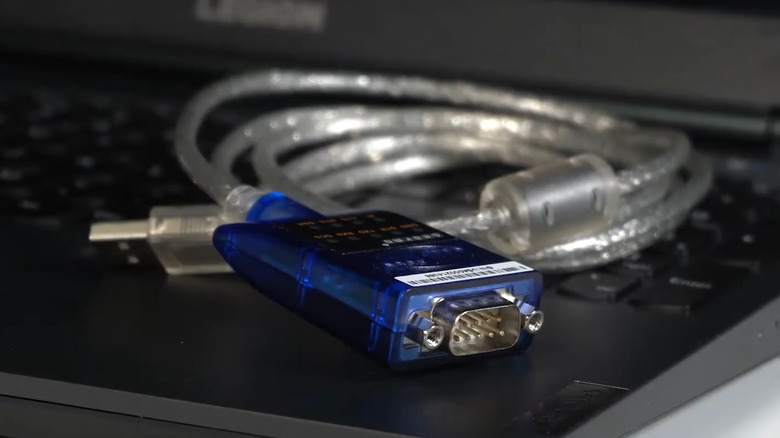
USB to serial adapter on a laptop keyboard

As technology has advanced, the types of ports on computers have also changed for the better. However, that doesn’t mean devices with older connectors and ports are completely useless. You just need the right USB adapters to make them work. One such adapter is the USB to serial converter, which is used for connecting various legacy devices to modern computers. The USB to serial adapter has a USB-A port on one end and a serial port on the other. The serial port is most commonly RS232, which is a standard that dates back to the 1960s. Although RS232 is the most widely used, these adapters can also feature RS485 or RS422 serial interfaces. They include a chip that allows computers to communicate with the legacy hardware device. In general, these adapters are used for connecting devices, such as printers, scanners, modems, scales, and GPS trackers. They are also commonly used with industrial equipment like Point of Sale (POS) systems, barcode scanners, data-gathering sensors, and microcontrollers. An important thing to note about USB to serial adapters is that not all of them are the same. They can vary in terms of supported baud rates, cable types, duplexing capabilities, and more. So, when buying one, you’ll need to consider several factors, like the type of devices you want to connect to, the number of serial ports you need, whether it requires external power, and more.>>>NL2044HD22 battery for Inspired EnergDo you need a driver for USB to serial adapter?

USB to serial adapter on blue and gray surface.jpg

Most USB to serial adapters require you to install the necessary drivers on your computer. However, some of these adapters offer plug-and-play functionality, in which case the operating system uses a generic driver to communicate through the adapter. In such cases, you may not be able to use specific features, such as adjusting the baud rate, without installing the manufacturer-provided drivers. >>>575983 battery for VAIO VWNC71429-SLInstalling the drivers for the USB to serial adapters is fairly straightforward. You first need to visit the manufacturer’s website, search for your adapter model number and download its driver installation file. Then, simply unzip the file, run the installer, and follow the on-screen prompts to finish installing the missing driver. The setup wizard may ask you to reboot the PC to complete the installation. Once you’ve gone through this process, you can use the USB serial adapter by simply plugging it in.All in all, USB to serial adapters are quite easy to use. They help extend the life of legacy equipment and eliminate the need for expensive hardware upgrades.

Prices for these popular computer accessories are going up

MX Master 3S mouse

Logitech

Logitech has bumped up prices by up to 25% on a bunch of its products, probably because of tariffs on stuff coming in from China. A video breakdown byCameron Dougherty(via9to5Mac) shows that around 51% of Logitech’s lineup is feeling the impact, with an average price hike of about 14%.

For instance, the MX Master 3S mouse has increased by $20 to $119.99, the Pro X TKL keyboard shot up from $199.99 to $219.99, and the K400 Plus Wireless Touch keyboard is now $34.99 after a $7 increase (that’s a 25% jump!).

On the bright side, not everything has seen price increases—the MX Ergo mouse and the G703 gaming mouse are still at their old prices. You might even find better deals on Amazon, which could help balance out those hikes.

These price increases come right after Logitech pulled its financial outlook for 2026, thanks to “tariff uncertainty” tied to President Trump’s trade policies. It hadoriginally predictedsales for 2026 to be between $4.53 billion and $4.71 billion, but is still sticking with its2025 sales forecast.

Experts say Logitech’s pricing often sets the trend for other brands, so we might soon see similar increases from competitors.

In recent weeks, President Trump has announced various tariffs worldwide, leading to much uncertainty worldwide.

>>>Replacement battery for Logitech MX Anywhere3

Currently, China is facing exceptionally high tariff rates from the Trump administration. These began with a 10% tariff on all imports from China that took effect February 4, 2025, which was then increased by another 10% on March 4.

The tariff situation has escalated significantly, with China now facing up to a 245% tariff on some imports to the United States. This includes a 125% “reciprocal” tariff, a 20% tariff related to the fentanyl crisis, and existing Section 301 tariffs that range from 7.5% to 100% on specific goods.

>>>Replacement battery for Logitech G435 Lightspeed

Unlike other countries that received a 90-day pause on new tariffs above the 10% baseline, China has been excluded from this reprieve. While imports from most other countries maintain the 10% baseline tariff, China’s minimum tariff rate was increased to 145%.

Google Chrome finally brings the long-awaited bottom address bar for Android

Android users get to rejoice as Google introduces a functionality iOS has had since 2023.

Google Chrome logo on an Android phone held in one hand.

What you need to know

  • Google Chrome 135 on Android introduces a long-requested bottom address bar feature this week.
  • The said feature had been available for iOS users since 2023, and other browsers like Samsung Internet have also had this feature for a while.
  • The latest feature update has been popping up for Chrome on Android this week, and a wider roll out is expected soon.

Google Chrome users will now have an easy way to browse, especially for large-screen phones. The search giant has started rolling out a new update, which shifts the address bar from its conventional top position to the bottom.

According to9to5Google, Google has initially tested the bottom address bar on its Chrome app for Android last October, and the company is now rolling it out to the stable version of the browser app onAndroid phones.

>>>Replacement battery for Google Pixel 9 Pro Fold

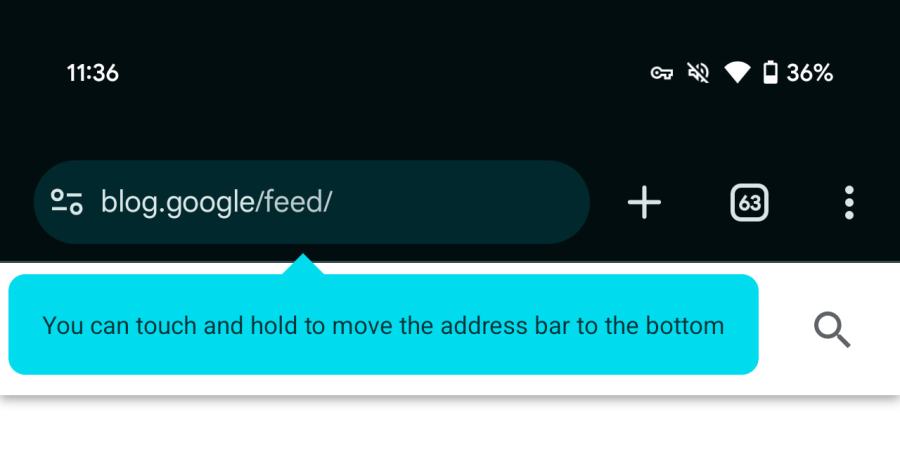
Chrome 135 bottom address bar option

(Image credit: 9to5Google)

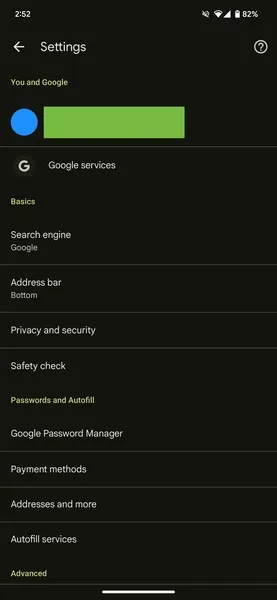
The publication further notes that some users on the stable build, which is the Chrome 135 version, are already seeing the new prompt “You can touch and hold to move the address bar to the bottom.” Alternatively, Chrome settings also has a new section dubbed “Address bar” that allows users to change its placement to top or bottom, per their preference.

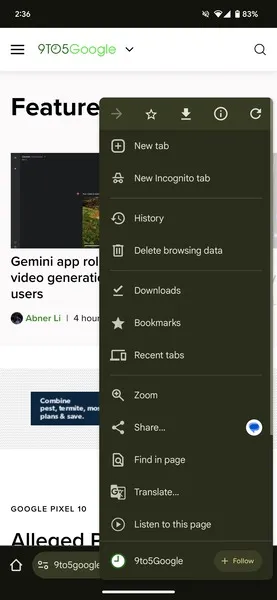
Further, aside from the positioning, nothing significantly has changed with the new address bar. The three-dot menu and its options like new tab, incognito tab, bookmarks, and history remain the same, and users would still have to reach for the top of the screen to get them, while having them reordered to the bottom would have been ideal as they are the most used options while browsing.

>>>Replacement battery for Google Pixel Fold

(Image credit: 9to5Google)The said feature appears to have just started popping up on the Chrome 135 version this week, and the wider roll-out of the feature is expected soon. It has been a widely requested feature as the phones today have become hard to reach to the top, especially when using with a single hand.

Such handy options are already available in browsers like Samsung Internet and Arc browser. It is good to see Google catch up and bring the most requested feature finally to Android devices, whereas iOS users havehad this functionalityfor a while now, since 2023 to be precise.