OnePlus AI with Plus Key and AI Plus Mind for personalized experience unveiled

OnePlus today introduces OnePlus AI, which the company described as “Intelligently Yours.” This marks a new phase in OnePlus’s strategy to deliver personalized artificial intelligence experiences.

Alongside this, OnePlus announced the Plus Key, a customizable hardware button debuting on theupcomingOnePlus 13s, along with a broad set of AI tools designed to improve productivity, creativity, and user privacy.

>>>Replacement battery for Auuc Oneplus IEC 62133-2 BA-E202-03

Plus Key: Personalized AI Features
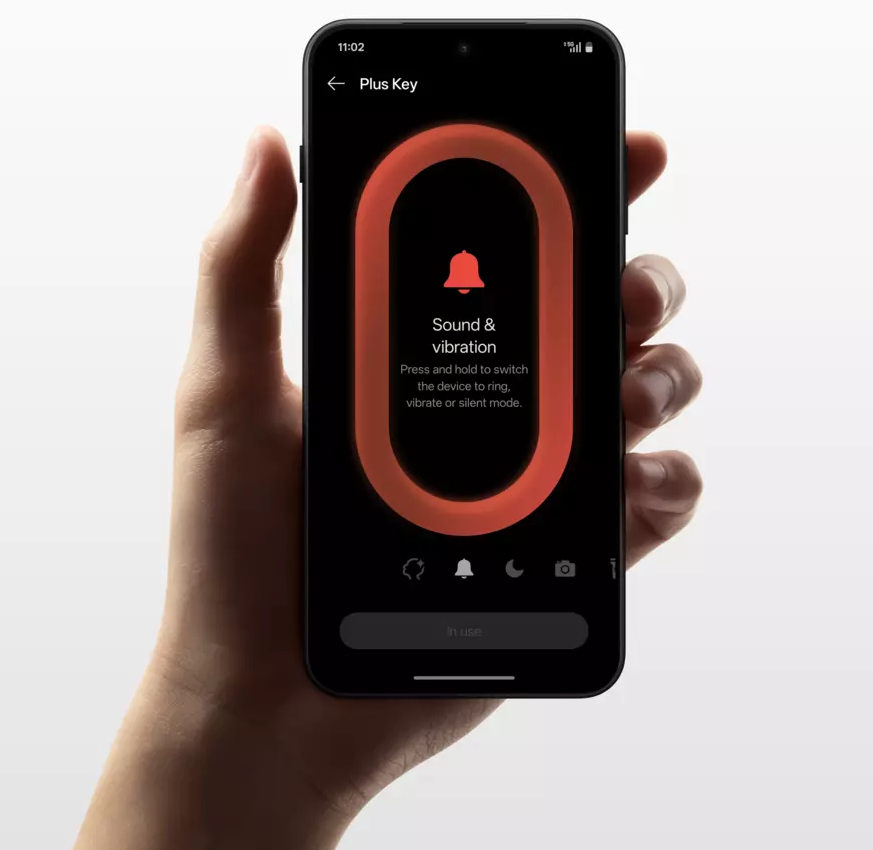
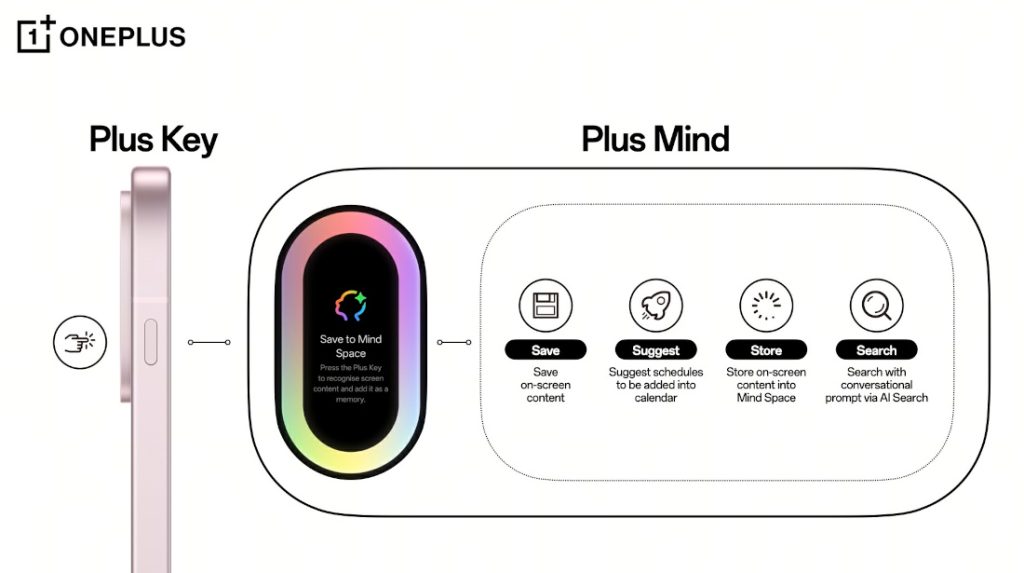
  • OnePlus has revealed the Plus Key, a new button positioned as a way to access the new OnePlus AI suite
  • The Plus Key replaces the Alert Slider found on OnePlus phones since the OnePlus 2
  • The Plus Key will come to all OnePlus phones launching this year

As the next evolution after the familiar Alert Slider, the Plus Key can be set to perform tasks like switching sound modes, opening the camera, starting translations, or launching recordings.

At the center of this update is AI Plus Mind, which activates either with the Plus Key or a three-finger swipe. It lets users save and organize important on-screen information — such as events, bookings, or listings — into a dedicated Mind Space, helping avoid information overload.

>>>Replacement battery for OnePlus 12 5G
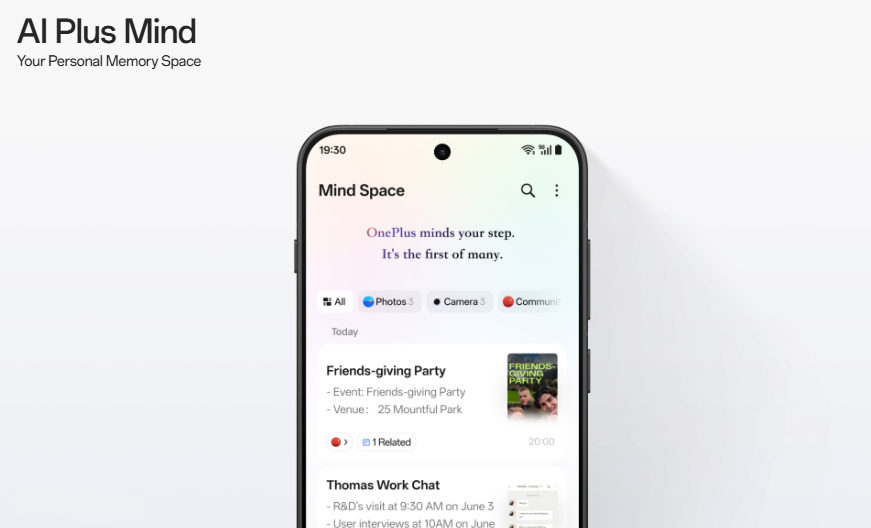
Beyond simple saving, AI Plus Mind uses artificial intelligence to understand the context of saved content. For example, it can pull event details from an image or message and add them directly to the user’s calendar.

Using AI Search, users will be able to locate saved content through natural language questions. Additionally, OnePlus intends to add automatic sorting features to AI Plus Mind before the end of the year.

>>>Replacement battery for OnePlus Ace 3
OnePlus AI: New Tools in Development

The company noted that OnePlus AI includes several new tools they are actively developing, all aimed at enhancing the user experience:

  • AI VoiceScribe: Records, summarizes, and translates calls or meetings across major messaging, video, and conferencing apps.
  • AI Call Assistant (India only): The Dialer app on the OnePlus 13s will provide features like automatic summaries of calls and real-time translations.
  • AI Translation: Combines text, live voice, camera, and screen translation into one streamlined app.
  • AI Search: Supports conversational searches across local files, settings, notes, and calendars, working together with AI Plus Mind.
  • AI Reframe: Analyzes photo scenes and suggests multiple creative framing options.
  • AI Best Face 2.0: Arriving via OTA in summer 2025, enhances group photos by fixing closed eyes and unflattering expressions, working with images of up to 20 people—including photos taken on other devices.
Integration with Google Gemini

OnePlus also announced deeper integration with Google Gemini. Soon, Gemini will work across OnePlus apps like Notes and Clock, as well as Google apps, creating a unified AI experience. Gemini Live will allow real-time conversations about what the phone’s camera sees or what’s displayed on the screen.

Privacy and Security

OnePlus emphasized its focus on privacy with its Private Computing Cloud (PCC). For sensitive tasks, AI processing runs securely on the device. If cloud processing is needed, the PCC keeps all data encrypted and protected through a Trusted Execution Environment (TEE) that secures the entire process — from device to cloud servers.

The company said its goal is to deliver “deeply personalized and secure AI experiences” through innovations like the Plus Key, AI Plus Mind, and PCC, aiming to create an AI system that fits naturally into daily life.

Availability

The company confirmed that AI Plus Mind willlaunchfirst on the OnePlus 13s on June 5, 2025, followed by a software update for other OnePlus 13 Series devices, with plans to expand to more models later.
WhatsApp just finally launched its much anticipated iPad app

It’s the classic WhatsApp experience, but bigger

WhatsApp

WhatsApp gets the impetus to be a e-commerce platform(Image credit: Shutterstock)

Meta is known for offering many apps, but not many of them support the iPad. That is changing now, though, at least for one that makes messaging and voice calls across the globe a breeze.

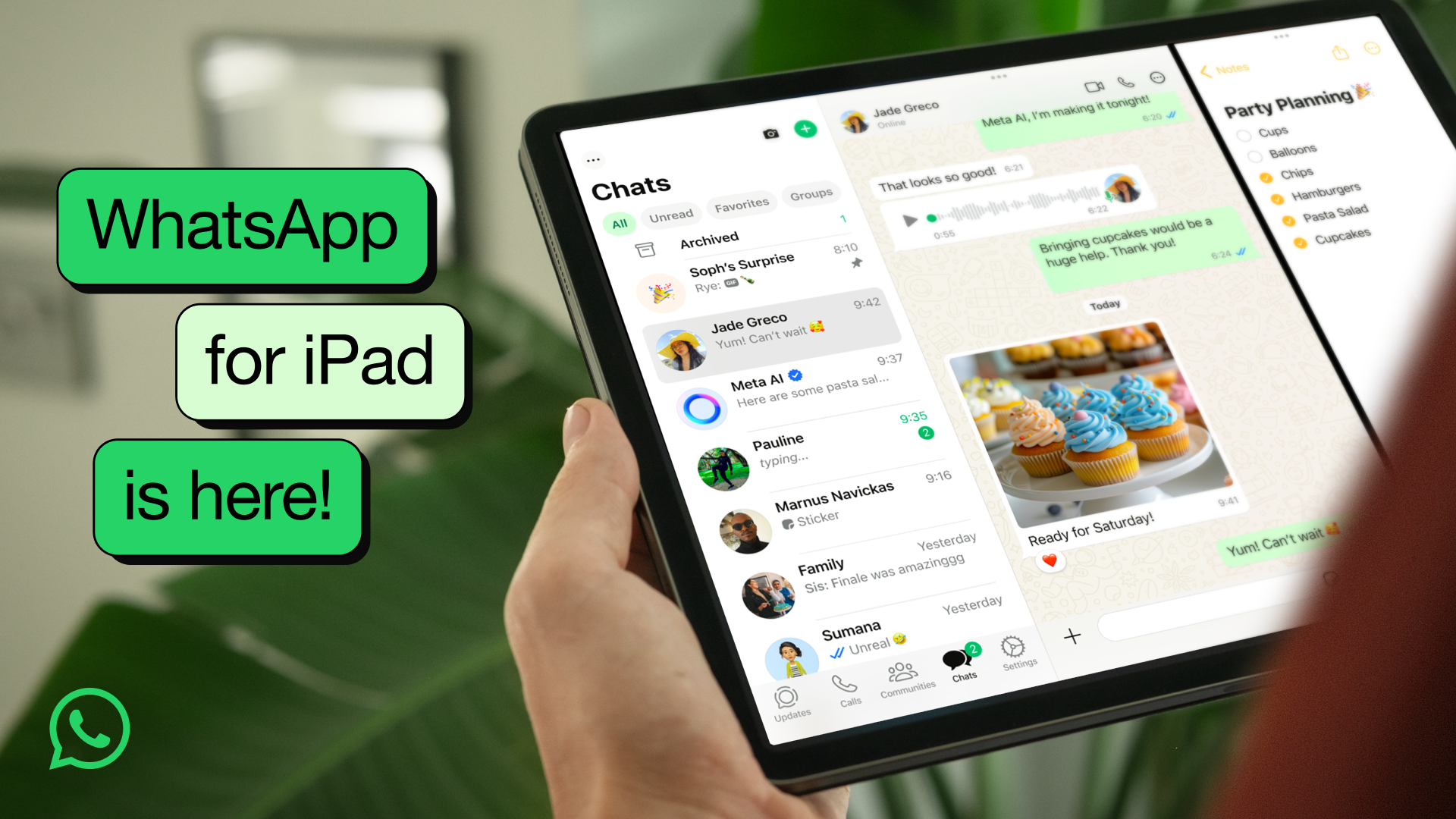
That’s right –WhatsAppis now full-sized on the iPad as the most recent build that hitApple’s App Store brings support for Apple’s tablet. It’s been a long time coming, andWhatsAppis even beating Instagram to the punch.

While the release notes for the latest build, 25.16.81, don’t mention anything special, this fresh piece of code does enable support for the iPad. Once you’ve updated, it’ll stretch and fill the screen appropriately on an entry-level iPad, theiPad mini, or both sizes of theiPad ProoriPad Air.

You’ll be able to respond to messages, share your iPadOS screen on a call, and video chat with up to 32 other folks. WhatsApp even releaseda blog postdetailing the anticipated arrival.

>>>Replacement battery for Apple iPad Pro 11 2nd Generation

Compatible with the following iPad models: iPad Pro (M4), 12.9-inch iPad Pro (3rd generation and later), 11-inch iPad Pro (1st generation and later), and iPad Air (5th generation), 11-inch iPad Air (M2 and later), and 13-inch iPad Air (M2 and later)

WhatsApp for iPad is here – lead image

(Image credit: Meta)

It’s still the classic messaging experience that WhatsApp has offered, but there is one key change from the iPhone version. WhatsApp now features a two-column layout, allowing you to view contacts’ names and group chats on the left and the messages for the selected chat on the right. So, it’s quite similar to how Apple’s own Messages app utilizes the larger screen real estate.

Perhaps even better news for iPad fans, the team at Meta has baked in support for multitasking on the iPad. This way, you can split the screen to have WhatsApp on one side or have it be the floating third app. That should make it easier to respond to messages and keep an eye on larger group chats.

The app also works with the Magic Keyboard and the Apple Pencil, allowing you to use the latter to scribble a message and send it within WhatsApp.

Now, a WhatsApp app for iPad has been rumored for quite some time, but the anticipation built up earlier this week when theapp responded to a post on X (formerly Twitter)with a set of looking eyes. Less than a day later, the app is here, and it has us wondering what Meta might drop on the iPad next.

>>>Replacement battery for Apple iPad Pro 12.9 3rd Generation

Arguably, Instagram is another app within Meta’s wheelhouse that iPad users want support for, so WhatsApp gaining support hopefully shows that it’s also in the works.

The WhatsApp team also promises that this is just the start of its journey on iPad, and is looking forward to feedback from users.

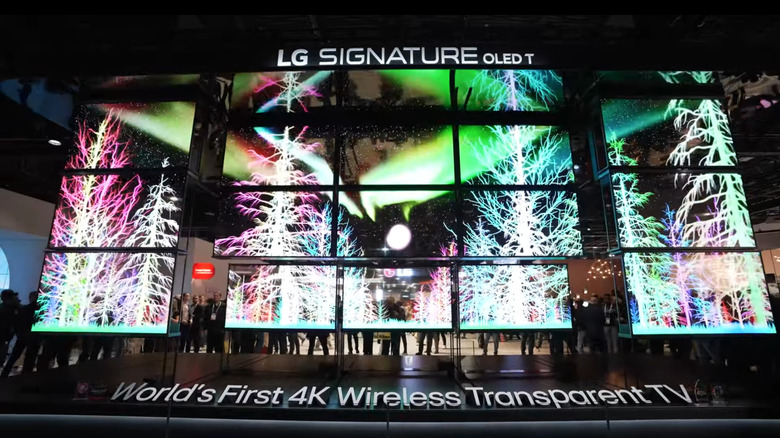
HOW EXACTLY DOES LG’S TRANSPARENT TV TECH WORK?

Several transparent LG OLED TVs on display

LG’s transparent TV tech starts with OLED (not to be confused with QLED). It stands for organic light-emitting diodes; they are self-lighting pixels, which means they don’t need a separate backlight like LCDs. LG’s transparent OLED panel uses a modified pixel structure where the light-emitting portions are shrunk and spaced out, leaving gaps between them that allow light to pass through. The trick is using materials like indium tin oxide for the wiring; it’s conductive but mostly see-through.The real challenge is the transistors. These are normally opaque, but LG uses IGZO (indium gallium zinc oxide) instead of traditional silicon to shrink them down and reduce visual obstruction. Everything is built on a glass substrate that also has to remain optically clean. To protect the sensitive OLED materials from moisture or air exposure (which would kill them), the panel is sealed in a transparent encapsulation layer.So while it looks like a floating hologram, the screen is basically a tightly packed grid of translucent components with just enough space for background visibility. It’s not glass-clear (you’ll still see some darkening), but it’s transparent enough to create that futuristic floating image effect. LG claims around 45% transparency.>>>Replacement adapter for LG 32HL714S-WWhat makes LG’s OLED T different from earlier transparent screens

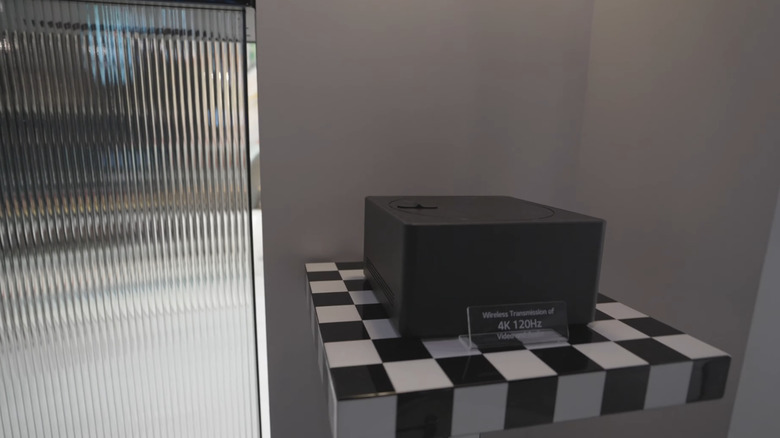
Wireless Zero Connect Box on display

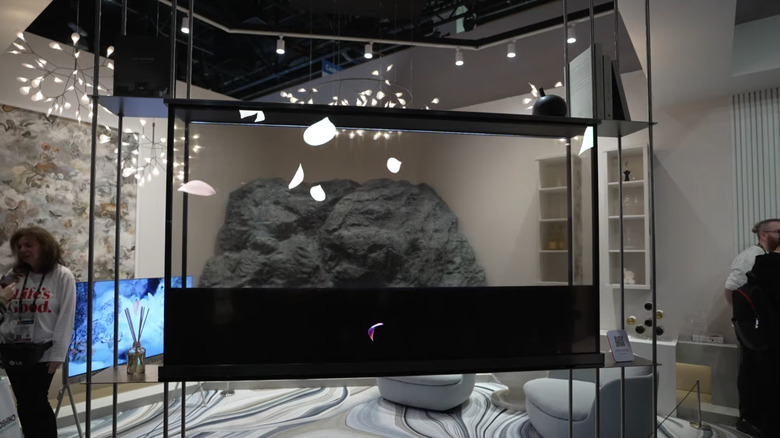
The LG OLED T is a rethinking of where and how TVs can exist in your space. First, it’s wireless. Using a Zero Connect Box, LG sends 4K video and audio to the display through proprietary wireless tech. That means no HDMI cords running up your wall or across the room. You can place it anywhere, even in front of a window or in the middle of a room.Unlike earlier prototypes that needed to be against a solid surface, the OLED T integrates a retractable contrast screen behind the panel. With the push of a button, a black layer rises up to give you proper blacks and vivid contrast when needed. When it drops down, the screen returns to full transparency.The TV supports both passive and dynamic content. You can run ambient visuals, digital art, or news tickers on the transparent screen while still seeing your space behind it. LG also added software features like the “T-Bar,” which runs information like weather and music titles along the bottom without obstructing your view.While Xiaomi technically released the first transparent TV back in 2020, LG’s version is the first to combine OLED tech with a wireless setup and ambient transparency modes. That makes it more than a gimmick; it’s a modular, design-conscious screen meant to integrate with modern living spaces, not dominate them.>>>Replacement adapter for LG 32HL714S-W 4K IPSWhy transparent TVs are cool but not quite ready for everyone

Black screen in the LG OLED T TV rolling down to reveal the background

Despite the slick demos, LG’s transparent TV isn’t coming to most homes anytime soon, and it’s not just about price, although at $60,000, it’s one of the most expensive TVs on sale. Image performance is also compromised by design. Since the pixels are spaced out to let light through, you lose brightness and contrast compared to LG’s non-transparent OLEDs. Even with the retractable black layer, it’s not on par with high-end models like the G4 or M-series.There’s also the simple question of practicality. Most people don’t want to see their bookcase, window, or hallway light through the TV while binge-watching a show. For this tech to really shine, it needs a controlled environment or use case. That’s why LG’s early commercial installs are focused on retail signage and smart windows; places where screens are part of the architecture, not focal points.>>>Replacement battery for LG Nexus 5In the long term, though, transparent displays may prove more useful in places like AR-driven desktops, vehicles, or storefronts. But for living room dominance, conventional OLEDs still win. Transparent TVs are technically impressive, but the wow factor is still doing more of the heavy lifting than the use cases. But still, there is no denying the fact that this might be one of the most important advancements in TV history.

Google building audio-only mode for driving ahead of video apps on Android Auto

Google will soon make it possible for video apps on Android Automotive to switch between video and audio modes when the car is in motion, right as Google plans to bring video apps to Android Auto.

Video apps already exist on Android Automotive, but they work exclusively when the vehicle is parked. This means that the content is cut off the moment the vehicle is in motion, which is a good thing in most cases, but can be a downside with some types of content. For example, video podcasts and sports games benefit from the visuals, but they aren’t required.

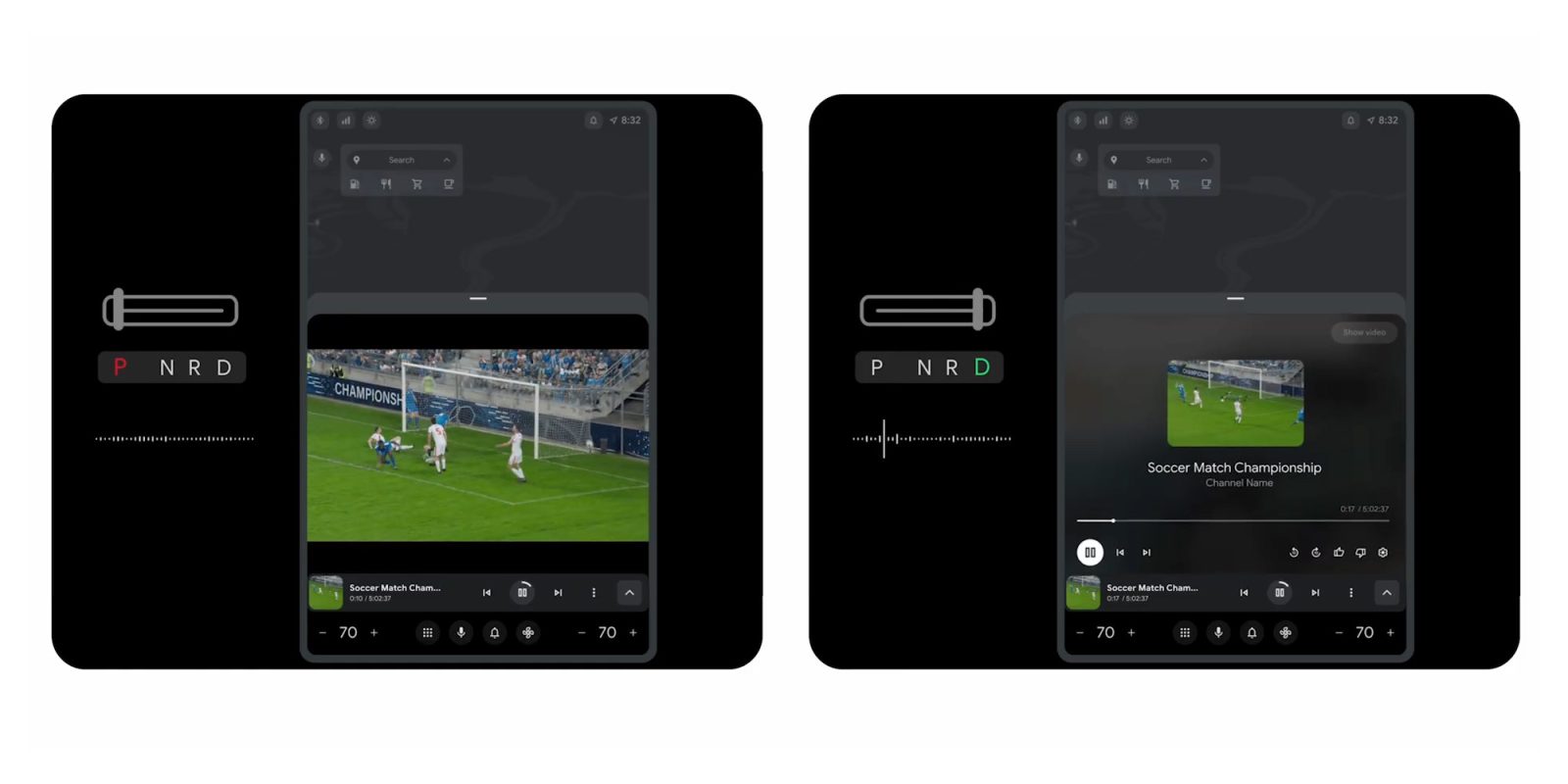
That’s exactly why Google will allow Android Automotive apps to switch between video and an audio-only mode when the vehicle is in motion.

Googleexplainsduring a developer video:

We’re also enabling audio while driving experiences for video apps on cars with Google built-in. You can now implement seamless transitions from parked video playback to audio-only listening while driving. Suppose you’re streaming a live sports event while getting curbside pickup. Now, you can continue listening to the audio when you start to drive again.

>>>Replacement battery for Google Pixel 9 Pro Fold

For now, this is available in an early access program and only on cars running Android 14 and above through Android Automotive OS. App developers need to manually implement the feature.

The benefits are obvious, but the timing is also pretty exciting. Google confirmed this week that it will “soon” support video apps on Android Auto – the phone-based platform that works on car displays – and it stands to reason that this functionality could make its way over.

>>>Replacement battery for Google Pixel Fold

For now, though, there’s a lot of waiting. Not only do we need to wait for this new functionality to make its way to Android Automotive apps, but we also have to wait for video apps to come to Android Auto. Either way, though, Google is putting a lot into building out Android app functionality in cars, and there’s a lot to look forward to.