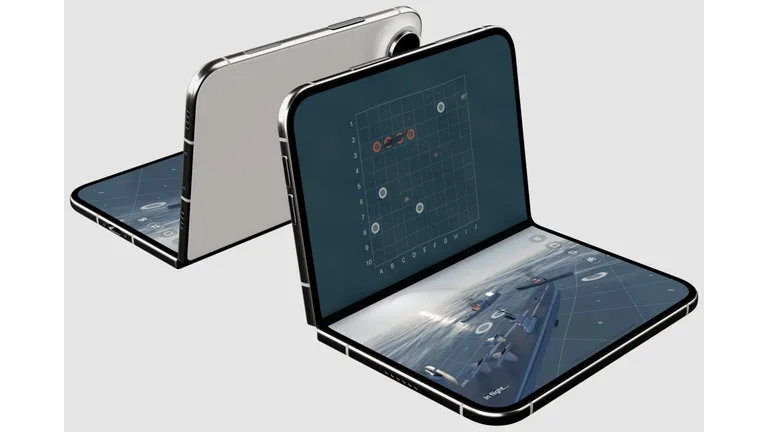
The arrival of the iPhone Duo could mark one of the biggest changes to Apple’s smartphone line-up in years. A foldable iPhone is expected to put more emphasis on a larger display, multitasking and a more flexible way of using iOS. For British buyers who have become accustomed to choosing between a standard iPhone and a Pro model, the Duo could offer something very different.
But buying a new phone is only half the experience. The right apps can make a new device feel genuinely useful from the moment it leaves the box. Whether you want to turn the larger display into a productivity hub, manage your everyday life or simply make the most of Apple’s latest hardware, these are the best iPhone Duo apps worth considering on day one.
1. Microsoft 365 for a bigger productivity screen
A foldable phone makes much more sense when you use it for work. Microsoft 365 is therefore one of the first downloads worth making.
Word, Excel and PowerPoint are already familiar to millions of users in the UK, but a larger internal display could make editing documents and checking spreadsheets considerably more comfortable. The extra screen space should also make it easier to work with documents without constantly switching between apps.
For people who use their iPhone for work while commuting, Microsoft 365 on iPhone Duo could turn the handset into a surprisingly capable mobile office.
The downside is that advanced productivity features can still feel more natural on a laptop. A larger foldable display does not completely replace a keyboard and desktop software.
2. Google Maps for everyday travel
For British users, Google Maps remains an obvious day-one download.
The UK’s public transport network, cycling routes and busy urban roads make navigation particularly useful. On a larger foldable display, maps could benefit from having more information visible at once, making it easier to plan a journey while checking nearby restaurants, stations or shops.
Apple Maps is also improving, so there is a genuine choice here. However, users who regularly travel between different parts of the UK may appreciate Google’s extensive location data.
As one of the most useful apps for iPhone Duo, Google Maps would also demonstrate why a larger display matters beyond simply watching videos.
3. WhatsApp for a more useful messaging experience
WhatsApp is almost impossible to ignore in the UK.
The messaging service is deeply embedded in everyday communication, from family groups to workplace chats and community conversations. A foldable iPhone could make WhatsApp particularly attractive because the larger screen gives conversations more room while potentially making media, documents and group chats easier to manage.
For anyone searching for best messaging apps for iPhone Duo, WhatsApp is an obvious starting point.
There is also a practical benefit. The Duo’s larger display could make long conversations and document sharing less frustrating than on a traditional smartphone screen.
4. Notion for organising everything
If you want to test whether your new foldable iPhone can genuinely improve productivity, install Notion.
Notion combines notes, task management, databases and project planning in one application. Its flexible interface could benefit from the extra screen real estate offered by an iPhone Duo.
Students, freelancers and professionals could use the device to keep a task list on one side while reviewing information elsewhere, depending on how iOS handles multitasking on the new hardware.
This makes Notion a strong choice for anyone looking for productivity apps for iPhone Duo rather than simply entertainment.
5. Spotify for the commute
Not every day-one app needs to be about work.
Spotify remains one of the easiest ways to make a new phone immediately useful. Whether you’re travelling on the London Underground, commuting by train or heading out for a weekend trip, music and podcasts are natural companions for a new smartphone.
A larger display could make browsing playlists, podcasts and recommendations more enjoyable, although this is also an area where the Duo’s bigger screen may not offer a dramatic advantage.
Still, if you’re building your iPhone Duo app collection, Spotify deserves a place near the top.
6. BBC Sounds for a distinctly British experience
For UK buyers, BBC Sounds is another excellent download.
The app provides access to BBC radio, podcasts and on-demand audio, making it particularly useful for commuters who want news, documentaries or entertainment without spending their entire journey staring at a screen.
That matters with a foldable device. One of the advantages of the iPhone Duo could be choosing when you actually need its large display. For audio content, the phone can remain folded or partially closed while you listen.
With British consumers increasingly interested in digital wellbeing and reducing unnecessary screen time, apps such as BBC Sounds fit naturally into a more balanced smartphone routine.
7. Kindle for making the larger display count
A larger internal screen could also make the iPhone Duo interesting for reading.
Amazon’s Kindle app gives users access to books, magazines and other digital publications without requiring another dedicated device. While serious readers will probably still prefer an actual Kindle, the Duo’s larger screen could make occasional reading more comfortable.
The key advantage is convenience. Your books are already in your pocket, whether you’re sitting on a train from Manchester to London or waiting for a flight.
For best apps for the iPhone Duo, Kindle is particularly appealing because it takes advantage of the fundamental reason for buying a foldable phone: more screen when you need it.
8. Adobe Lightroom for mobile photography
The camera will inevitably be one of the most important features of a premium iPhone, and Lightroom is an excellent companion for photography enthusiasts.
Apple’s camera processing has become increasingly sophisticated, but users who want more control over exposure, colour and RAW images may want a dedicated editing application.
The combination of a high-end iPhone camera and a larger foldable display could make photo editing considerably more practical. A larger canvas gives users more room to inspect details and make precise adjustments.
For creators searching for photo editing apps for iPhone Duo, Lightroom is one of the strongest choices.
9. 1Password for security
A new phone is also a good opportunity to improve your digital security.
1Password can store passwords, passkeys and secure information, helping users avoid relying on the same password across multiple services. That’s particularly relevant as Apple continues to push passkeys and stronger account security.
The best new iPhone isn’t much use if your accounts remain poorly protected. Installing a password manager on day one is therefore a sensible step rather than an optional extra.
10. Apple Fitness+ for making use of the hardware
Finally, Apple Fitness+ makes sense for users already invested in Apple’s ecosystem.
The service combines workouts, trainers and health-focused features, and a larger iPhone display could make exercise sessions easier to follow when an iPad or television isn’t available.
This could be especially useful for people living in smaller UK homes or travelling frequently.
Which apps should you install first?
The most important point is not to download dozens of applications simply because you have bought a new phone. The real attraction of the iPhone Duo should be how its hardware and software work together.
For productivity, start with Microsoft 365 and Notion. For communication, WhatsApp is an obvious choice. For travel, install Google Maps. For entertainment, Spotify and BBC Sounds cover both music and spoken content. Kindle and Lightroom then demonstrate what a larger display can potentially do beyond conventional smartphone tasks.
The iPhone Duo’s biggest challenge may ultimately be proving that its foldable design offers enough practical value to justify its premium price. A thinner design, larger screen and more flexible form factor are exciting, but British shoppers are increasingly conscious of value, longevity and whether new technology genuinely improves everyday life.
That is why the best iPhone Duo apps will not necessarily be the newest or most technically impressive. They will be the ones that make the larger display useful, reduce friction and help the phone fit naturally into everyday life.
If Apple gets the hardware and iOS experience right, the first day with an iPhone Duo could feel less like setting up another smartphone and more like discovering an entirely new way to use an iPhone.
Apple Cell Phone Batteries – Shop a wide selection of Apple Cell Phone Batteries at www.oriccabattery.co.uk Fast Shipping. 30 Day Replacement Guarantee.